Gogs: The Original Minimalist Git Service
Editor’s Note: This article is part of our definitive guide to GitHub Alternatives. Click here to read the main overview. Looking specifically for Gogs’s more feature-rich descendant? See our dedicated Gitea guide for a closer look at how it compares.
Update (June 2026): This article has been refreshed to cover the
0.14.xrelease line, the newdocker-nextcontainer image, and a critical remote-code-execution vulnerability (CVE-2026-52806) that was patched in0.14.3. If you’re running an older Gogs instance, jump straight to What’s Changed Since Last Year before reading the rest.
Table of Contents
- What’s Changed Since Last Year
- Key Features at a Glance
- The Gogs Philosophy: Who Is It For?
- GitHub vs. Gogs: A Quick Comparison
- Installing Gogs
- Pros and Cons
- Getting Started & Further Reading
- Frequently Asked Questions
- Conclusion
Before there was Gitea, there was Gogs (Go Git Service): the pioneering open-source project that proved a powerful, self-hosted Git service could be delivered in a single, lightweight binary. Written in Go, its mission was, and remains, to be “a painless self-hosted Git service” — the spiritual ancestor to a new generation of efficient Git tools, and the project from which the popular Gitea was forked.
What’s Changed Since Last Year
A lot has happened in the Gogs project since this guide was first published. If you read the original version of this article, here’s what’s different in mid-2026:
A critical RCE was found — and patched
In May 2026, security researchers at Rapid7 disclosed a critical argument-injection vulnerability (CVSS 9.4, tracked as CVE-2026-52806) affecting all then-current Gogs versions. Any authenticated user — even one who just self-registered on an instance with open registration — could trigger remote code execution on the server by crafting a malicious branch name and using the “Rebase before merging” pull request option. Because Gogs ships with open registration and unlimited repository creation enabled by default, an unauthenticated attacker could exploit a default-configured instance simply by signing up.
The Gogs maintainer fixed this, along with roughly twenty other security issues (stored XSS, SSRF, authorization bypasses, and more), in version 0.14.3, released June 7, 2026. If you’re running anything older than 0.14.3, treat this as an urgent upgrade — not a routine one.
New release line: 0.14.0 through 0.14.3
The 0.14.x series brought both features and a steady drumbeat of security patches:
- Go 1.25 required to build from source, and the project switched to a pure-Go SQLite driver, so CGO is no longer needed to compile Gogs.
- Environment variable expansion in
app.ini— you can now writePASSWORD = ${DATABASE_PASSWORD}and have it resolved from the process environment at startup, keeping secrets out of the config file on disk. - Tag-to-tag comparison in the diff viewer, alongside the existing branch comparison.
- Custom logout redirect URLs via
[auth] CUSTOM_LOGOUT_URL. - Several rounds of security hardening: reverse-proxy auth headers are now only trusted from IPs listed in
TRUSTED_PROXY_IPS, webhook deliveries no longer follow redirects into local network address space (closing an SSRF hole), and API tokens can no longer be passed as URL query parameters — only via theAuthorizationheader.
That’s a representative sample, not the full list — 0.14.3 alone fixed around twenty distinct security issues. For the complete, line-by-line breakdown, see the official GitHub releases page or the project’s CHANGELOG.md.
A new Docker image strategy
Gogs began publishing a second container image, gogs/gogs:next-latest, described as the “modern, non-root, cloud-native” image. The long-standing root-privileged image (with its extensive GOGS_CUSTOM-style runtime configuration options) continues as the default gogs/gogs:latest for now, but the project has signaled that next-latest will become the default starting in 0.16.0, at which point today’s image will be renamed legacy-latest and eventually removed.
Worth setting expectations before you switch: as of 0.14.x, next-latest doesn’t yet support all of the runtime container options the legacy image offers. If your setup leans on GOGS_CUSTOM, SSH_PORT, or other environment-driven overrides, double-check they’re supported before migrating production workloads — for now it’s best treated as a preview for new, simple deployments rather than a drop-in replacement.
The bigger picture hasn’t changed
Despite the patch volume, Gogs is still the same project at heart: a single maintainer (unknwon), a single binary, and a deliberately small feature set. The high number of disclosed vulnerabilities in 2026 reflects increased external security research attention on the project (notably from Rapid7), not necessarily a sudden decline in code quality — but it’s a useful reminder that a single-maintainer project can have a long gap between disclosure and patch on a low-traffic repository. Plan your update cadence accordingly.
Key Features at a Glance
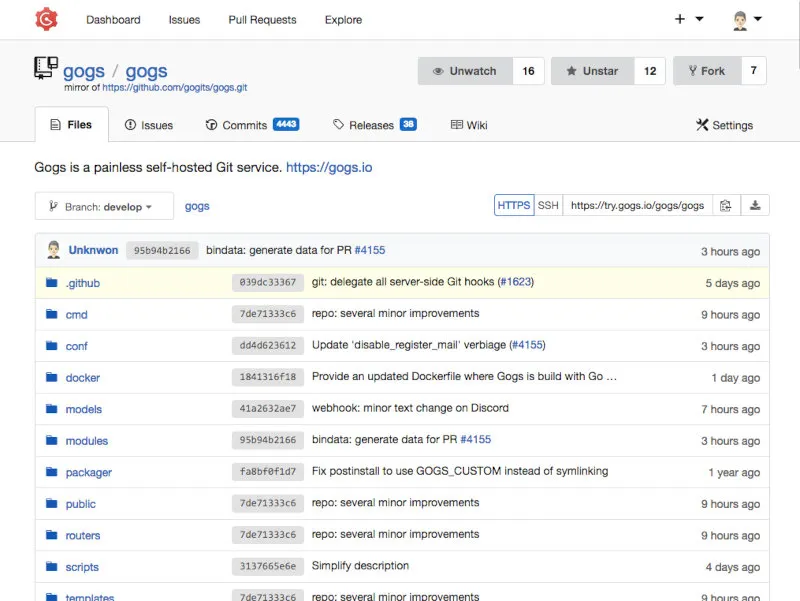
Gogs deliberately keeps its feature set focused on the essentials to maintain its simplicity and performance.
| Feature | Description | Key Benefit |
|---|---|---|
| Absolute Simplicity | Written in Go and compiled to a single binary with no runtime dependencies. | Can be installed and run on virtually any platform (Windows, macOS, Linux, ARM) in minutes with minimal configuration. |
| Extremely Low Resource Usage | Famously requires very little RAM or CPU power to operate. The project’s own documentation cites running comfortably in 64 MiB of RAM for light personal use, with 2 CPU cores and 512MB RAM as a baseline for small-team workloads. | The perfect choice for running on very cheap hardware, including older machines, a Raspberry Pi, or NAS devices. |
| Core Collaboration Tools | Provides essential repository hosting, issue tracking, pull requests, and a built-in wiki in a clean web UI. | Covers the fundamental needs for individual developers or small teams to collaborate on code without any unnecessary bloat. |
| SSH, HTTP/S Support | Offers standard Git protocols for interacting with repositories, including built-in SSH server support. | Provides a familiar and secure way for developers to clone, fetch, and push code using standard Git clients. |
| Pure-Go SQLite (new) | Default SQLite backend no longer requires CGO to build. | Simpler, more portable builds, especially useful for cross-compiling to ARM devices like a Raspberry Pi. |
The Gogs Philosophy: Who Is It For?
The philosophy of Gogs is uncompromising minimalism. It is not in a feature race with other platforms. Instead, it prioritizes stability, simplicity, and a small footprint above all else. Its development is guided by a single lead maintainer, ensuring a consistent and focused vision.
This makes it an ideal choice for:
The Purist: Developers who want a Git server that does its job and nothing more. No CI/CD, no package registries, just Git.
Embedded and Low-Power Systems: Its incredibly low resource usage makes it one of the few viable options for running on hardware with limited memory and CPU.
Personal Projects: An excellent way to host your own code on a home server or NAS device without dedicating significant resources to it.
Users Who Value Stability Over Features: The slower, more deliberate development pace means less churn and a highly stable core product.
GitHub vs. Gogs: A Quick Comparison
This comparison highlights the vast difference in scale, scope, and philosophy.
| Aspect | GitHub | Gogs |
|---|---|---|
| Primary Focus | A global DevOps platform with a massive community. | The simplest possible self-hosted Git server. |
| Hosting Options | Cloud (SaaS) and Self-hosted (Enterprise). | Self-hosted only. |
| Feature Scope | Expansive: CI/CD, packages, security scanning, etc. | Minimalist: Repository hosting and basic collaboration tools. |
| Development Model | Massive corporate engineering team. | Single lead maintainer with community contributions. |
| Patch Cadence | Continuous, automatic for SaaS users. | Manual upgrades — you are responsible for tracking releases. |
Installing Gogs
The fastest way to get a feel for Gogs is to run it in Docker. Below are working snippets for both the Docker route and a bare-binary install, plus the minimum app.ini you need to get past the setup wizard.
Always install the latest patch release. At the time of writing that’s
0.14.3. Check the releases page before you deploy, since this article will age the same way the original did.
Quick Start with Docker Compose
This brings up Gogs with a persistent SQLite database, mapped to a local ./data directory so nothing is lost on container restart. It also sets a couple of common configuration values directly as environment variables and adds a basic healthcheck so docker compose ps reflects whether the web UI is actually responding.
# docker-compose.yml
services:
  gogs:
    image: gogs/gogs:0.14.3
    container_name: gogs
    restart: unless-stopped
    ports:
      - "3000:3000" # Web UI
      - "10022:22" # Git over SSH
    environment:
      - GOGS_SECRET_KEY=${GOGS_SECRET_KEY}
      - TZ=UTC
    volumes:
      - ./data:/data
    healthcheck:
      test: ["CMD", "wget", "-q", "-O", "/dev/null", "http://localhost:3000/"]
      interval: 30s
      timeout: 5s
      retries: 3
      start_period: 20s
Start it with:
docker compose up -dThen open http://localhost:3000 and walk through the installer. Select SQLite3 as the database type for the simplest setup — no separate database container required.
If you’d rather try the newer, non-root image while it’s still maturing, swap the image line:
image: gogs/gogs:next-latestPrefer PostgreSQL or MySQL over SQLite?
SQLite is fine for personal use, but for a small team you may want a real database server. Here’s the same setup with a PostgreSQL sidecar — pick PostgreSQL as the database type in the installer and point it at the db service:
# docker-compose.yml
services:
  gogs:
    image: gogs/gogs:0.14.3
    container_name: gogs
    restart: unless-stopped
    depends_on:
      - db
    ports:
      - "3000:3000"
      - "10022:22"
    environment:
      - GOGS_SECRET_KEY=${GOGS_SECRET_KEY}
    volumes:
      - ./data:/data

  db:
    image: postgres:16-alpine
    container_name: gogs-db
    restart: unless-stopped
    environment:
      - POSTGRES_USER=gogs
      - POSTGRES_PASSWORD=${POSTGRES_PASSWORD}
      - POSTGRES_DB=gogs
    volumes:
      - ./pgdata:/var/lib/postgresql/data
In the installer, set the database host to db:5432 and use the same gogs / ${POSTGRES_PASSWORD} credentials. MySQL or MariaDB work the same way — swap the postgres:16-alpine image for mysql:8 or mariadb:11 and adjust the environment variable names (MYSQL_USER, MYSQL_PASSWORD, MYSQL_DATABASE) accordingly.
Installing from a Pre-Built Binary
If you’d rather skip Docker entirely — for example, on a Raspberry Pi running a minimal OS — grab the matching archive from the releases page and run the binary directly:
# Example: Linux ARM64 (Raspberry Pi 4/5, 64-bit OS)
curl -LO https://github.com/gogs/gogs/releases/download/v0.14.3/gogs_v0.14.3_linux_arm64.tar.gz

# Always verify the checksum against the value published on the releases page
sha256sum gogs_v0.14.3_linux_arm64.tar.gz

tar -xzf gogs_v0.14.3_linux_arm64.tar.gz
cd gogs
./gogs web
gogs web --help lists every available flag, including the port and custom config path overrides.
Minimal app.ini Configuration
Gogs only needs a custom/conf/app.ini containing the keys you actually want to override — it overlays the shipped defaults. Here’s a minimal example that uses SQLite and pulls the secret key from an environment variable instead of hardcoding it:
; custom/conf/app.ini

[server]
DOMAIN           = git.example.com
ROOT_URL         = https://git.example.com/
HTTP_PORT        = 3000

[database]
TYPE = sqlite3
PATH = data/gogs.db

[security]
; Resolved from the GOGS_SECRET_KEY environment variable at startup,
; so the real value never lives in this file.
SECRET_KEY = ${GOGS_SECRET_KEY}

[auth]
; Recommended after the CVE-2026-52806 disclosure: don't let strangers
; self-register and immediately start creating repositories.
DISABLE_REGISTRATION = true
Launch with the secret pulled from the shell environment:
export GOGS_SECRET_KEY=$(openssl rand -hex 32)
./gogs web
Security tip: Regardless of which version you run, set
DISABLE_REGISTRATION = true(orMAX_CREATION_LIMIT = 0per-user via the admin panel) unless you specifically want open public sign-ups. Several of the vulnerabilities patched in0.14.3, including the rebase RCE, were easiest to exploit from a freshly self-registered account.
Hardening Checklist
A short list worth running through before exposing any Gogs instance to the internet:
- Run
0.14.3or later. This isn’t optional given the RCE history — check the releases page before deploying. - Put it behind a reverse proxy with HTTPS, such as nginx or Caddy, rather than serving plain HTTP directly to the internet.
- Disable open registration (
DISABLE_REGISTRATION = true) unless you genuinely need public sign-ups. - Back up
/dataregularly — it contains your repositories, SQLite database (if used), SSH keys, and uploaded attachments. - Watch the release feed. Subscribe to the GitHub releases RSS feed or “Watch → Releases only” on the repository so a future advisory doesn’t pass you by.
Common Setup Issues
A few problems come up often enough in community forums to be worth flagging before you hit them yourself:
- SSH port conflicts in Docker. Host port
22is almost always already in use by your machine’s own SSH daemon. Map Gogs’s SSH port to something else, like10022:22as shown above, and remember to use that port explicitly when cloning (ssh://git@git.example.com:10022/user/repo.git). - Installer keeps redirecting to
/installafter an upgrade. This usually meansapp.iniwasn’t picked up — confirm the file lives undercustom/conf/app.inirelative to the binary (orGOGS_CUSTOMif you’ve relocated it), and that any Docker volume mount actually persists that path. - Switching database backends later isn’t a config toggle. Gogs doesn’t migrate data between database types automatically; moving from SQLite to PostgreSQL or MySQL after the fact requires a manual data export/import, so it’s worth choosing your backend deliberately at install time if you expect to grow.
Pros and Cons
Why You Might Choose Gogs
The Lightest of the Lightweights: Gogs is renowned for its minuscule resource footprint, arguably even more so than its descendants.
Unmatched Simplicity of Installation: If you can download a file and execute it from the command line, you can install Gogs.
Focused and Stable: It does its core job extremely well and doesn’t change rapidly, making it a reliable and predictable tool.
Clean, Uncluttered Interface: The UI provides the essentials without any distracting or complex elements.
Potential Drawbacks
Slower Feature Development: This is the main trade-off. Gogs lacks the modern features that have been added to its fork, Gitea, such as integrated CI/CD, a container registry, and package management.
Smaller Community and Support: The community is smaller and less active than Gitea’s, which was forked in part to allow for a more open, community-driven governance model. Gogs still maintains a substantial footprint on GitHub — tens of thousands of stars and thousands of forks — but commit activity and issue response times trail well behind Gitea’s larger, more distributed contributor base.
Patch Latency Is a Real Risk: The 2026 RCE disclosure illustrates the trade-off of a single-maintainer model directly — the researcher’s disclosure timeline shows roughly two months between initial private report and a shipped fix, during which internet-facing instances with open registration were exploitable. Self-hosters need to actively track releases rather than assume updates will arrive quickly.
“The Gitea Factor”: Many users ultimately migrate to or choose Gitea for its expanded feature set — it offers a similarly lightweight experience but with richer functionality and more active community development.
Single-Maintainer Model: While this ensures a consistent vision, it also presents a risk. The project’s health is heavily dependent on a single individual.
Getting Started & Further Reading
Ready to try the original painless Git service? Explore Gogs with these official links.
Official Website: https://gogs.io/
Documentation: https://gogs.io/docs
GitHub Repository (for code and issues): https://github.com/gogs/gogs
Releases & Changelog: https://github.com/gogs/gogs/releases
Live Demo: https://try.gogs.io/
Considering the fork instead? Our Gitea guide and upcoming Forgejo coverage are part of the same GitHub Alternatives series, linked from the main overview.
Migrating from GitHub
Gogs doesn’t have a one-click GitHub importer, but moving a repository over — history, branches, and tags included — is a two-command job with a mirror clone:
# 1. Create a bare mirror clone of the source repository
git clone --mirror https://github.com/your-org/your-repo.git

# 2. Push every ref to your new Gogs repository
cd your-repo.git
git push --mirror https://git.example.com/your-org/your-repo.git
Create the destination repository in the Gogs web UI first (leave it empty, without a README), then run the commands above. Issues, pull requests, and wiki pages aren’t carried over by this method — only the Git history itself. For a wiki, repeat the same mirror-clone-and-push against the repository’s .wiki.git URL.
Frequently Asked Questions
Q: Is Gogs completely free to use? A: Yes, Gogs is 100% free and open-source under the MIT license. There are no paid tiers or subscriptions, as it is designed for self-hosting.
Q: How does Gogs compare to Gitea? A: Gogs is the original project from which Gitea was forked. Gitea offers more modern features like CI/CD and package registries, with a larger community and faster development pace. Gogs remains simpler and lighter, prioritizing minimalism and stability over feature richness.
Q: Can Gogs run on a Raspberry Pi?
A: Absolutely. Gogs’ low resource usage makes it an excellent choice for running on a Raspberry Pi or other low-power devices. The official documentation provides specific guidance for ARM-based installations, and the move to a pure-Go SQLite driver in 0.14.x has made cross-compiling for ARM simpler since CGO is no longer required.
Q: Does Gogs support migrating repositories from GitHub?
A: Yes, Gogs supports repository migration from GitHub using standard Git commands (e.g., git clone --mirror and git push --mirror). However, it lacks a built-in GUI importer like some other platforms.
Q: Is Gogs safe to expose to the internet?
A: It can be, but only if you stay current with patch releases. A critical remote-code-execution vulnerability (CVE-2026-52806) affecting all pre-0.14.3 versions was disclosed and fixed in June 2026. If you run a public-facing Gogs instance, upgrade to 0.14.3 or later immediately, disable open registration unless you need it, and subscribe to the GitHub releases feed so you don’t miss future security advisories.
Q: What kind of support is available for Gogs? A: Gogs relies on community support through its GitHub repository and forums. Since it has a single maintainer, updates and responses may be slower compared to projects with larger teams or more active communities — something worth weighing carefully if you plan to run a public-facing instance.
Conclusion
Gogs is a landmark project in the history of Git hosting. It set the standard for what a lightweight, easy-to-use self-hosted Git server could be. While its own fork, Gitea, has since surpassed it in features and community size, Gogs remains a perfectly valid and respectable choice for the minimalist purist — provided you keep it patched. If you need the absolute simplest, most resource-efficient Git server, have no need for modern DevOps bells and whistles, and are willing to actively track its release notes, Gogs is a stable, elegant, and timeless solution.
Because Gogs is maintained by a single person, releases — security or otherwise — can arrive irregularly. Bookmark the releases page or subscribe to its Atom feed so you’re not caught running an unpatched instance.
Ready to see it for yourself? Try the live demo at try.gogs.io with no installation required, or spin up your own instance with the Docker Compose snippet above in under five minutes.