Gitea: An Ultimate Lightweight Self-Hosted Git Service
Table of Contents
- Key Features at a Glance
- The Gitea Philosophy: Who Is It For?
- GitHub vs. Gitea: A Quick Comparison
- What’s New in Gitea (2025–2026)
- Quick Start: Installing Gitea Today
- Gitea Actions in Practice: A CI/CD Example
- Gitea and AI Agents: The MCP Server
- Pros and Cons
- Gitea Cloud
- Gitea Enterprise
- A Note on Forgejo
- Getting Started & Further Reading
- Frequently Asked Questions (FAQ)
- Conclusion
In the realm of self-hosted Git solutions, performance and ease of use are king. While heavyweights like GitLab offer a complete DevOps empire, many users simply want the core functionality of GitHub running on their own hardware, without the complexity or resource drain. This is where Gitea shines.
Forked from the Gogs project and now driven by a large and active community, Gitea is a free, open-source Git service written in Go. Its mission is to be the easiest, fastest, and most painless way to set up a self-hosted Git service. It achieves this by being incredibly lightweight, delivering a surprisingly rich feature set in a single, compact binary.
This article was last refreshed in June 2026 to reflect everything that’s changed since our original review — including a major frontend rebuild, a much more capable Actions runtime, deeper package registry support, and Gitea’s growing role as a backend for AI coding agents.
Version note: As of June 2026, the latest stable release is 1.26.2 (patch releases continue to land regularly with security fixes — see Security and the CVE Cadence below). If you’re reading this later, check the release blog for anything newer and swap the image tags in the examples below accordingly.
Key Features at a Glance
Gitea strikes a perfect balance between being lightweight and feature-rich, providing far more than just basic repository hosting.
| Feature | Description | Key Benefit |
|---|---|---|
| Extremely Lightweight | Written in Go and compiled into a single binary, Gitea has exceptionally low RAM and CPU requirements. | Can be run comfortably on low-cost hardware like a Raspberry Pi or a small VPS, making it accessible to virtually anyone. |
| Simple Installation | With no external dependencies (beyond a database), installation is as simple as downloading the correct binary for your OS and running it. | You can have a fully functional Git server running in minutes, a stark contrast to the complex setup of larger platforms. |
| Full-Featured Experience | Includes not just Git hosting but also issue tracking, pull requests, wikis, a container registry, and a package manager. | Provides a surprisingly complete, GitHub-like experience out of the box, covering the most common developer needs. |
| Integrated CI/CD (Gitea Actions) | A built-in CI/CD system that is compatible with the GitHub Actions syntax, allowing you to run automated workflows on your own infrastructure. | A game-changing feature for a lightweight platform, enabling powerful automation without relying on external tools like Jenkins. |
| Modern Frontend (Vite + HTMX) | The UI build now runs on Vite (since 1.26), with HTMX handling server-rendered dynamic elements (introduced back in 1.22) — together replacing the old jQuery/Fomantic UI stack entirely. | Faster page loads, smaller JS bundles, and a snappier admin and code-review experience. |
| AI Agent Connectivity (MCP) | An official Model Context Protocol server lets AI coding assistants read issues, open pull requests, and manage repos through natural language. | Plugs Gitea directly into agentic coding workflows like Claude Code without custom scripting. |
The Gitea Philosophy: Who Is It For?
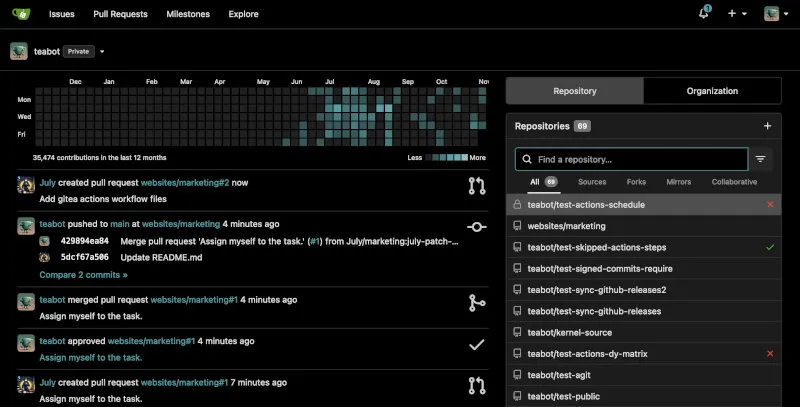
Gitea’s philosophy is rooted in painless self-hosting and community-driven development. It aims to provide maximum value with minimum overhead, empowering users with full control over their code and infrastructure.
This makes it the perfect choice for:
Individuals and Hobbyists: The ideal solution for running a personal Git server in a home lab or on a small cloud instance.
Small to Medium-Sized Teams: A cost-effective and easy-to-manage private Git service that provides all the essential collaboration tools.
Resource-Constrained Environments: Its low resource usage makes it perfect for deployment on embedded devices, older hardware, or the cheapest VPS tiers. In practice, a small team (a handful of users, modest repo sizes) runs comfortably on a Raspberry Pi 4 or a 1 vCPU / 1GB RAM VPS with SQLite — well below what GitLab CE or similar platforms would need for the same workload. Larger teams or repos with heavy search/CI usage will want more headroom, particularly RAM for the database and any code-search indexer.
Open-Source Advocates: For those who want a complete software development stack that is 100% free and open-source.
Teams Building AI-Assisted Workflows: With native MCP support, Gitea has become a popular backend for developers who want Claude or other agents to triage issues, open pull requests, and manage CI on their behalf.
GitHub vs. Gitea: A Quick Comparison
The comparison highlights the trade-offs between a global SaaS platform and a lean, self-hosted solution.
| Aspect | GitHub | Gitea |
|---|---|---|
| Primary Focus | A global platform for community and enterprise collaboration. | A painless, lightweight solution for self-hosting Git. |
| Hosting Options | Cloud (SaaS) and Self-hosted (Enterprise). | Self-hosted, plus managed Gitea Cloud and Gitea Enterprise via CommitGo. |
| Resource Usage | N/A (SaaS) | Extremely low. A key design goal. |
| CI/CD | GitHub Actions (massive, cloud-hosted runners). | Gitea Actions (self-hosted runners, compatible syntax, now with concurrency groups and managed-runner options). |
| Frontend Stack | Proprietary, React-based. | Vite-built, HTMX/Tailwind, with CodeMirror for in-browser editing. |
| AI Agent Support | Copilot, plus broad third-party MCP ecosystem. | Official gitea-mcp server for Claude, Cursor, and other MCP clients. |
| Package Registry | GitHub Packages (npm, Docker, Maven, NuGet, RubyGems, and more). | Built into core Gitea, 20+ formats including npm, Docker, Maven, Helm, Cargo, and now Terraform state. |
| Federation | None (closed platform). | Experimental ActivityPub/ForgeFed support is in development (NLnet-funded), not yet a default-on production feature. |
What’s New in Gitea (2025–2026)
Since our original review, Gitea has shipped several major releases — 1.23, 1.24, 1.25, and most recently 1.26 — each landing roughly every few months. Here’s what actually changed under the hood.
The short version, if you’re skimming:
- Frontend: Full migration to Vite + CodeMirror completed in 1.26, finishing the multi-year move off jQuery/Fomantic UI.
- CI/CD: Gitea Actions added workflow concurrency groups, reusable private workflows, per-runner pause/disable, and re-run-failed-jobs.
- Day-to-day UX: Keyboard shortcuts for search, faster file navigation, auto-generated release notes.
- Packages: Terraform state hosting joins the existing 20+ supported package formats.
- Security: Frequent, transparent CVE patching across the 1.25.x and 1.26.x lines.
- AI agents: An official MCP server now lets tools like Claude operate on Gitea repos via natural language (covered in its own section below).
If that’s all you needed, feel free to jump to Quick Start. Otherwise, here’s the detail.
The Frontend Overhaul: Vite, CodeMirror, and the End of jQuery
For nearly a decade, Gitea’s interface ran on jQuery and Fomantic UI. Starting with 1.22, the project began a multi-release migration toward modern tooling — HTMX and Tailwind landed first, gradually replacing jQuery-driven interactivity — and that migration was formally completed in 1.26: the front-end toolchain now builds with Vite for faster development feedback and leaner production bundles, and in-browser editing uses CodeMirror instead of Monaco, improving consistency with the rest of the UI and bundle layout.
This isn’t just an internal refactor — it’s noticeable to anyone running an instance. Pages load faster, the JavaScript bundle is significantly smaller, and the in-browser file editor behaves more predictably across browsers. Along the way, Gitea also modernized its cross-site request protections: the old CSRF cookie mechanism gives way to CrossOriginProtection, which may affect custom reverse-proxy or embedding setups. If you run Gitea behind a custom proxy with manual CORS or cookie tuning, it’s worth re-checking your config after upgrading.
Gitea Actions Gets Serious
Gitea Actions — the GitHub Actions-compatible CI/CD system — has matured considerably. Recent releases added support for actions and reusable workflows from private repositories, configurable permissions for Actions tokens, per-runner pause and disable controls, support for non-zipped artifacts, workflow summaries, and the option to re-run only failed jobs.
The headline addition in 1.26 is workflow concurrency: workflows can declare concurrency groups so new runs cancel or queue behind in-flight jobs, closely matching GitHub Actions. This closes one of the more annoying gaps for teams migrating CI pipelines straight from GitHub. Complex pipelines are also easier to reason about now, since the run view can show how jobs depend on each other, with updated workflow graph styling for clarity.
A minimal workflow using the new concurrency syntax looks like this:
# .gitea/workflows/ci.yml
name: CI

on:
  push:
    branches: [main]
  pull_request:

# New in 1.26: cancel superseded runs on the same branch automatically
concurrency:
  group: ci-${{ github.ref }}
  cancel-in-progress: true

jobs:
  test:
    runs-on: ubuntu-latest
    steps:
      - uses: actions/checkout@v4
      - uses: actions/setup-node@v4
        with:
          node-version: 20
      - run: npm ci
      - run: npm test

  build:
    needs: test
    runs-on: ubuntu-latest
    steps:
      - uses: actions/checkout@v4
      - run: docker build -t myapp:${{ github.sha }} .
Because this syntax is compatible with GitHub Actions, most workflows can be copied over with little more than a change to the runs-on runner labels.
Repository, Search, and Release Improvements
Day-to-day repository browsing has picked up several quality-of-life upgrades. You can now navigate the code browser and search faster from the keyboard, similar to familiar shortcuts in other Git hosts, jump directly to a file by name, and remove a whole directory from the browser when you have permission — useful for routine repo maintenance without dropping to a shell.
Release management got smarter too. The release editor can now generate Markdown release notes server-side from merged pull requests and contributors, similar to GitHub, which removes a lot of manual changelog editing for maintainers cutting tags regularly. On the package side, Gitea’s registry gained support for hosting Terraform state, so teams can coordinate infrastructure with the same access controls as code — joining the long list of package formats (npm, Maven, Docker, Helm, Cargo, NuGet, PyPI, and more) Gitea already supports out of the box.
For organizations migrating from GitHub, Gitea also added git archive --remote support, meaning clients can fetch archives through Git’s remote archive protocol, not only through HTTP download — a small but useful interoperability detail for scripted tooling.
Security and the CVE Cadence
Gitea’s security team has kept up a steady release cycle of patch versions. The 1.26 line alone addressed multiple CVEs across releases, including fixes for a stored XSS vulnerability in the Gitea 3D File Viewer via the glTF extensionsRequired field, and later patch releases fixed issues ranging from a permission-reading bug, unambiguous artifact signature payloads, public-only token filtering in API queries, missed token scope checking, and stronger PKCE validation and refresh-token replay protection in the OAuth flow.
The practical takeaway: Gitea ships security patches frequently and transparently, with public CVE write-ups and credit to reporters. If you self-host, subscribe to the release feed and apply patch versions promptly — most of these are low-effort binary or container swaps, not breaking upgrades. Always back up your data directory and database before upgrading, and check the version-specific upgrade notes in the release blog for any breaking changes (like the CSRF mechanism update above) before rolling out to production. To report a vulnerability yourself, the project asks that you email security@gitea.io rather than filing a public issue — see the security policy for the current PGP key and process.
Quick Start: Installing Gitea Today
Gitea’s installation story hasn’t changed in philosophy — it’s still a single binary plus a database — but the recommended Docker Compose setup has been refined. Here’s a current, minimal production-leaning setup using PostgreSQL:
# docker-compose.yml
version: "3"

networks:
  gitea:
    external: false

services:
  server:
    image: docker.gitea.com/gitea:1.26.2
    container_name: gitea
    environment:
      - USER_UID=1000
      - USER_GID=1000
      - GITEA__database__DB_TYPE=postgres
      - GITEA__database__HOST=db:5432
      - GITEA__database__NAME=gitea
      - GITEA__database__USER=gitea
      - GITEA__database__PASSWD=changeme
    restart: always
    networks:
      - gitea
    volumes:
      - ./gitea-data:/data
      - /etc/timezone:/etc/timezone:ro
      - /etc/localtime:/etc/localtime:ro
    ports:
      - "3000:3000"
      - "2222:22"
    depends_on:
      - db

  db:
    image: postgres:16
    restart: always
    environment:
      - POSTGRES_USER=gitea
      - POSTGRES_PASSWORD=changeme
      - POSTGRES_DB=gitea
    networks:
      - gitea
    volumes:
      - ./postgres-data:/var/lib/postgresql/data
Bring it up with:
docker compose up -dThen visit http://your-server:3000 to finish the setup wizard. Note that new installations now default to automatic public URL detection — Gitea will try to infer the correct external URL itself. If you’re running behind a reverse proxy with a non-standard hostname, double-check the [server] section in app.ini after install so links, webhooks, and redirects resolve correctly.
Security tip — rootless images: The example above uses the standard
docker.gitea.com/giteaimage, which runs as root inside the container. For a more security-conscious deployment, swap in the-rootlessvariant (e.g.docker.gitea.com/gitea:1.26.2-rootless), which runs as an unprivileged user by default. Rootless images use a different volume layout (/var/lib/giteaand/etc/giteainstead of/data) and rely on Gitea’s built-in SSH server rather than a standalone OpenSSH install, so check the rootless installation docs before switching — rootful and rootless images aren’t interchangeable on the same data volume.
For a single-binary install without Docker, the process is unchanged:
wget -O gitea https://dl.gitea.com/gitea/1.26.2/gitea-1.26.2-linux-amd64
chmod +x gitea
./gitea web --config /etc/gitea/app.ini
Try it first: Not ready to install anything? Gitea publishes a public sandbox at try.gitea.io where you can click through the actual UI — issues, pull requests, Actions, and all — before committing to a deployment.
Migrating from GitHub or GitLab
Gitea’s built-in migration tool (under New Migration when creating a repository) can import repositories, issue history, pull requests, releases, and wikis directly from GitHub, GitLab, Gitea, Gogs, OneDev, and a few others — including from AWS CodeCommit as of recent releases. A few practical gotchas worth knowing before a large migration:
- Webhooks don’t transfer automatically. Existing webhooks on the source platform (CI triggers, chat notifications, deploy hooks) need to be recreated manually on the new Gitea repository after migration.
- Git LFS objects migrate, but slowly on large repos. Budget extra time for LFS-heavy repositories, and verify object integrity afterward rather than assuming a clean transfer.
- Issue/PR numbering is preserved where possible, so cross-references in old commit messages or external docs that point to issue numbers usually still resolve correctly.
- Personal access tokens, not OAuth apps, are typically the simplest auth method for the migration wizard itself — set one up with read access on the source platform before starting.
- For an org-wide migration, doing a few pilot repositories first (rather than the whole org at once) makes it much easier to catch webhook and LFS issues before they multiply.
Common setup snags:
- SSH port conflicts: The example Compose file maps container port 22 to host port 2222 to avoid clashing with the host’s own SSH daemon. If you change this, remember to also update
SSH_PORTinapp.iniso generated clone URLs are correct.- Docker networking: If the web UI loads but Git operations over SSH fail, double-check that the SSH port is actually published and not blocked by a firewall or cloud security group — it’s easy to open 3000 and forget 2222.
- Reverse proxy and the CSRF/CrossOriginProtection change: If you’re on a recent version behind Nginx, Caddy, or Traefik and start seeing unexpected 403s on form submissions after upgrading to 1.26, check that your proxy correctly forwards the
HostandX-Forwarded-Protoheaders — CrossOriginProtection relies on these matching your configuredROOT_URL.
Gitea Actions in Practice: A CI/CD Example
Setting up a self-hosted runner is still the main extra step compared to GitHub’s managed runners, but the process is straightforward. With Docker:
docker run -d \
  --name gitea-runner \
  -v /var/run/docker.sock:/var/run/docker.sock \
  -e GITEA_INSTANCE_URL="https://git.example.com" \
  -e GITEA_RUNNER_REGISTRATION_TOKEN="<token-from-admin-panel>" \
  -e GITEA_RUNNER_NAME="runner-01" \
  gitea/act_runner:latest
Runners can now be individually paused or disabled from the admin panel — handy when you need to take a machine down for maintenance without deregistering it entirely. A workflow that re-runs only failed jobs (rather than the whole pipeline) and uses a private reusable workflow might look like this:
# .gitea/workflows/deploy.yml
name: Deploy

on:
  push:
    tags:
      - "v*"

jobs:
  build-and-test:
    uses: my-org/shared-workflows/.gitea/workflows/build.yml@main
    secrets: inherit

  deploy:
    needs: build-and-test
    runs-on: self-hosted
    steps:
      - uses: actions/checkout@v4
      - name: Deploy to production
        run: ./scripts/deploy.sh
        env:
          DEPLOY_KEY: ${{ secrets.DEPLOY_KEY }}
If deploy fails because of a flaky network call rather than a real bug, you can re-run just that job from the Actions UI instead of rebuilding everything from scratch — a small change that saves real CI minutes on self-hosted hardware.
Gitea and AI Agents: The MCP Server
One of the more notable developments since our last review isn’t a Gitea release at all — it’s the rise of the Model Context Protocol (MCP) and Gitea’s official support for it. The gitea-mcp server is an integration plugin designed to connect Gitea with Model Context Protocol systems, enabling seamless command execution and management of repositories, users, and other resources through an MCP-compatible chat interface.
In practice, this means tools like Claude Code or Claude Cowork can list issues, open pull requests, review diffs, and manage milestones on a self-hosted Gitea instance using plain language, instead of requiring custom scripts against the REST API. Configuration is a short JSON snippet:
{
  "mcpServers": {
    "gitea": {
      "command": "gitea-mcp",
      "args": [
        "-t",
        "stdio",
        "-H",
        "https://git.your-domain.org",
        "-T",
        "<your-personal-access-token>"
      ]
    }
  }
}
Or, via the Claude Code CLI directly:
claude mcp add --transport stdio --scope user gitea \
  --env GITEA_ACCESS_TOKEN=token \
  --env GITEA_HOST=https://gitea.com \
  -- go run gitea.com/gitea/gitea-mcp@latest -t stdio
The tool surface has been growing steadily — recent updates have added milestone and issue-type filtering, label-based queries, and additional pull request operations. Once connected, a typical prompt to Claude looks like:
“Look at the open issues labeled
buginmy-org/my-repoon Gitea, summarize the three oldest ones, and open a draft pull request on a new branch that fixes the one about the broken pagination.”
The agent will use the MCP tools to list issues, read the relevant code, and create the branch and pull request — no manual API scripting required.
One important caveat worth repeating from the project’s own documentation and third-party wrappers: Gitea doesn’t have granular access scopes for tokens, so an agent connected via a personal access token can do anything the token’s owner can do, including deleting repositories. If you’re hooking an agent up to a production instance, consider a dedicated low-privilege account, a separate Gitea instance for agent experiments, or careful prompt and tool restrictions — the same caution you’d apply to any automation with broad API access.
Pros and Cons
Why You Might Choose Gitea
Unbelievably Lightweight and Fast: Being a single Go binary gives it a massive performance advantage and makes it trivial to deploy and update.
Surprisingly Full-Featured: The inclusion of CI/CD, package registries, and a container registry puts it well ahead of other minimalist options.
Vibrant Community and Active Development: Gitea has a very active community, ensuring it is constantly being improved with new features and security patches — the project now ships a major-ish release roughly every two to three months, plus frequent patch releases for security fixes. The project has accumulated well over 50,000 stars on its GitHub mirror and draws contributions from a large, globally distributed group of maintainers; exact figures shift constantly, so check the GitHub repository for current numbers.
Familiar GitHub-like Interface: The UI is clean, intuitive, and immediately familiar to anyone who has used GitHub, and the recent frontend rebuild has made it noticeably faster without changing the workflow you already know.
Built for the Agentic Coding Era: With an official MCP server and growing third-party tooling, Gitea is one of the easier self-hosted Git platforms to wire into AI coding assistants.
For more on how Gitea stacks up against other self-hosted and SaaS options, see our complete guide to GitHub Alternatives.
Potential Drawbacks
You Are the Administrator: The freedom of self-hosting comes with the responsibility of managing security, backups, and updates for your instance.
CI/CD Is Self-Hosted by Default: While Gitea Actions is powerful and increasingly feature-complete, you must provide and manage the runners that execute the jobs, unlike the managed runners offered by GitHub — though Gitea Cloud now offers managed runners as a paid alternative.
Smaller Ecosystem: While it has great built-in features, it lacks the vast marketplace of third-party apps and deep integrations available for GitHub, though the MCP and Actions ecosystems are closing this gap for automation use cases.
Token Scoping for AI Agents Needs Care: As noted above, Gitea’s access tokens aren’t finely scoped, so connecting an AI agent requires more manual caution than platforms with granular permission models.
Breaking Changes During Upgrades: The pace of development means occasional breaking changes — the CSRF mechanism update and the Vite migration are recent examples — so reading release notes before upgrading production instances remains essential.
Gitea Cloud
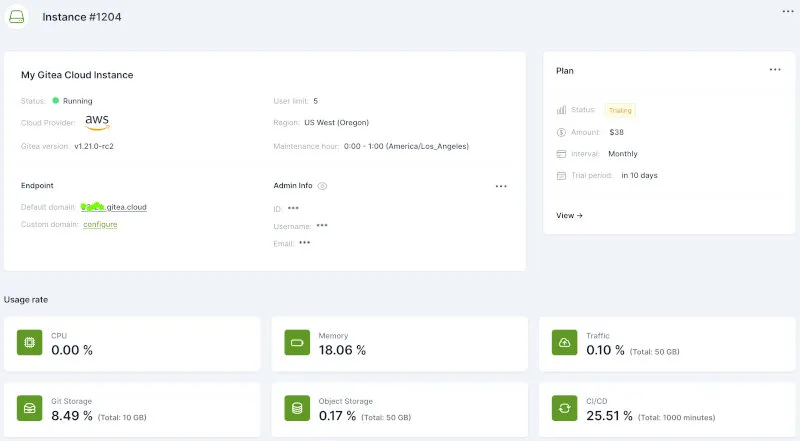
Commercial offering: Gitea Cloud is a paid, managed product sold by CommitGo, Inc. (a company founded by Gitea’s original creators) — it is separate from the free, open-source Gitea project itself. We cover it here because it’s a relevant option for teams evaluating the broader Gitea ecosystem, not as an endorsement.
Gitea Cloud is a fully managed Git hosting service offered by CommitGo, Inc., designed to simplify the deployment and maintenance of Gitea instances while retaining the core benefits of the open-source Gitea project. It provides a cloud-based solution with infrastructure-level isolation, which CommitGo positions as suited to teams and organizations that prioritize ease of use, security, and compliance without the burden of self-hosting.Gitea Cloud, Gitea Cloud Blog
| Feature | Description | Key Benefit |
|---|---|---|
| Managed Infrastructure | Gitea Cloud handles maintenance, backups, upgrades, and scaling, ensuring 24/7 availability. | Frees teams to focus on coding rather than server management. |
| Isolated Environments | Each instance runs in a private, isolated environment with no shared data unless explicitly permitted. | Enhances security and compliance, especially for regulated industries. |
| Custom Domain Support | Allows the use of custom domains and flexible organization/permission management. | Aligns with your organization’s branding and structure. |
| Managed CI/CD Runners | Includes managed runners for Gitea Actions, compatible with GitHub Actions syntax. | Simplifies automation workflows without needing to configure runners. |
| Automatic Version Upgrades | Instances are automatically upgraded to new Gitea releases during a scheduled maintenance window. | Removes patching and upgrade overhead entirely from the team’s plate. |
| Flexible Pricing and Trials | Offers pay-as-you-go plans with discounts for startups, small teams, and non-profits, plus a 30-day free trial. | Accommodates various team sizes and budgets with easy scalability. |
Gitea Enterprise
Commercial offering: Like Gitea Cloud, Gitea Enterprise is a paid product from CommitGo, Inc., layered on top of the free open-source core. The Gitea project’s governance charter prohibits proprietary code in the open-source codebase itself, so these are clearly separated commercial add-ons rather than features held back from the free version.
Gitea Enterprise is a premium, enhanced version of the open-source Gitea project, tailored for enterprise-level users. It builds on Gitea’s lightweight foundation with additional features for security, scalability, and customization, backed by dedicated support, and remains fully compatible with the open-source version, allowing seamless transitions.Gitea Enterprise, Gitea Enterprise News
| Feature | Description | Key Benefit |
|---|---|---|
| Branch Protection Inheritance | Allows organization-wide branch protection rules to apply across all repositories. | Simplifies security management for large teams. |
| Dependency Scanning | Automatically identifies vulnerabilities in open-source dependencies. | Enhances code security by proactively addressing risks. |
| Advanced Security Features | Includes IP Allowlist and mandatory two-factor authentication. | Strengthens instance and account security. |
| SAML Integration | Supports seamless integration with enterprise identity providers via SAML 2.0. | Simplifies authentication and authorization processes. |
| Kubernetes Autoscaling Runners | CI/CD runners that scale automatically on Kubernetes based on workflow demand. | Handles bursty CI load without manually managing runner capacity. |
| Audit Log | Provides a comprehensive history of user actions and system events. | Improves transparency and compliance tracking. |
| Enterprise Themes | Offers customizable UI themes tailored for enterprise branding. | Enhances user experience with personalized interfaces. |
| Premium Support | Includes dedicated support via email or online chat during the license period, plus emergency remote support. | Ensures rapid assistance for enterprise users. |
Pricing for self-managed Gitea Enterprise is published at roughly $9.50 per user per month with a one-year commitment, or $19 per user per month without one, with discounts available for startups and non-profits — though as with any vendor pricing, it’s worth confirming current rates directly with CommitGo before budgeting.
Putting the cost picture in perspective: Self-hosted open-source Gitea is free at any team size — your real cost is server hardware/hosting plus your own time for maintenance. Gitea Cloud and Enterprise both start in roughly the same per-seat range as GitHub Team, trading the “free but you maintain it” model for “paid but managed/supported.” For a small team with modest CI needs, a $5–10/month VPS running open-source Gitea is often the cheapest option overall; the paid tiers earn their keep once you need SSO/SAML, audit logs, or managed runners that would otherwise take real engineering time to build and maintain yourself.
A Note on Forgejo
No discussion of Gitea in 2026 is complete without mentioning Forgejo, a community-driven fork of Gitea that emerged in 2022 in response to the formation of the for-profit Gitea Limited entity. Forgejo (used as the default Git host on Codeberg, among others) shares Gitea’s codebase lineage and remains under the same permissive MIT license, but has diverged on governance: rather than a hybrid model with a commercial arm, Forgejo is steered collectively by its contributors and its domains are held by the non-profit Codeberg e.V., with no equivalent of CommitGo’s paid Cloud or Enterprise tiers. If your primary concern is keeping every byte of the stack under a community-governed nonprofit, Forgejo is worth evaluating alongside Gitea. If you’re comfortable with Gitea’s hybrid open-source-plus-commercial-addons model — similar in spirit to how GitLab or Mattermost operate — Gitea itself remains the more actively developed and widely deployed option of the two.
See Also: Other Self-Hosted Options
If Gitea isn’t quite the right fit, a few related projects are worth a look: Forgejo (above) for a community-governed fork with the same feature set; GitLab Community Edition for a much heavier but more DevSecOps-complete self-hosted platform; and OneDev for a lighter-weight alternative with strong built-in CI and a different UI philosophy. We may cover these in dedicated comparisons as part of our GitHub Alternatives series.
Getting Started & Further Reading
Ready to experience the fastest self-hosted Git service? Explore Gitea with these official links.
Official Website: https://gitea.io/
Documentation: https://docs.gitea.io/
Live Demo: https://try.gitea.io/
GitHub Repository (for community interaction): https://github.com/go-gitea/gitea
Gitea MCP Server: https://gitea.com/gitea/gitea-mcp
Release Blog: https://blog.gitea.com/
Frequently Asked Questions (FAQ)
Q: What databases does Gitea support? A: Gitea supports SQLite (default, no external setup required), PostgreSQL, MySQL, MariaDB, and MSSQL. SQLite is ideal for small setups, while the others are better for larger teams or production environments. Gitea now requires non-end-of-life database versions (MySQL 8.0+, PostgreSQL 12+, MSSQL 2012+).
Q: Can Gitea scale for large teams or organizations? A: Yes, Gitea can scale for larger teams when paired with a robust database (e.g., PostgreSQL) and proper server resources. However, it’s primarily optimized for small to medium-sized teams due to its lightweight design. For larger organizations, Gitea Enterprise adds Kubernetes autoscaling runners and branch-protection inheritance specifically to help it scale operationally.
Q: How does Gitea Actions compare to GitHub Actions? A: Gitea Actions uses the same syntax as GitHub Actions, making workflows portable, and as of 1.26 supports concurrency groups, reusable workflows from private repos, and re-running only failed jobs — closing most of the remaining feature gap. However, Gitea requires you to host your own runners (unless you use Gitea Cloud’s managed runners), while GitHub provides managed runners by default.
Q: Is Gitea secure for production use? A: Gitea is secure when properly configured and kept up to date. The project maintains an active security disclosure process and ships frequent patch releases — for example, the 1.25.x and 1.26.x lines each addressed multiple CVEs within months of release. As with any self-hosted solution, you’re responsible for applying updates promptly and securing your server.
Q: Can I migrate my repositories from GitHub to Gitea? A: Yes, Gitea provides a built-in migration tool that allows you to import repositories, issues, and pull requests from GitHub, GitLab, and other platforms with minimal effort. Recent releases have also improved migration fidelity for things like GitLab comment reactions and draft pull request status.
Q: Can I connect an AI coding assistant like Claude to my Gitea instance?
A: Yes. Gitea publishes an official MCP server (gitea-mcp) that exposes repository, issue, and pull-request operations to MCP-compatible clients such as Claude Code and Claude Cowork. Because Gitea access tokens aren’t finely scoped, it’s a good idea to use a dedicated account or token with limited privileges when connecting an agent.
Conclusion
Gitea is a true gem in the world of open-source software, and the last year of development has only sharpened that reputation. It masterfully delivers a fast, stable, and feature-rich Git experience without the bloat — and it has now modernized its entire frontend stack, matured its CI/CD system to near feature-parity with GitHub Actions for most teams, and positioned itself as a natural fit for the growing world of AI coding agents via MCP. It proves that you don’t need a heavyweight platform to get a modern development workflow. For anyone looking to take control of their code with a self-hosted solution that is a joy to use and manage, Gitea is not just an alternative; it’s a top-tier choice — and in 2026, it’s arguably a stronger one than ever. Looking ahead, ongoing work on federation (ActivityPub/ForgeFed) and continued investment in the Actions runtime suggest Gitea’s pace of improvement isn’t slowing down — worth keeping an eye on if cross-instance collaboration matters to your team.
This article reflects Gitea 1.26.x as of June 2026. Gitea releases frequently — check the official blog for anything newer than what’s described here before making deployment decisions.