Secure Source Manager
Editor’s Note: This article is part of our upcoming definitive guide to GitHub Alternatives.
Secure Source Manager: A Deep Dive into Google Cloud’s Next-Generation Git Service
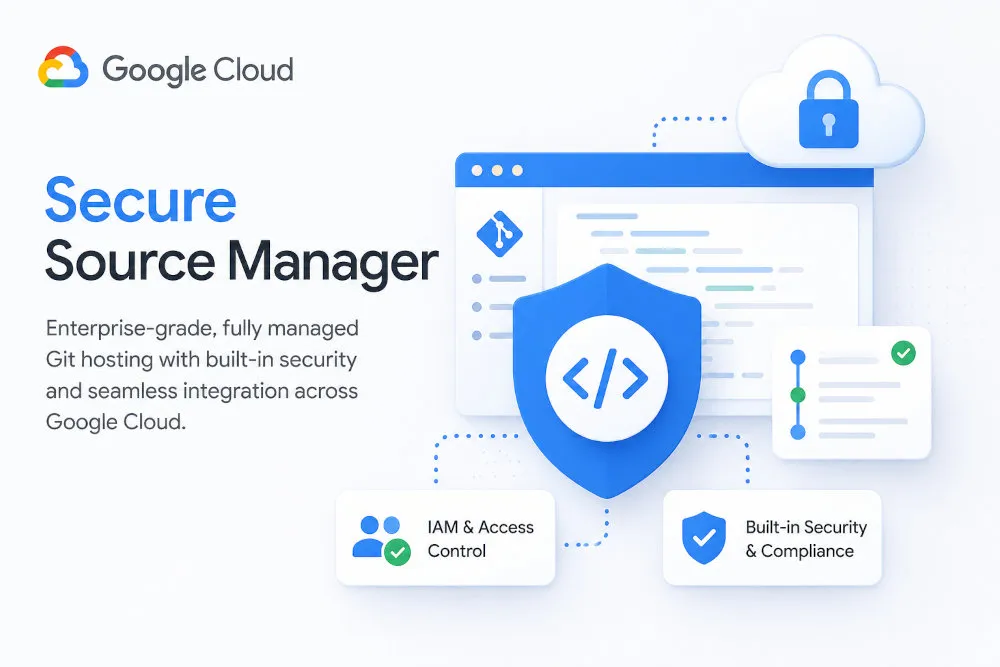
Google Cloud’s source control story has a new chapter. Secure Source Manager (SSM) is a regionally deployed, single-tenant, fully managed private Git repository service — and unlike its predecessor, Cloud Source Repositories (CSR), it ships with the collaboration features developers actually expect: native pull requests, issue tracking, branch protection, and code review, all wrapped inside Google Cloud’s IAM and compliance model.
SSM isn’t just a new product sitting alongside CSR. It’s the platform Google has officially designated as the migration target for CSR users, and the service Google now recommends for any team that wants a private, security-first Git host tightly coupled to the rest of Google Cloud. If you’ve read our guide to Cloud Source Repositories, think of this as the natural next step in that story.
Its primary purpose is to provide a secure, compliant home for source code that integrates with Cloud Build, Cloud KMS, Developer Connect, and Cloud IAM — while finally giving Google Cloud users a collaboration experience that doesn’t feel like a step down from GitHub, GitLab, or Bitbucket.
Note: Secure Source Manager is a relatively young, actively evolving product. Billing for SSM instances began on June 1, 2025, at a flat rate of $1,000 per month per instance, with per-user licensing rolling out later in 2025. Regions, IAM roles, and integration options are expanding regularly — always confirm current specifics against the official documentation before making purchasing or architecture decisions.
Table of Contents
- Key Features at a Glance
- The Secure Source Manager Philosophy: Who Is It For?
- GitHub vs. Secure Source Manager: A Quick Comparison
- Technical Architecture and Security
- Setting Up Secure Source Manager
- Pull Requests, Issues, and Code Review
- Integration with Google Cloud Services
- CI/CD Workflows with Cloud Build
- Managing Access and Permissions
- Monitoring and Troubleshooting
- Migrating from Cloud Source Repositories
- Cost Analysis and Optimization
- Pros and Cons
- Getting Started & Further Reading
- Frequently Asked Questions (FAQ)
- Conclusion
Key Features at a Glance
Secure Source Manager is built around three pillars: regional control, native collaboration, and Cloud IAM-driven security.
| Feature | Description | Key Benefit |
|---|---|---|
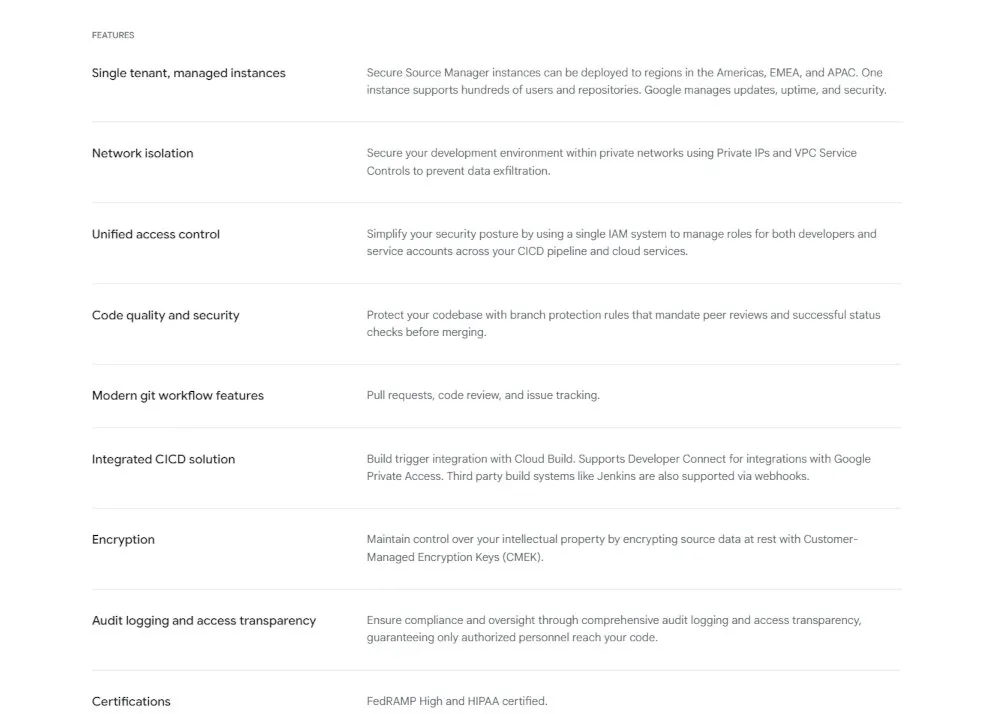
| Regional, Single-Tenant Instances | SSM instances are deployed to a specific Google Cloud region across the Americas, EMEA, or APAC, and serve a single organization. | Gives you control over data residency and isolates your repositories from other customers’ workloads. |
| Native Pull Requests & Issues | A built-in PR workflow with reviewers, labels, milestones, assignees, and due dates, plus issue tracking with CODEOWNERS support. | Closes the biggest functional gap between CSR and platforms like GitHub, GitLab, or Bitbucket. |
| Branch Protection | Configurable rules that require pull requests, minimum approvals, resolved comments, linear history, and passing status checks. | Enforces code review discipline and quality gates directly inside the platform, without external tooling. |
| Deep Cloud IAM Integration | A dedicated set of instance-level and repository-level IAM roles — 11 in total for user principals. | Granular, centrally managed access control that’s consistent with how the rest of Google Cloud is administered. |
| CMEK & Compliance Certifications | Optional customer-managed encryption keys via Cloud KMS; SSM is FedRAMP High and HIPAA compliant. | Meets stringent regulatory and data-sovereignty requirements without bolting on third-party tools. |
| Developer Connect & Webhooks | Connects to Developer Connect for a private Git proxy, and to Jenkins or other CI systems via webhooks, alongside native Cloud Build. | Flexible integration with both Google-native and third-party CI/CD pipelines. |
The Secure Source Manager Philosophy: Who Is It For?
Secure Source Manager is designed for organizations that want the security posture and infrastructure-grade reliability of a hyperscaler-hosted Git service, without giving up the collaboration workflows — pull requests, code review, issue tracking — that modern development teams rely on every day.
This makes it the ideal choice for:
Organizations migrating off Cloud Source Repositories: With CSR now formally in deprecation, SSM is Google’s named successor and the most direct migration path for teams that just need “CSR, but with a real collaboration UI.”
Regulated industries: FedRAMP High and HIPAA compliance, combined with customer-managed encryption keys and VPC Service Controls, make SSM a strong fit for healthcare, finance, government, and other compliance-heavy sectors already standardized on Google Cloud.
Teams that found CSR’s UI too limiting: Native pull requests, issue tracking, CODEOWNERS-based review assignment, and branch protection bring SSM’s day-to-day developer experience much closer to GitHub or GitLab.
Security teams enforcing zero-trust CI/CD: Single-tenant instances, Private Service Connect, VPC Service Controls perimeters, and IAM-only access mean source code never needs to touch the public internet if your architecture demands it.
If your organization is already running production workloads on Google Cloud and wants a Git host that feels like a modern SCM platform while living entirely inside your GCP security perimeter, SSM is built for exactly that.
GitHub vs. Secure Source Manager: A Quick Comparison
| Aspect | GitHub | Secure Source Manager |
|---|---|---|
| Primary Focus | A global developer platform with a massive community and ecosystem. | A private, regionally deployed, single-tenant Git service for Google Cloud-native teams. |
| Collaboration UI | Best-in-class, mature pull request, review, and discussion experience, plus a huge marketplace of integrations. | Built-in pull requests, issue tracking, and CODEOWNERS — functional and improving, but newer and less feature-dense. |
| CI/CD | Deeply integrated, feature-rich GitHub Actions. | Cloud Build via a repository triggers file, or third-party CI like Jenkins via webhooks. |
| Deployment Model | Fully managed, multi-tenant SaaS — nothing to provision. | You provision regional, single-tenant instances yourself, choosing region and encryption model. |
| Unique Feature | The world’s largest open-source community and integration marketplace. | Native CMEK, FedRAMP High/HIPAA compliance, and VPC Service Controls perimeter support baked into the platform. |
Technical Architecture and Security
Secure Source Manager’s architecture reflects a deliberate design choice: rather than a single shared, multi-tenant service (as CSR was), SSM is built around discrete, customer-provisioned instances.
Instance and Repository Model
SSM uses a two-level resource hierarchy. An instance is a regional deployment — projects/PROJECT_ID/locations/LOCATION/instances/INSTANCE_ID — and a repository is attached to (though not a child of) an instance in the same project and region — projects/PROJECT_ID/locations/LOCATION/repositories/REPOSITORY_ID. Each instance is reachable through its own URI, in the form INSTANCE_ID-PROJECT_NUMBER.LOCATION.sourcemanager.dev, and exposes a web interface, Git HTTPS/SSH endpoints, and an API endpoint.
Instances are deployed to a specific Google Cloud region across the Americas, EMEA, and APAC, with new regions added on an ongoing basis. Because SSM is single-tenant, a single instance should generally contain users from only one organization — Google explicitly recommends separate instances if you need to collaborate with external companies, unless there’s a contractual relationship justifying a shared instance.
Security Model
Encryption at Rest and in Transit: By default, Google Cloud automatically encrypts SSM data at rest using Google-managed keys. For organizations with stricter compliance needs, SSM supports customer-managed encryption keys (CMEK) via Cloud Key Management Service — specified at instance creation time, with access to the key controlled through IAM. If a CMEK key is disabled or destroyed, data encrypted with it becomes inaccessible.
Identity and Access Management: All access — through the web UI, Git over HTTPS/SSH, or the API — is governed by Cloud IAM, using a dedicated set of SSM-specific roles layered across instances and repositories.
Compliance Certifications: Secure Source Manager is FedRAMP High compliant and HIPAA compliant, making it suitable for government and healthcare workloads with strict regulatory requirements.
Federated Identity: Instances can be created with workforce identity federation enabled, allowing external identity providers to authenticate into SSM without provisioning Google identities for every user.
Network Security Features
SSM supports several deployment patterns depending on how isolated your source code needs to be:
VPC Service Controls: SSM instances can be placed inside a VPC Service Controls perimeter to guard against data exfiltration, consistent with how other sensitive Google Cloud services are protected.
Private Service Connect Instances: For fully private deployments, SSM supports Private Service Connect, keeping all traffic to the instance off the public internet.
Developer Connect Git Proxy: Connecting SSM to Developer Connect enables a Git proxy that supports Private Google Access for read operations like git clone. This is highly useful for internal build systems; however, note that git push is not supported through the proxy, meaning write access still requires direct network connectivity to the instance.
Setting Up Secure Source Manager
Initial Configuration
Standing up SSM involves a few more explicit infrastructure decisions than CSR did, since you’re provisioning a dedicated instance rather than just enabling a shared service:
-
Enable the API: Run
gcloud services enable securesourcemanager.googleapis.comin your project, or enable it from the Cloud Console. -
Create the Service Agent: SSM requires a per-product, per-project service account (P4SA). Create it with
gcloud beta services identity create --service=securesourcemanager.googleapis.com --project=PROJECT_ID, then grant the Secure Source Manager Service Agent role to the resulting service account — instance creation will fail without this step. -
Create an Instance: Use
gcloud source-manager instances create INSTANCE_ID --region=LOCATION --project=PROJECT_ID, optionally adding--kms-key=...for CMEK or--enable-workforce-identity-federationfor federated identity. Instance creation is a long-running operation, and the region you choose can’t be changed afterward. -
Grant Instance Access: Users, groups, and service accounts need at least the Instance Accessor role before they can do anything else — including being granted repository-level roles.
-
Access the Web Interface: Once active, the instance is reachable at
INSTANCE_ID-PROJECT_NUMBER.LOCATION.sourcemanager.dev, where you’ll be prompted to authorize access via OAuth on first login.
Repository Creation and Configuration
Repositories can be created in two ways:
Web Interface: From the instance’s “My repositories” page, create a new repository directly, optionally initializing it with a README, .gitignore, or license file.
API: POST to https://securesourcemanager.googleapis.com/v1/projects/PROJECT_ID/locations/REGION/repositories, specifying the parent instance and repository ID.
Creating repositories requires the Repo Creator role at the project level and the Instance Repository Creator role on the instance.
Best Practices for Initial Setup
-
Choose your instance’s region carefully based on data residency and latency requirements — this decision is permanent for that instance.
-
Decide on CMEK vs. Google-managed encryption at instance creation time, since this can’t be retrofitted onto an existing instance.
-
Plan your IAM role assignments in two layers: grant instance-level roles first, then repository-level roles — repository roles have no effect without a corresponding instance role.
-
Evaluate whether Private Service Connect or a VPC Service Controls perimeter is needed before you create your first instance, as retrofitting network architecture later is more disruptive.
-
Set up notifications early so teams are alerted to pull request and issue activity from day one.
Pull Requests, Issues, and Code Review
This is the area where SSM most clearly differentiates itself from CSR — and the feature set most likely to matter day-to-day for development teams.
Pull Request Workflow
Pull requests are created and managed directly in the SSM web interface. You can assign reviewers, apply labels, set milestones, assign owners, and set due dates — much of the metadata developers expect from platforms like GitHub or GitLab.
CODEOWNERS Support: SSM supports CODEOWNERS files to automatically assign required reviewers based on which files or directories a pull request touches, helping route changes to the right subject-matter experts without manual triage.
Branch Protection: Protected branch rules can require pull requests before merging, set a minimum number of reviewers and approvers, block merges if new commits land after approval, require all review comments to be resolved, enforce a linear Git history, and require passing build status checks before a merge is allowed. Rules can apply to a single branch or to all branches matching a pattern.
Issue Tracking
Issues can be opened against a specific branch or tag, and support labels, milestones, assignees, and due dates — similar in spirit to issue trackers on other major Git platforms. Both issue and pull request templates can be configured per repository to standardize the information contributors provide.
Notifications
SSM can send notifications for activity on pull requests and issues you’re participating in, or for repositories you’re watching, helping teams stay on top of review requests and discussion without constantly polling the web UI.
Integration with Google Cloud Services
Like CSR before it, SSM’s value compounds through its integrations with the rest of Google Cloud — though the connection model looks a little different.
Cloud Build Integration
SSM connects to Cloud Build through a triggers file committed to your repository, which defines build triggers based on push events, pull request events, and branch or tag filters, following a documented triggers file schema. This declarative, in-repo approach to trigger configuration is a notable departure from CSR’s console-configured triggers.
Developer Connect Integration
Connecting an SSM instance to Developer Connect unifies how Google Cloud services reference your repositories and unlocks the Git proxy feature, which supports Private Google Access for read operations — useful for build systems and tooling that need to fetch source without the instance being exposed publicly.
Jenkins and Other CI/CD via Webhooks
For teams not standardizing on Cloud Build, SSM supports webhooks that notify external systems — including Jenkins — of repository events, enabling custom or third-party CI/CD pipelines to trigger off SSM activity.
Artifact Registry, Cloud Deploy, and Serverless
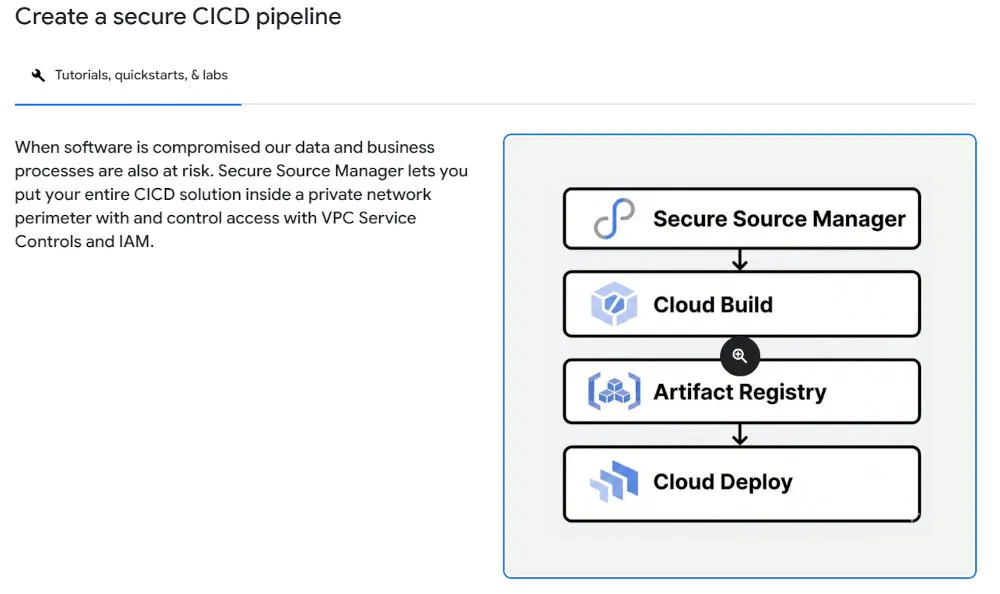
As with CSR, the broader build-to-deploy pipeline remains the same: Cloud Build can push built artifacts to Artifact Registry, and from there, you can leverage Cloud Deploy to orchestrate structured releases to GKE, Cloud Run, App Engine, or Cloud Functions. SSM simply and cleanly replaces the source-hosting layer at the front of that integrated pipeline.
CI/CD Workflows with Cloud Build
Triggers File Configuration
Rather than configuring triggers purely through the console, SSM encourages defining them in a triggers file within the repository itself — specifying which events (pushes, pull requests) and which branch or tag patterns should kick off a Cloud Build run. This keeps trigger configuration version-controlled alongside the code it builds.
Multi-Stage Pipeline Design
Once a build is triggered, pipeline design considerations carry over directly from the broader Cloud Build feature set:
Parallel Execution: Independent build steps can run in parallel to reduce overall pipeline time.
Conditional Steps: cloudbuild.yaml configurations can include conditional logic to adapt pipelines to different scenarios — for example, running a different deployment step for a release tag versus a feature branch.
Environment Promotion: Pipelines can be designed to promote builds through development, staging, and production environments based on branch or tag patterns defined in the triggers file.
Security Integration in CI/CD
The same security building blocks available to CSR-based pipelines apply here:
Binary Authorization: Ensure only verified, signed container images can be deployed to production.
Security Scanning: Automatically scan container images for vulnerabilities as part of the build process.
Secret Management: Use Secret Manager to handle API keys, database credentials, and other sensitive build-time values without storing them in the repository.
Managing Access and Permissions
Secure Source Manager’s IAM model is notably more granular than CSR’s three roles (source.reader, source.writer, source.admin) — SSM offers 11 roles for user principals, split across instance-level and repository-level scopes, plus a superuser role.
Instance-Level Roles
Instance Owner (roles/securesourcemanager.instanceOwner): Full administrative access to the instance.
Instance Accessor (roles/securesourcemanager.instanceAccessor): The baseline role required for any user to access the instance’s web interface or connect via Git — without it, repository-level roles have no effect.
Instance Manager (roles/securesourcemanager.instanceManager): Permissions to list and manage instances at the project level.
Instance Repository Creator (roles/securesourcemanager.instanceRepositoryCreator): Allows creating and modifying repositories within a specific instance.
Repo Creator (roles/securesourcemanager.repoCreator): A project-level role allowing repository creation, paired with Instance Repository Creator to actually create repos in a given instance.
Repository-Level Roles
Repo Admin (roles/securesourcemanager.repoAdmin): Full administrative control over a specific repository, including managing permissions for other users.
Repo Writer (roles/securesourcemanager.repoWriter): Push and pull access, plus the ability to create issues and pull requests.
Repo Reader (roles/securesourcemanager.repoReader): Read-only access — clone and pull, but not push.
The Superuser Role
Admin (roles/securesourcemanager.admin): Grants all SSM permissions across instances and repositories. Because instance permissions don’t apply when bound to a repository (and vice versa), this role must be bound at the project level to be effective.
Two-Step Access Model
A key operational difference from CSR: access is layered. A user must first be granted an instance-level role (typically Instance Accessor) before any repository-level role they’re granted will take effect. This two-step model gives administrators a clean way to control who can reach an instance at all, separately from what they can do once they’re in.
Monitoring and Troubleshooting
Cloud Audit Logging
SSM activity is logged to Cloud Audit Logs, consistent with how other Google Cloud services expose admin activity, data access, and system events — giving security teams the same audit trail they’d expect from any GCP resource.
Email Notifications
Email notifications for instance-level events were added to SSM, giving administrators visibility into instance health and configuration changes without needing to actively monitor the console.
Known Issues and Maintenance Windows
Google publishes a dedicated known issues and maintenance windows page for SSM. Because each instance is a discrete deployment, maintenance windows and any known issues can be specific to the region or instance configuration you’ve chosen — worth checking before assuming an issue is isolated to your setup.
Troubleshooting Common Issues
IAM Role Ordering: The most common early stumbling block is forgetting that repository roles require a corresponding instance role — a user with only Repo Writer but no Instance Accessor won’t be able to access anything.
CMEK Key Access: If an instance was created with a CMEK key, ensure the key remains enabled and accessible — a disabled or destroyed key makes the entire instance’s data inaccessible, not just new writes.
VPC Service Controls Configuration: Instances inside a VPC-SC perimeter require careful configuration of allowed services and ingress/egress rules; misconfiguration commonly manifests as access being silently denied rather than an obvious error.
Service Agent Permissions: If instance creation fails outright, the most likely cause is a missing or incorrectly scoped Secure Source Manager Service Agent role on the per-product service account.
Migrating from Cloud Source Repositories
For many readers, the most relevant question isn’t “should I adopt SSM from scratch?” but “how do I move my existing CSR repositories here?” Google has published official guidance for exactly this scenario.
Why Now
Cloud Source Repositories is in active deprecation, having reached its official End of Sale on June 17, 2024. While Google has committed to giving at least a year’s notice before a full shutdown—and no final date has been announced as of mid-2026—SSM is the designated landing spot for CSR repositories. For organizations that used CSR prior to the cutoff, Google strongly recommends starting the move proactively rather than waiting for the shutdown clock to start.
Repository Migration
Google’s official CSR-to-SSM migration guide walks through exporting a CSR repository — including its full branch, tag, and commit history — using git clone --mirror, and pushing that data into a newly created SSM repository. Because both are standard Git repositories under the hood, the data migration itself is largely a Git operation; the more involved work is on the configuration side.
Permissions Mapping
CSR’s three IAM roles map onto a combination of SSM roles, since SSM’s permission model is considerably more granular:
| CSR Role | Closest SSM Equivalent |
|---|---|
roles/source.reader | securesourcemanager.instanceAccessor + securesourcemanager.repoReader |
roles/source.writer | securesourcemanager.instanceAccessor + securesourcemanager.repoWriter |
roles/source.admin | A combination of securesourcemanager.instanceAccessor, securesourcemanager.repoAdmin, and securesourcemanager.instanceRepositoryCreator — or securesourcemanager.admin at the project level for full superuser parity |
Because roles/source.admin’s repository-creation permission only applied at the project scope in CSR, Google’s guidance specifically calls out binding the equivalent SSM permissions at the project level too, rather than per-repository.
CI/CD Migration
Cloud Build triggers configured against CSR repositories need to be recreated against their SSM equivalents — in practice, this typically means adding a triggers file to the migrated repository rather than relying on console-configured triggers, since that’s SSM’s preferred trigger configuration model.
Migrating from GitHub or Bitbucket Mirrors
If your CSR repository was itself a mirror of a GitHub or Bitbucket repository (a common CSR pattern), you have a simpler option: push directly from GitHub or Bitbucket to a new SSM repository using standard Git remotes, skipping CSR as an intermediary entirely going forward.
Cost Analysis and Optimization
Pricing Model
SSM introduced a new pricing model that’s structured very differently from CSR’s free-tier-plus-usage approach:
Instance Pricing: Each SSM instance is billed at a flat base rate of $1,000 per month, which covers the underlying single-tenant infrastructure. Instances are billed at the end of each month they’re in service, with partial months prorated.
Per-User Licensing: In addition to the instance fee, Google’s pricing model includes per-user licensing. The $1,000 base price inherently includes your first 100 user licenses; any additional users beyond that initial tier are billed at $10 per user per month.
Worked Example: An organization with one instance hosting 112 users and a second instance hosting 5 users would pay $1,000 for the first instance (covering its first 100 users) plus $120 for the 12 additional users, and $1,000 for the second instance (well under its included 100 users) — for a combined total of $2,120 per month across both instances.
Cost Optimization Strategies
Because pricing is per-instance rather than per-repository or per-GB, optimization looks different from CSR:
Instance Consolidation: Since each instance costs $1,000/month regardless of size, consolidating repositories and teams onto fewer instances — where region and tenancy requirements allow — directly reduces cost.
User Count Management: Keep an eye on per-instance user counts relative to the 100-user included allotment; an instance sitting just over 100 users is paying a premium for a small number of extra seats that might be better consolidated.
Region Planning: Each instance is tied to a single region, so avoid creating redundant instances across regions unless data residency genuinely requires it.
Decommission Unused Instances: If you spin up a test or evaluation instance, decommission it promptly — the flat monthly fee applies for as long as the instance exists, even with minimal usage.
Total Cost of Ownership
When evaluating SSM against alternatives, consider the full picture: the flat per-instance fee replaces the need for self-managed Git infrastructure and its associated operational overhead, while the built-in compliance certifications (FedRAMP High, HIPAA) may reduce or eliminate the need for separate compliance tooling layered on top of a more generic Git host.
Pros and Cons

Why You Might Choose Secure Source Manager
Closes CSR’s Biggest Gap: Native pull requests, issue tracking, CODEOWNERS, and branch protection bring the collaboration experience much closer to what teams expect from GitHub or GitLab.
Official Forward Path for GCP-Native Teams: As the designated successor to CSR, SSM is the safest long-term bet for organizations that want to stay within Google Cloud’s source control ecosystem.
Strong Compliance Posture: FedRAMP High and HIPAA compliance, plus CMEK and VPC Service Controls, make SSM viable for workloads that previously needed third-party security layers bolted onto a Git host.
Flexible Deployment Models: Public, private, and mixed network integration patterns — including Private Service Connect — let you match the deployment model to your security requirements.
Potential Drawbacks
Newer, Still-Maturing Product: SSM is younger than CSR and far younger than GitHub or GitLab; expect features, regions, and documentation to continue evolving, sometimes with rough edges.
Per-Instance Pricing Can Be Costly for Small Teams: A flat $1,000/month per instance is a meaningful fixed cost for a small team that just needs a handful of private repositories — CSR’s free tier had no equivalent.
Single-Tenant Regional Model Requires Upfront Planning: Choosing a region and encryption model at instance creation — with limited ability to change either later — means more architectural decisions need to be made before you write your first line of code.
Smaller Ecosystem Than GitHub or GitLab: While integrations with Cloud Build, Developer Connect, and Jenkins cover common cases, SSM doesn’t have anything resembling GitHub’s marketplace of third-party Actions and apps.
Getting Started & Further Reading
Ready to set up a private, IAM-governed Git host inside your Google Cloud environment? Explore SSM with the official links.
Official Product Page: https://cloud.google.com/products/secure-source-manager
Documentation Overview: https://cloud.google.com/secure-source-manager/docs/overview
Pricing Page: https://cloud.google.com/products/secure-source-manager/pricing
Quickstart: Create and Access an Instance: https://cloud.google.com/secure-source-manager/docs/create-access-instance
CSR to SSM Migration Guide: https://cloud.google.com/source-repositories/docs/csr-ssm-migration-guide
Frequently Asked Questions (FAQ)
1. Is Secure Source Manager free? No, not in the way CSR’s free tier was. SSM is billed at a flat $1,000 per month per instance (covering up to 100 users), with additional users billed at $10/month each beyond that. There’s no free tier for ongoing use, though new Google Cloud customers may be able to apply general free-trial credit toward initial evaluation.
2. Can I use Secure Source Manager for public, open-source projects? No. Like CSR before it, SSM is designed exclusively for private repositories within an organization’s Google Cloud environment. It has no public-facing social coding, discovery, or open-source collaboration features.
3. Is Secure Source Manager the same product as Cloud Source Repositories, just renamed? No — they’re architecturally different products. CSR was a shared, multi-tenant, project-scoped service with a minimal web UI. SSM is a regionally deployed, single-tenant service with its own instances, native pull requests and issue tracking, and a more granular IAM model. SSM is positioned as CSR’s successor, but migrating between them involves real data and configuration work, not just a name change.
4. What is the main advantage of SSM over a platform like GitHub? The primary advantages are deployment control and compliance. SSM lets you run single-tenant instances inside your own Google Cloud regions, optionally behind VPC Service Controls or Private Service Connect, with FedRAMP High and HIPAA compliance and customer-managed encryption keys — a security and data-residency posture that’s harder to achieve on a multi-tenant SaaS platform.
5. Do I have to provision a new instance for every project? No. A single SSM instance can host many repositories — Google’s guidance is that “one instance supports hundreds of users and repositories.” Most organizations should aim to consolidate onto as few instances as their region and tenancy requirements allow, since pricing is per-instance.
6. How does branch protection work in SSM? Protected branch rules can require pull requests before merging, set minimum reviewer and approver counts, block merges if new commits arrive after approval, require resolved review comments, enforce linear history, and require passing build status checks. Rules can target a single branch or apply across all branches matching a pattern.
7. Can I connect SSM to CI/CD tools other than Cloud Build? Yes. While Cloud Build is the most tightly integrated option (via an in-repo triggers file), SSM also supports webhooks for connecting to Jenkins or other third-party CI/CD systems.
8. What happens to my collaboration metadata (pull requests, issues) if I migrate from CSR? Since CSR never natively supported pull requests or issue tracking, there is no historical collaboration metadata to migrate. The standard migration simply moves your core Git repository data—branches, tags, and commit history—into a new SSM repository. Any review or tracking workflows you establish in SSM (like PRs, issues, and CODEOWNERS) will start fresh.
9. Is Secure Source Manager available in my region? SSM is available across a growing list of regions in the Americas, EMEA, and APAC, but not in every Google Cloud region yet. Check Google’s current locations documentation before committing to a region, since an instance’s region can’t be changed after creation.
10. Does SSM support SSH for Git operations, like GitHub does? Yes. Unlike CSR, which relied on Cloud IAM-authenticated HTTPS, SSM supports both HTTPS and SSH authentication for Git operations, giving teams the option to use SSH keys the way they would with GitHub, GitLab, or Bitbucket.
Conclusion
Secure Source Manager represents Google Cloud’s clearest statement yet about what it thinks private source control should look like in 2026: regionally controlled, single-tenant, deeply compliant, and — finally — collaborative in the way developers actually expect. Where Cloud Source Repositories traded a rich UI for integration, SSM tries to offer both: native pull requests and issue tracking alongside the IAM, audit logging, and encryption controls that made CSR appealing to security-conscious teams in the first place.
For organizations currently on CSR, SSM is the path of least resistance — Google has published migration and permissions-mapping guides specifically to ease that transition, and the underlying Git data is portable by design. For teams evaluating Google Cloud as a new home for private source control, SSM’s compliance certifications and flexible network deployment models make it a serious contender, provided the per-instance pricing model fits your scale.
As with any newer product, expect continued change: new regions, refined IAM roles, and expanded integrations are likely as SSM matures into its role as the backbone of source control on Google Cloud. Whether you’re migrating from CSR, evaluating SSM against GitHub or GitLab, or building a security-first CI/CD pipeline from scratch, the principles in this guide should give you a solid starting point — paired, as always, with a check of the official documentation for the latest specifics.