
Secrets Management Best Practices: Securing Your Applications in 2026
Secrets Management Best Practices: Securing Your Applications in 2026
Table of Contents
- Introduction
- What Are “Secrets”?
- The Risks of Poor Secrets Management
- Core Best Practices
- Integrating Secrets Management into CI/CD
- Beyond Secrets: Advanced Architectural Patterns
- Top Tools: Beginner to Advanced
- Conclusion
Introduction
The 2025 Verizon Data Breach Investigations Report found that compromised credentials are involved in over 77% of web application breaches. Not misconfigured servers, not zero-days — stolen or leaked passwords and API keys. And in most cases, these credentials weren’t stolen through sophisticated hacking. They were simply… left in the open.
A developer pushed a commit with an AWS key embedded in the code. A .env file was shared over Slack. A database password lived unchanged in a config file for four years. Sounds familiar?
This is the secrets management problem, and if you’re building or operating any modern application, it affects you.
This post is your definitive guide. Whether you’re a solo developer just learning to avoid git commit-ing your API keys, or a senior DevOps engineer architecting a zero-trust secrets infrastructure for a Fortune 500 company, you’ll find actionable advice here.
What Are “Secrets”?
In software, a “secret” is any sensitive credential used for machine-to-machine authentication or encryption. These are not the same as human passwords (though those matter too). We’re talking about:
| Secret Type | Examples |
|---|---|
| API Keys | Stripe keys, OpenAI keys, SendGrid keys |
| Database Credentials | PostgreSQL passwords, MongoDB URIs |
| OAuth Tokens | Service account tokens, refresh tokens |
| SSH Keys | Deploy keys, server access keys |
| TLS/SSL Certificates | Private keys for HTTPS |
| Encryption Keys | AES keys, RSA private keys |
| Cloud IAM Credentials | AWS Access Key ID + Secret, GCP service account JSON |
| Webhook Signing Secrets | GitHub webhook secrets, Stripe webhook secrets |
The common thread: if this value is compromised, an attacker gains access to systems, data, or the ability to impersonate your application.
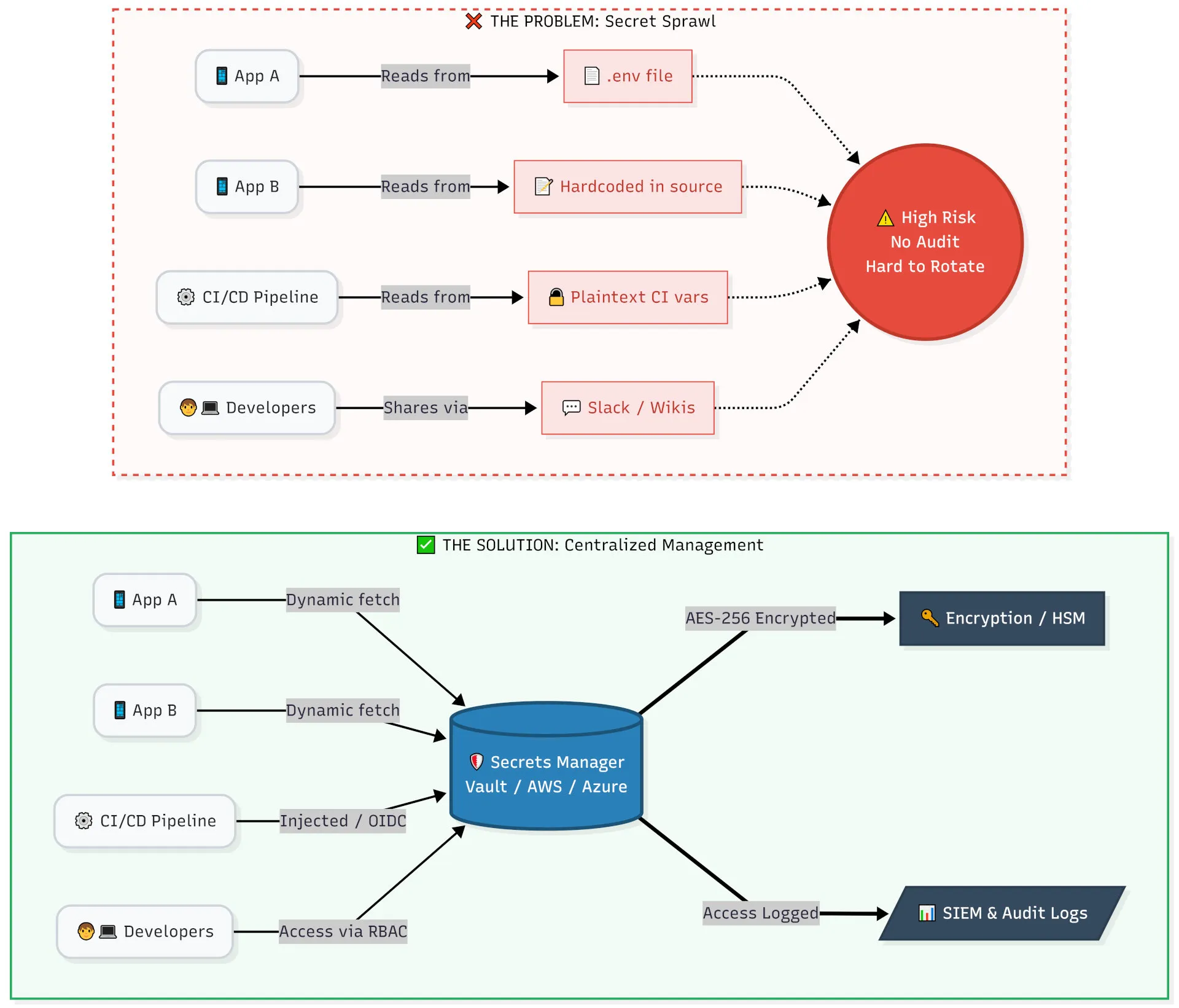
The Problem: Secret Sprawl
As microservices, multi-cloud, and DevOps practices have evolved, secrets have multiplied and scattered across your infrastructure:
❌ Secret Sprawl — Where Secrets End Up (By Accident)

├── source_code/
│   ├── config.py          ← API key hardcoded in line 42
│   ├── docker-compose.yml ← DB password in environment block
│   └── .env               ← Committed to Git "just this once"
│
├── CI/CD Pipelines/
│   ├── GitHub Actions     ← Secret in plaintext in YAML workflow
│   └── Jenkins            ← Password in build script
│
├── Developer Machines/
│   ├── ~/.bash_profile    ← export AWS_SECRET="abc123"
│   └── Slack DMs          ← "hey here's the prod DB password"
│
└── Random Wikis/
    └── Confluence         ← "Prod credentials" page (view-only? maybe)
This is secret sprawl: uncontrolled, untracked, unaudited secrets living everywhere and nowhere. It’s the root cause of most credential-related breaches.
The Risks of Poor Secrets Management
Before diving into solutions, let’s understand what’s at stake.
Hardcoding Secrets in Source Code
The most common mistake in the industry. A developer is rushing to ship a feature, needs an API key to test, and drops it directly in the code. It ships. It gets forgotten.
# ❌ DON'T EVER DO THIS
import stripe

stripe.api_key = "sk_live_4eC39HqLyjWDarjtT1zdp7dc"  # Real production key!

def charge_customer(amount, token):
    stripe.Charge.create(amount=amount, currency="usd", source=token)
Even if this isn’t pushed to a public repository, it’s still a serious risk:
- Every developer with repo access can see it
- It appears in
git logforever, even if later removed - It travels into backups, forks, and CI/CD build logs
- Tools like GitHub’s secret scanning will flag it — but after the fact
Real-world consequence: In 2023, Toyota exposed a credential in a public GitHub repo for nearly five years, potentially exposing the data of 296,000 customers. The key was sitting there the whole time.
Lack of Visibility and Auditing
If you don’t know where your secrets are, you cannot answer these questions:
- Which services are using this database password?
- Who accessed the production API key last Tuesday at 2 AM?
- When this key was rotated last week, did the rotation break anything?
- Is this secret still in use, or can we safely delete it?
Without a centralized system, secrets management is flying blind. And blind spots are exactly where attackers thrive.
Static and Long-Lived Credentials
Many organizations use the same database password for years. This is catastrophically risky:
- Wide blast radius: If it’s ever leaked, the attacker has unrestricted access for as long as the credential is valid
- Rotation paralysis: The longer a credential lives, the more systems depend on it, making rotation feel impossible
- No breach detection window: You can’t distinguish a legitimate connection from a malicious one using the same long-lived key
Think about it like a physical key to your office. You’d never leave the same key unchanged for five years without knowing exactly who has a copy of it.
The “Post-it Note” Equivalent for DevOps
The #ops Slack channel. The email thread titled “FWD: Prod DB Creds.” The shared Google Doc. The Confluence page anyone can view.
Sharing secrets through unencrypted communication channels is the digital equivalent of taping your PIN to your debit card. Once a secret leaves a secure system and enters a communication channel, you have zero control over where it ends up, who forwards it, or how long it persists in chat history.
The AI Boom: Jupyter Notebooks and LLM API Keys
One of the fastest-growing secret leak vectors in 2025 and 2026 is AI development. With the explosion of LLM-powered applications, data scientists and developers routinely hardcode OPENAI_API_KEY, ANTHROPIC_API_KEY, or HuggingFace tokens directly into Jupyter Notebooks, Python scripts, and LangChain/LlamaIndex setups.
# ❌ Extremely common in data science notebooks — and extremely dangerous
import openai

openai.api_key = "sk-proj-abc123..."   # ❌ Hardcoded LLM key

response = openai.chat.completions.create(
    model="gpt-4o",
    messages=[{"role": "user", "content": "Summarize this document..."}]
)
This is compounded by a critical Jupyter Notebook trap: notebooks store cell outputs and variable state in their underlying JSON structure. Even if you delete a code cell containing a key, the key may still be embedded in the notebook’s output history — and will be committed to Git along with the .ipynb file.
# A Jupyter notebook is just JSON — secrets hide in plain sight
$ cat my_analysis.ipynb | python3 -m json.tool | grep -i "api_key"
# "OPENAI_API_KEY": "sk-proj-abc123..."   ← still there after cell deletion!
How to fix it for AI/data science workflows:
# ✅ Option 1: Use environment variables (minimum viable fix)
import os
import openai

openai.api_key = os.environ["OPENAI_API_KEY"]

# ✅ Option 2: Use python-dotenv (common in notebooks — still use .gitignore!)
from dotenv import load_dotenv
load_dotenv()  # Reads from .env file
openai.api_key = os.getenv("OPENAI_API_KEY")

# ✅ Option 3: Use a secrets manager (best for production AI apps)
import boto3, json
secret = json.loads(
    boto3.client("secretsmanager").get_secret_value(SecretId="prod/ai/openai")["SecretString"]
)
openai.api_key = secret["api_key"]
# Add to .gitignore — strip notebook outputs before committing
pip install nbstripout
nbstripout --install # Installs a git filter that auto-strips outputs on commitLLM API keys should be treated with the exact same rigor as production database passwords. A leaked OpenAI key can rack up thousands of dollars in charges within hours. A leaked key for an internal LLM with access to proprietary data can be far worse.
Core Best Practices
Never Hardcode Secrets (The Golden Rule)
This is non-negotiable. No exceptions. Not for “just testing.” Not for “it’s a private repo.” Not for “I’ll fix it later.”
❌ Wrong — hardcoded in source:
// config.js
const dbConfig = {
  host: "prod-db.company.com",
  user: "admin",
  password: "SuperSecret123!", // ❌ Hardcoded
  database: "customers",
};
✅ Right — injected via environment variable:
// config.js
const dbConfig = {
  host: process.env.DB_HOST,
  user: process.env.DB_USER,
  password: process.env.DB_PASSWORD, // ✅ Read from environment
  database: process.env.DB_NAME,
};
✅ Even better — fetched from a secrets manager at runtime:
// config.js (Node.js + AWS Secrets Manager)
import {
  SecretsManagerClient,
  GetSecretValueCommand,
} from "@aws-sdk/client-secrets-manager";

const client = new SecretsManagerClient({ region: "us-east-1" });

async function getDbConfig() {
  const response = await client.send(
    new GetSecretValueCommand({ SecretId: "prod/myapp/database" }),
  );
  return JSON.parse(response.SecretString);
}
Add a .gitignore to protect local secret files:
# .gitignore

# Environment variable files
.env
.env.local
.env.production
.env.*.local

# Key and certificate files
*.key
*.pem
secrets.json

# Package manager auth configs (contain publishing tokens!)
.npmrc
.pypirc
pip.conf

# Cloud credential files
.aws/credentials
gcloud/application_default_credentials.json
*.tfvars          # Terraform variable files often contain secrets

# Jupyter Notebooks — strip outputs, but also ignore local checkpoint files
.ipynb_checkpoints/

# macOS metadata (can sometimes capture env vars from terminal sessions)
.DS_Store
Add a .env.example for documentation (no real values):
# .env.example — commit this, NOT .env
DB_HOST=your-database-host
DB_USER=your-database-user
DB_PASSWORD=your-database-password
DB_NAME=your-database-name
STRIPE_SECRET_KEY=sk_live_...
Centralize Your Secrets
A dedicated secrets manager is the “single source of truth” for all credentials. Instead of secrets scattered across config files, Slack messages, and developer machines, every application and service fetches secrets from one place.
Architecture: Before vs. After
❌ Before (Secret Sprawl)                ✅ After (Centralized)
────────────────────────                 ─────────────────────────
App A ──── .env file                     App A ──┐
App B ──── config.yaml                   App B ──┤
App C ──── Kubernetes secret             App C ──┤──► Secrets Manager ◄── Audit Logs
CI/CD ──── Pipeline env var             CI/CD ──┤              │
Dev 1 ──── ~/.bash_profile              Dev 1 ──┘              └──► Encryption
Dev 2 ──── Slack message                                              (AES-256)
Example: Fetching a secret from HashiCorp Vault
# Authenticate and fetch a secret via CLI
vault login -method=aws

vault kv get -mount=secret prod/myapp/database
# Output:
# == Secret Path ==
# secret/data/prod/myapp/database
#
# ======= Data =======
# Key        Value
# ---        -----
# password   correcthorsebatterystaple
# username   app_user
Example: Fetching via Vault’s HTTP API (Python)
import hvac

client = hvac.Client(url='https://vault.company.com:8200', token=os.environ['VAULT_TOKEN'])

secret = client.secrets.kv.v2.read_secret_version(
    path='prod/myapp/database',
    mount_point='secret'
)

db_password = secret['data']['data']['password']
Example: Using AWS Secrets Manager (Python)
import boto3
import json

def get_secret(secret_name: str, region: str = "us-east-1") -> dict:
    client = boto3.client("secretsmanager", region_name=region)
    response = client.get_secret_value(SecretId=secret_name)
    return json.loads(response["SecretString"])

# Usage
creds = get_secret("prod/myapp/database")
print(creds["username"])  # app_user
print(creds["password"])  # fetched securely, never hardcoded
Enforce Least Privilege and RBAC
Every application, user, and service should have access to only the secrets they absolutely need — and nothing more. This is the Principle of Least Privilege (PoLP).
Pair this with Role-Based Access Control (RBAC) to segment access by team and environment.
Vault Policy Example (HCL)
# policy: backend-app-prod.hcl
# Only allows the backend app to read its own production secrets

path "secret/data/prod/backend/*" {
  capabilities = ["read"]
}

# Explicitly deny access to other environments
path "secret/data/staging/*" {
  capabilities = ["deny"]
}

path "secret/data/prod/payments/*" {
  capabilities = ["deny"]   # Payments service manages its own secrets
}
AWS IAM Policy for Scoped Secrets Access
{
  "Version": "2012-10-17",
  "Statement": [
    {
      "Sid": "AllowBackendAppSecrets",
      "Effect": "Allow",
      "Action": [
        "secretsmanager:GetSecretValue",
        "secretsmanager:DescribeSecret"
      ],
      "Resource": "arn:aws:secretsmanager:us-east-1:123456789012:secret:prod/backend-app/*"
    },
    {
      "Sid": "DenyEverythingElse",
      "Effect": "Deny",
      "Action": "secretsmanager:*",
      "NotResource": "arn:aws:secretsmanager:us-east-1:123456789012:secret:prod/backend-app/*"
    }
  ]
}
RBAC Matrix Example
| Role | Dev Secrets | Staging Secrets | Prod Secrets | Rotate Secrets |
|---|---|---|---|---|
| Developer | ✅ Read/Write | ✅ Read | ❌ | ❌ |
| DevOps Engineer | ✅ | ✅ | ✅ Read | ✅ |
| CI/CD Pipeline | ❌ | ✅ Read | ✅ Read | ❌ |
| Security Team | ✅ | ✅ | ✅ | ✅ |
| Application (Runtime) | ❌ | ❌ | ✅ Own secrets only | ❌ |
Automate Secret Rotation
Manual secret rotation is a lie you tell yourself. In practice, manual rotation:
- Gets postponed indefinitely (“we’ll do it next sprint”)
- Is error-prone (miss one service, cause an outage)
- Causes downtime if not coordinated properly
- Simply doesn’t happen often enough
The goal: rotate secrets automatically, frequently, and without downtime.
AWS Secrets Manager — Automated Rotation (Terraform)
resource "aws_secretsmanager_secret_rotation" "db_rotation" {
  secret_id           = aws_secretsmanager_secret.db_password.id
  rotation_lambda_arn = aws_lambda_function.rotate_db_secret.arn

  rotation_rules {
    automatically_after_days = 30  # Rotate every 30 days automatically
  }
}
Vault — Dynamic Secrets with TTL (a preview of practice #5)
# Configure PostgreSQL secrets engine to auto-rotate
vault secrets enable database

vault write database/config/my-postgresql-database \
    plugin_name=postgresql-database-plugin \
    allowed_roles="*" \
    connection_url="postgresql://{{username}}:{{password}}@db.company.com:5432/mydb" \
    username="vault_admin" \
    password="initial-password"

vault write database/roles/my-role \
    db_name=my-postgresql-database \
    creation_statements="CREATE ROLE \"{{name}}\" WITH LOGIN PASSWORD '{{password}}' VALID UNTIL '{{expiration}}';" \
    default_ttl="1h" \   # Credentials expire after 1 hour
    max_ttl="24h"
A Zero-Downtime Rotation Strategy:
1. Generate new credential in secrets manager
2. Update the credential in the target system (e.g., database allows BOTH old + new)
3. Deploy applications with the new credential
4. Verify all applications are using the new credential
5. Revoke the old credential
6. Log the rotation event for audit
⚠️ The Terraform State File Trap
If you use Infrastructure as Code (Terraform, Pulumi, etc.) to provision or reference secrets, be aware that Terraform stores resource attributes — including secret values — in plaintext in the
.tfstatefile by default. This means any secret you declare or look up in Terraform may end up readable in your state file.# This is safe to write... data "aws_secretsmanager_secret_version" "db_password" { secret_id = "prod/myapp/database" } # ...but the resolved value will appear in terraform.tfstate in plaintext! # "secret_string": "{ \"password\": \"SuperSecret123!\" }"Mitigations:
- Always use a remote, encrypted state backend (e.g., S3 + KMS, Terraform Cloud, or Atlantis) — never commit
terraform.tfstateto Git- Restrict access to your state backend as strictly as you restrict production secrets
- Consider using
sensitive = trueon output values to suppress terminal display- Prefer fetching secrets at application runtime rather than during Terraform
apply# Mark outputs as sensitive to suppress terminal display output "db_password" { value = aws_secretsmanager_secret_version.db.secret_string sensitive = true # Won't print to console, but still stored in state! } # Backend config — encrypt state at rest with KMS terraform { backend "s3" { bucket = "my-terraform-state" key = "prod/terraform.tfstate" region = "us-east-1" encrypt = true kms_key_id = "alias/terraform-state-key" # AES-256 encryption dynamodb_table = "terraform-locks" } }
Move Towards Dynamic / Ephemeral Secrets
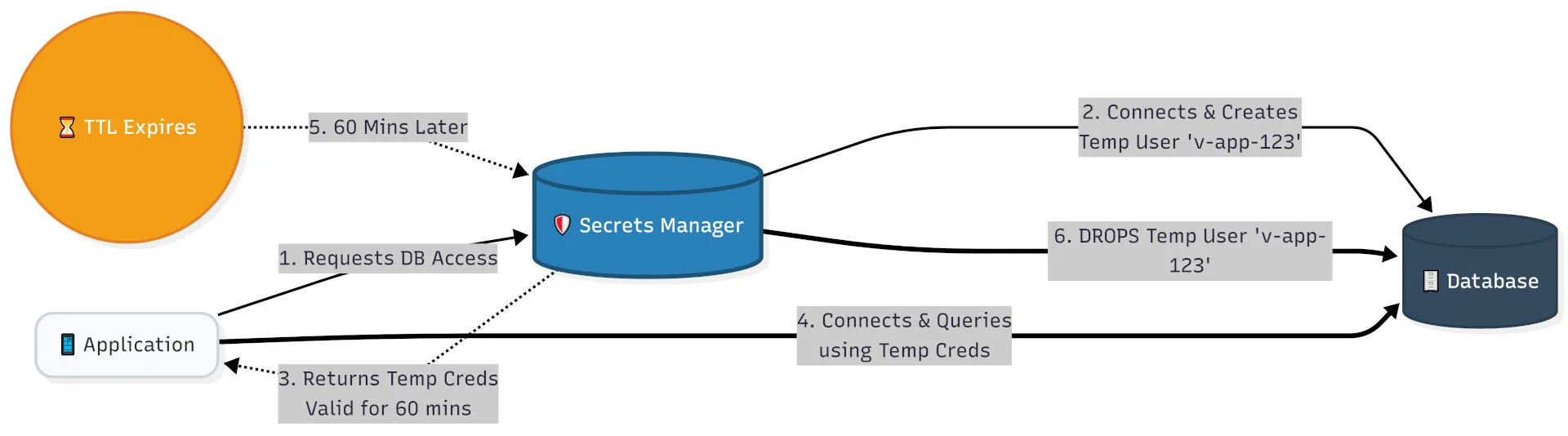
Dynamic secrets are the gold standard. Instead of a static password that lives forever, your application requests a credential that:
- Is generated on-demand, uniquely for that request
- Expires automatically after a short TTL (e.g., 15 minutes or 1 hour)
- Is automatically revoked when no longer needed
How Dynamic Secrets Work
Application                HashiCorp Vault             Database
    │                            │                         │
    │─── "I need DB access" ────►│                         │
    │    (authenticated request)  │                         │
    │                            │──── CREATE ROLE ───────►│
    │                            │     username: v-app-abc  │
    │                            │     password: xK9!mPq2   │
    │                            │     TTL: 60 minutes      │
    │◄── Returns temp credential─│◄─── OK ─────────────────│
    │                            │                         │
    │──────────────────── Connects to DB using temp creds ►│
    │                            │                         │
    │                    [60 minutes later]                │
    │                            │──── DROP ROLE ─────────►│
    │                            │     username: v-app-abc  │
    │                            │◄─── OK ─────────────────│
    │                            │  (credential auto-expired)
Requesting a dynamic DB credential from Vault (Python)
import hvac
import psycopg2

# Authenticate to Vault (using AWS IAM auth in production)
client = hvac.Client(url='https://vault.company.com:8200')
client.auth.aws.iam_login(role='my-app-role')

# Request a dynamic, short-lived database credential
db_creds = client.secrets.database.generate_credentials(name='my-role')
username = db_creds['data']['username']  # e.g., v-app-1684932847-abc123
password = db_creds['data']['password']  # e.g., A-xK9!mPq2-xyz789
lease_id = db_creds['lease_id']

# Connect with the ephemeral credential
conn = psycopg2.connect(
    host="prod-db.company.com",
    user=username,
    password=password,
    dbname="customers"
)

# ... do database work ...

# Explicitly revoke credential when done (optional — it expires anyway)
client.sys.revoke_lease(lease_id=lease_id)
Why this is transformative:
- Stolen credential? Useless — it expired in an hour
- Breach investigation? Every credential is unique per request — full attribution
- No rotation policy needed — credentials literally cannot become stale
Encrypt Data at Rest and in Transit
A secrets manager is only as secure as its encryption. Ensure:
- At rest: All stored secrets use AES-256 encryption (industry standard)
- In transit: All API calls to fetch secrets use TLS 1.2+ (enforce HTTPS)
- Key management: The encryption keys themselves are protected by Hardware Security Modules (HSMs) where possible
Verifying TLS is enforced in Vault (HCL config)
# vault.hcl — server configuration
listener "tcp" {
  address       = "0.0.0.0:8200"
  tls_cert_file = "/etc/vault/tls/vault.crt"
  tls_key_file  = "/etc/vault/tls/vault.key"
  tls_min_version = "tls12"           # Enforce TLS 1.2 minimum
  tls_cipher_suites = "TLS_ECDHE_RSA_WITH_AES_256_GCM_SHA384"
}

seal "awskms" {
  region     = "us-east-1"
  kms_key_id = "arn:aws:kms:us-east-1:123456789012:key/mrk-abc123"  # HSM-backed key
}
Enforcing HTTPS for API secret fetches (Python example with cert verification)
import requests

# GOOD: Certificate verification enabled by default
response = requests.get(
    "https://vault.company.com:8200/v1/secret/data/myapp",
    headers={"X-Vault-Token": os.environ["VAULT_TOKEN"]},
    verify=True,    # ✅ Always verify TLS certificate (default: True)
    timeout=5
)

# BAD: Never do this in production
# response = requests.get(..., verify=False)  # ❌ Disables TLS verification
Kubernetes: Encrypting etcd Secrets at Rest
# encryption-config.yaml — for Kubernetes control plane
apiVersion: apiserver.config.k8s.io/v1
kind: EncryptionConfiguration
resources:
  - resources:
      - secrets
    providers:
      - aescbc:
          keys:
            - name: key1
              secret: <base64-encoded-32-byte-key> # AES-256
      - identity: {} # Fallback for unencrypted secrets (migrate away from this)
Implement Continuous Auditing and Alerting
You cannot respond to a breach you don’t know about. Every interaction with a secret should be logged, and anomalies should trigger alerts.
What to log for every secret access event
{
  "timestamp": "2026-06-07T14:32:01Z",
  "event_type": "secret_read",
  "secret_path": "secret/data/prod/backend/database",
  "actor": {
    "type": "service_account",
    "identity": "backend-app-prod",
    "aws_account": "123456789012",
    "assumed_role": "arn:aws:iam::123456789012:role/backend-app-role"
  },
  "source_ip": "10.0.1.45",
  "success": true,
  "lease_id": "secret/data/prod/backend/database/abc123xyz"
}
Setting up a Vault audit log
# Enable file-based audit logging in Vault
vault audit enable file file_path=/var/log/vault/audit.log

# Enable syslog output (for SIEM integration)
vault audit enable syslog tag="vault" facility="AUTH"
CloudWatch Alert for Anomalous Secret Access (Terraform)
resource "aws_cloudwatch_metric_alarm" "unusual_secret_access" {
  alarm_name          = "UnusualSecretsManagerAccess"
  comparison_operator = "GreaterThanThreshold"
  evaluation_periods  = "1"
  metric_name         = "ResourceAccessDenied"
  namespace           = "CloudTrail"
  period              = "300"   # Check every 5 minutes
  statistic           = "Sum"
  threshold           = "5"     # Alert if >5 denied access attempts in 5 min

  alarm_actions = [aws_sns_topic.security_alerts.arn]

  dimensions = {
    EventSource = "secretsmanager.amazonaws.com"
  }
}
Alerts to configure:
- Secret accessed from an IP not in your allowlist
- Application accessing a secret it has never touched before
- More than N secret reads in a short window (potential exfiltration)
- Failed authentication attempts to your secrets manager
- Secret accessed outside of business hours (for sensitive secrets)
Shift Left: Integrate Secret Scanning
The best time to catch a hardcoded secret is before it’s committed. The second best time is before it’s merged. Never after it’s deployed.
Pre-commit hook with GitLeaks (recommended)
GitLeaks is currently the industry-favorite pre-commit secret scanner: actively maintained, fast, zero dependencies, and works across any language or framework.
# Install GitLeaks
brew install gitleaks          # macOS
# or
curl -sSL https://github.com/gitleaks/gitleaks/releases/latest/download/gitleaks_linux_x64.tar.gz | tar xz
sudo mv gitleaks /usr/local/bin/

# Install pre-commit framework
pip install pre-commit
# .pre-commit-config.yaml — GitLeaks as primary scanner
repos:
- repo: https://github.com/gitleaks/gitleaks
rev: v8.18.2 # Pin to a specific release
hooks:
- id: gitleaks
name: Detect hardcoded secrets
description: Detect secrets with GitLeaks
entry: gitleaks protect --staged --redact -v
language: golang
pass_filenames: false# Install the hooks into your local repo
pre-commit install
# Test it manually
pre-commit run --all-filesNote on detect-secrets: Yelp’s
detect-secretsis a solid baseline-based scanner still worth knowing. However, its upstream maintenance has been inconsistent. If you prefer a baseline-based workflow (where you explicitly acknowledge known false positives rather than allowlisting by regex), it remains a valid option — IBM maintains an actively updated fork. For most teams, GitLeaks is the simpler, faster default.
GitHub Actions: TruffleHog Secret Scanning on Every PR
# .github/workflows/secret-scan.yml
name: Secret Scanning

on:
  pull_request:
    branches: [main, staging]
  push:
    branches: [main]

jobs:
  trufflehog:
    runs-on: ubuntu-latest
    steps:
      - name: Checkout code
        uses: actions/checkout@v4
        with:
          fetch-depth: 0 # Full history for thorough scanning

      - name: TruffleHog Scan
        uses: trufflesecurity/trufflehog@main
        with:
          path: ./
          base: ${{ github.event.repository.default_branch }}
          head: HEAD
          extra_args: --debug --only-verified # Only flag verified live secrets
GitLeaks configuration (alternative scanner)
# .gitleaks.toml
[extend]
  useDefault = true    # Include GitLeaks' built-in ruleset

[[rules]]
  id = "custom-internal-api-key"
  description = "Internal API Key"
  regex = '''INTERNAL-[A-Z0-9]{32}'''
  tags = ["key", "internal"]

[allowlist]
  description = "Global allowlist"
  paths = [
    '''.secrets.baseline''',
    '''tests/fixtures/''',    # Allow test fixtures with dummy values
  ]
  regexes = [
    '''EXAMPLE_KEY_DO_NOT_USE''',   # Known placeholder patterns
  ]
Integrating Secrets Management into CI/CD
Your CI/CD pipeline is one of the highest-value targets for attackers. Build servers hold credentials to deploy to production, push Docker images, and access cloud accounts. They are the keys to the kingdom.
Common CI/CD Secret Anti-Patterns
# ❌ BAD: Secret echoed in build log
- name: Deploy
  run: |
    echo "Deploying with key: ${{ secrets.AWS_SECRET_KEY }}"   # Now visible in logs!
    aws deploy ...

# ❌ BAD: Secret in workflow file
env:
  DATABASE_URL: "postgres://admin:password123@prod-db:5432/myapp"  # Committed to repo!
Best Practices for Pipelines
Use OIDC Instead of Long-Lived Cloud Credentials
OIDC (OpenID Connect) lets your CI/CD pipeline authenticate to cloud providers without storing any credentials at all. The pipeline proves its identity via a short-lived JWT token.
# .github/workflows/deploy.yml
name: Deploy to AWS

permissions:
  id-token: write # Required for OIDC
  contents: read

jobs:
  deploy:
    runs-on: ubuntu-latest
    steps:
      - uses: actions/checkout@v4

      - name: Configure AWS credentials via OIDC
        uses: aws-actions/configure-aws-credentials@v4
        with:
          role-to-assume: arn:aws:iam::123456789012:role/github-actions-deploy
          aws-region: us-east-1
          # No AWS_ACCESS_KEY_ID or AWS_SECRET_ACCESS_KEY needed!

      - name: Deploy
        run: aws s3 sync ./dist s3://my-production-bucket/
Inject Secrets from Vault at Runtime
# .github/workflows/test.yml — fetching secrets from Vault
jobs:
  test:
    runs-on: ubuntu-latest
    steps:
      - uses: actions/checkout@v4

      - name: Import secrets from HashiCorp Vault
        uses: hashicorp/vault-action@v3
        with:
          url: https://vault.company.com:8200
          method: jwt
          role: github-actions
          secrets: |
            secret/data/prod/database password | DB_PASSWORD ;
            secret/data/prod/stripe secret_key | STRIPE_SECRET_KEY ;

      - name: Run tests
        run: pytest
        env:
          DB_PASSWORD: ${{ env.DB_PASSWORD }} # Injected from Vault
          STRIPE_SECRET_KEY: ${{ env.STRIPE_SECRET_KEY }}
Masking Secrets in GitLab CI
# .gitlab-ci.yml
deploy:
  stage: deploy
  script:
    - echo "Deploying to production"
    # GitLab automatically masks variables marked as "masked" in CI/CD settings
    - ./deploy.sh # $DEPLOY_TOKEN is available but will never appear in logs
  environment:
    name: production
Kubernetes: External Secrets Operator
Rather than storing secrets in Kubernetes etcd (even encrypted), pull them dynamically from your secrets manager:
# external-secret.yaml — syncs AWS Secrets Manager → Kubernetes Secret
apiVersion: external-secrets.io/v1beta1
kind: ExternalSecret
metadata:
  name: backend-app-secret
  namespace: production
spec:
  refreshInterval: 1h # Sync every hour
  secretStoreRef:
    name: aws-secretsmanager
    kind: ClusterSecretStore
  target:
    name: backend-app-secret # Creates this Kubernetes Secret
    creationPolicy: Owner
  data:
    - secretKey: db-password # Key in the K8s secret
      remoteRef:
        key: prod/backend-app/database # Path in AWS Secrets Manager
        property: password
Beyond Secrets: Advanced Architectural Patterns
Once you’ve mastered the core best practices, the next frontier is architecting systems that reduce your dependence on secrets altogether.
Workload Identity with SPIFFE/SPIRE
OIDC solves the “no long-lived credentials in CI/CD” problem. For service-to-service communication inside your infrastructure — microservice A calling microservice B — the equivalent solution is Workload Identity.
SPIFFE (Secure Production Identity Framework for Everyone) and its reference implementation SPIRE allow every workload (container, VM, Lambda function) to receive a cryptographically verifiable identity at runtime. Services authenticate to each other using mTLS with short-lived X.509 certificates — no shared passwords, no API keys, no secrets to rotate.
Without Workload Identity (secret-based):           With SPIFFE/SPIRE (secretless):
───────────────────────────────────────             ──────────────────────────────────────
Service A ──── "password=abc123" ───► Service B     Service A ──── mTLS (SVID cert) ──► Service B
               ↑ Must be stored,                                   ↑ Auto-issued by SPIRE,
                 rotated, protected                                  expires in minutes,
                                                                    cryptographically verified
# SPIRE Agent config — issues SVIDs to local workloads
agent:
trust_domain: "example.org"
server_address: "spire-server"
server_port: 8081
plugins:
WorkloadAttestor:
- k8s:
skip_kubelet_verification: false
# Each workload gets a SPIFFE Verifiable Identity Document (SVID):
# spiffe://example.org/ns/production/sa/payment-serviceThis is the secretless architecture end-state: services prove who they are through cryptographic identity rather than shared credentials. Service meshes like Istio and Linkerd implement this pattern by default.
Scoped and Restricted API Tokens
When static API keys are unavoidable (third-party integrations, webhook endpoints), ensure they are as restricted as technically possible:
❌ Global Admin Key                    ✅ Scoped, Restricted Key
─────────────────────────────────      ─────────────────────────────────────────
Permissions: ALL                       Permissions: read:inventory ONLY
IP restriction: None                   IP restriction: 10.0.0.0/8 (internal only)
Expiry: Never                          Expiry: 90 days, auto-rotated
Rate limit: None                       Rate limit: 1000 req/day
Environment: All                       Environment: Production only
Many modern platforms support fine-grained tokens:
# GitHub: Create a fine-grained personal access token
# (Scoped to specific repos, specific permissions, expiry date)
# → Settings > Developer settings > Fine-grained personal access tokens

# Stripe: Use restricted API keys
# → Dashboard > Developers > API keys > Create restricted key
# Only grant the permissions your integration actually needs:
# - charges: read
# - customers: read/write
# - refunds: write
# (NOT "Full access")

# AWS: Use temporary STS credentials with a session policy
aws sts assume-role \
  --role-arn arn:aws:iam::123456789012:role/limited-deploy-role \
  --role-session-name my-session \
  --duration-seconds 900 \  # 15-minute credential, not permanent
  --policy '{"Version":"2012-10-17","Statement":[{"Effect":"Allow","Action":["s3:PutObject"],"Resource":"arn:aws:s3:::my-bucket/*"}]}'
Top Tools: Beginner to Advanced
Beginner-Friendly Tools
These tools are designed to get you out of .env files and into proper secrets management with minimal friction.
Doppler
- Best for: Startups, small teams, developer experience
- What it does: A secrets platform with a CLI that syncs secrets to your local environment, Docker, CI/CD, and cloud platforms
- Difficulty: ⭐ Easy
# Install Doppler CLI
brew install dopplerhq/cli/doppler

# Login and setup
doppler login
doppler setup  # Select your project and config

# Run your app with secrets injected automatically
doppler run -- node server.js

# Or export as environment variables
doppler secrets download --no-file --format=env > .env.local
Infisical
- Best for: Open-source alternative to Doppler; teams wanting self-hosting
- What it does: End-to-end encrypted secrets management with a great UI, CLI, and SDK support
- Difficulty: ⭐ Easy
# Install CLI
npm install -g @infisical/cli

# Login
infisical login

# Inject secrets when running your app
infisical run --env=prod -- python app.py

# Fetch specific secrets in your code (Python SDK)
from infisical_sdk import InfisicalSDKClient

client = InfisicalSDKClient(host="https://app.infisical.com")
client.auth.universal_auth.login(
    client_id="YOUR_CLIENT_ID",
    client_secret="YOUR_CLIENT_SECRET"
)

secret = client.secrets.get_secret_by_name(
    secret_name="DB_PASSWORD",
    project_id="YOUR_PROJECT_ID",
    environment_slug="prod",
    secret_path="/"
)
print(secret.secretValue)
1Password Secrets Automation
- Best for: Teams already using 1Password for password management
- What it does: Extends 1Password into developer workflows with a CLI and SDK
- Difficulty: ⭐⭐ Easy-Medium
# Use 1Password CLI to inject secrets
op run --env-file=".env.template" -- node server.js

# .env.template references 1Password items
DB_PASSWORD=op://Production/Database/password
STRIPE_KEY=op://Production/Stripe/secret_key
Intermediate Tools
AWS Secrets Manager
- Best for: Teams already on AWS
- What it does: Native AWS secrets storage with automatic rotation, fine-grained IAM, and deep integration with RDS, Lambda, ECS, etc.
- Difficulty: ⭐⭐ Medium
# Python: fetch and cache a secret
import boto3
import json
from functools import lru_cache

@lru_cache(maxsize=None)
def get_secret(secret_name: str) -> dict:
    client = boto3.client("secretsmanager", region_name="us-east-1")
    response = client.get_secret_value(SecretId=secret_name)
    return json.loads(response["SecretString"])
Azure Key Vault
- Best for: Teams on Azure / Microsoft ecosystem
- What it does: Stores keys, secrets, and certificates; integrates with Azure AD for identity-based access
# Python: Azure Key Vault
from azure.identity import DefaultAzureCredential
from azure.keyvault.secrets import SecretClient

credential = DefaultAzureCredential()
client = SecretClient(
    vault_url="https://my-key-vault.vault.azure.net/",
    credential=credential
)

secret = client.get_secret("DatabasePassword")
print(secret.value)
Google Cloud Secret Manager
- Best for: Teams on GCP
- What it does: Simple, fully-managed secrets service with IAM integration and versioning
# Python: Google Cloud Secret Manager
from google.cloud import secretmanager

client = secretmanager.SecretManagerServiceClient()
name = "projects/my-project/secrets/db-password/versions/latest"

response = client.access_secret_version(request={"name": name})
password = response.payload.data.decode("UTF-8")
Advanced / Enterprise Tools
HashiCorp Vault (Source-Available + Enterprise)
- Best for: Large teams, multi-cloud, dynamic secrets, zero-trust architecture
- What it does: The most powerful and flexible secrets platform available. Supports 50+ secret backends, dynamic credentials, PKI, SSH certificate management, and more
- Difficulty: ⭐⭐⭐⭐ Advanced
- License note: As of late 2023, HashiCorp switched Vault from an open-source (MPL 2.0) license to the Business Source License (BSL). This means it is source-available but no longer OSI-approved open-source. Teams that specifically require a true open-source license should evaluate OpenBao, a Linux Foundation fork of Vault that maintains an OSI-approved MPL 2.0 license and is API-compatible with Vault.
# Production-grade Vault setup (Docker Compose snippet)
version: '3.8'
services:
  vault:
    image: hashicorp/vault:1.17
    command: server
    volumes:
      - ./vault-config:/vault/config
      - vault-data:/vault/data
    environment:
      VAULT_ADDR: "https://0.0.0.0:8200"
    ports:
      - "8200:8200"
    cap_add:
      - IPC_LOCK   # Prevents vault memory from being swapped to disk

volumes:
  vault-data:
# vault-config/vault.hcl
storage "raft" {
path = "/vault/data"
node_id = "node1"
}
listener "tcp" {
address = "0.0.0.0:8200"
tls_cert_file = "/vault/tls/vault.crt"
tls_key_file = "/vault/tls/vault.key"
}
api_addr = "https://vault.company.com:8200"
cluster_addr = "https://vault.company.com:8201"
ui = true
# Auto-unseal using AWS KMS
seal "awskms" {
region = "us-east-1"
kms_key_id = "alias/vault-unseal-key"
}CyberArk Conjur
- Best for: Enterprise compliance-driven environments (banking, healthcare)
- What it does: Machine identity-based secrets management with deep PAM (Privileged Access Management) capabilities and compliance reporting
- Difficulty: ⭐⭐⭐⭐⭐ Enterprise
Kubernetes Secrets Store CSI Driver
- Best for: Kubernetes-native workloads needing secrets from external stores
- What it does: Mounts secrets from Vault, AWS, Azure, or GCP directly into Kubernetes pods as volumes — no SDK required in application code
# secretproviderclass.yaml
apiVersion: secrets-store.csi.x-k8s.io/v1
kind: SecretProviderClass
metadata:
  name: app-secrets
spec:
  provider: aws
  parameters:
    objects: |
      - objectName: "prod/myapp/database"
        objectType: "secretsmanager"
        jmesPath:
          - path: "password"
            objectAlias: "db-password"
---
# pod.yaml
spec:
  containers:
    - name: app
      volumeMounts:
        - name: secrets-store
          mountPath: "/mnt/secrets"
          readOnly: true
  volumes:
    - name: secrets-store
      csi:
        driver: secrets-store.csi.k8s.io
        readOnly: true
        volumeAttributes:
          secretProviderClass: "app-secrets"
# Secrets are now available at /mnt/secrets/db-password — no SDK, no env vars!
Secret Scanners
These tools scan your codebase and git history for exposed secrets.
| Tool | Best For | Open Source | CI/CD Integration |
|---|---|---|---|
| TruffleHog | Deep git history scanning, verified secrets | ✅ | ✅ |
| GitLeaks | Fast pre-commit and CI scanning | ✅ | ✅ |
| GitGuardian | Real-time monitoring, public repo scanning | Partially | ✅ |
| GitHub Advanced Security | GitHub-native secret scanning | ❌ (paid) | ✅ Built-in |
| detect-secrets (Yelp) | Baseline-based pre-commit scanning | ✅ | ✅ |
| Semgrep | Custom rule-based code scanning | ✅ | ✅ |
TruffleHog: Scan an entire git history
# Install
brew install trufflesecurity/trufflehog/trufflehog

# Scan local repository (full git history)
trufflehog git file://. --since-commit HEAD~50 --only-verified

# Scan a GitHub repository
trufflehog github --org=myorg --only-verified

# Output in JSON for SIEM integration
trufflehog git file://. --json | jq '.SourceMetadata.Data.Git.commit'
GitLeaks: Pre-commit and CI scanning
# Install
brew install gitleaks

# Scan staged changes (pre-commit)
gitleaks protect --staged

# Scan entire repository history
gitleaks detect --source . --report-path gitleaks-report.json

# Example output when a secret is found:
# ○
#     │╲
#     │ ○
#     ○ ░
#     ░    gitleaks
#
# Finding:     AWS Access Key found
# Secret:      AKIAIOSFODNN7EXAMPLE
# RuleID:      aws-access-key-id
# Entropy:     3.88
# File:        config/aws.py
# Line:        14
# Commit:      a1b2c3d4e5f6...
# Author:      Dev Dev <dev@company.com>
# Date:        2026-06-01T09:00:00Z
Conclusion
Secrets management is one of those disciplines that feels abstract until the moment it isn’t — until a credential leaks, a breach occurs, or a compliance audit reveals sprawl you didn’t know you had.
The good news: the path forward is clear, and you don’t have to implement everything at once.
Start here if you’re a beginner:
- Add
.envto your.gitignoreimmediately - Install a pre-commit secret scanner (detect-secrets or GitLeaks) today
- Sign up for Doppler or Infisical and migrate your team’s
.envfiles this week
Scale up as you grow:
- Move to a cloud-native secrets manager (AWS Secrets Manager, Azure Key Vault, GCP Secret Manager)
- Implement RBAC and least-privilege access policies
- Enable automated secret rotation for all database credentials
- Integrate TruffleHog or GitGuardian into your CI/CD pipeline
Go enterprise when you’re ready:
- Deploy HashiCorp Vault for dynamic secrets and multi-cloud
- Implement OIDC for all CI/CD pipeline cloud authentication
- Build a full audit and alerting pipeline into your SIEM
- Adopt the Kubernetes Secrets Store CSI Driver for pod-native secret injection
The key insight: Secrets management is not a one-time project. It’s an ongoing security posture. Credentials rotate, services are decommissioned, teams change. The systems you build to manage secrets today need to be as automated and auditable as your production infrastructure itself.
The tools exist. The best practices are proven. The only thing standing between your organization and a credential leak is the decision to start.
What secrets management tools or practices does your team use? What’s been the hardest part of your journey? The comments are open.
Further Reading