RhodeCode: A Secure, Behind-the-Firewall Code Management
Table of Contents
- Key Features at a Glance
- Community vs. Enterprise Edition
- What’s New in 2025–2026
- The RhodeCode Philosophy: Who Is It For?
- GitHub vs. RhodeCode: A Quick Comparison
- Pros and Cons
- How RhodeCode Works: A Technical Overview
- Installation with RCstack
- Performance and Scaling
- Using the REST API
- Setting Up Permissions Programmatically
- Integrating with CI/CD
- AI-Assisted Code Review
- Migrating to RhodeCode
- Use Cases and Real-World Applications
- Getting Started & Further Reading
- FAQ
- Conclusion
In 2026, regulatory pressure, legacy modernization mandates, and tightening IP security policies have made one question more urgent than ever: where does your source code actually live, and who can truly access it? RhodeCode answers that question with a platform engineered for a single, critical purpose: secure, compliant, and centralized version control for the enterprise — entirely behind your own firewall.
RhodeCode is a self-hosted platform that uniquely offers first-class, unified support for Git, Subversion (SVN), and Mercurial (Hg). Whether you’re running cutting-edge microservices or decade-old SVN monorepos, RhodeCode brings them under one roof with consistent access control, audit trails, and code review — without a single byte leaving your network.
Key Features at a Glance
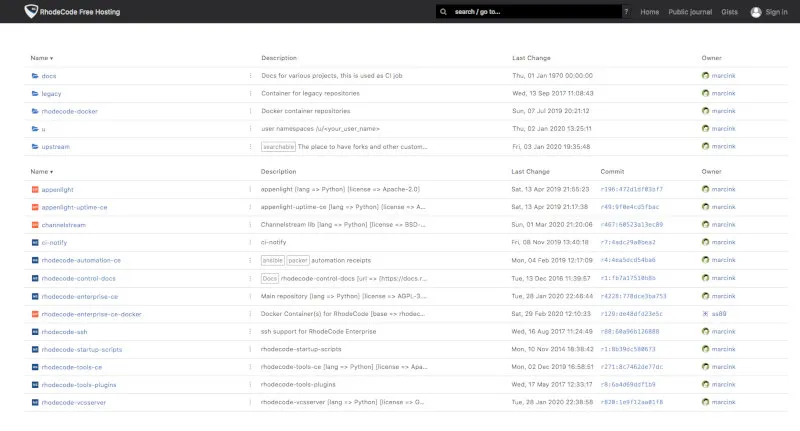
RhodeCode’s feature set is tailored for enterprise-grade control, security, and governance over source code assets.
| Feature | Description | Key Benefit |
|---|---|---|
| Unified VCS Hosting | Provides a single web interface and API to manage Git, SVN, and Mercurial repositories seamlessly. | Eliminates tool sprawl by centralizing all of a company’s code, whether legacy or modern, into one manageable platform. |
| Advanced Permission Management | Offers an extremely granular, role-based permission system that can be applied to users, groups, repositories, and even specific branches or files. | Enables enterprises to enforce strict “need-to-know” access policies, protecting sensitive IP and ensuring compliance. |
| Enterprise Security & Compliance | Built for high-security environments with features like full audit logs, integration with LDAP/Active Directory, and IP restrictions. | Meets the stringent security and regulatory requirements of industries like finance, defense, and healthcare. |
| Integrated Code Review | A powerful code review tool (pull/merge requests) that works consistently across Git, SVN, and Mercurial. | Provides a unified and high-quality code review process for all teams, regardless of their preferred version control system. |
| AI-Assisted Code Review | Connect to ChatGPT, Gemini, Claude, or a custom AI model to automatically analyze pull requests across all supported VCSs. | Accelerates reviews, catches security issues early, and enforces quality standards without slowing teams down. |
| Secret Scanning | On-demand scanning of repositories for accidentally committed credentials, API keys, and secrets. | Proactively prevents credential leaks before they reach production. |
| Full-Text Code Search | Integrated Elasticsearch-backed code indexing enables searching across all repository content, commit messages, and file paths. | Developers can find any snippet or function across thousands of repositories in seconds, without local clones. |
| Large File Support | Native support for Git LFS and Mercurial Largefiles for managing binary assets and large media files. | Game studios, hardware teams, and data science orgs can version large assets without bloating the main repository. |
| Webhooks & Extensive API | Rich webhook system plus a JSON-RPC API covering all admin and repo operations; SDK available for Python. | Automates provisioning, CI/CD triggers, and third-party tool integration with minimal glue code. |
| RCstack Docker Installer | A purpose-built Docker-based installer that manages the entire RhodeCode stack including routing, metrics, and scaling. | Dramatically simplifies installation, upgrade, and multi-node management with zero-downtime deploys. |
Community vs. Enterprise Edition
RhodeCode is available in two editions. The Community Edition (CE) is free and open source; the Enterprise Edition (EE) adds the features most critical for regulated and large-scale environments.
| Capability | Community (CE) | Enterprise (EE) |
|---|---|---|
| Git, SVN, Mercurial hosting | ✅ | ✅ |
| Basic code review (pull requests) | ✅ | ✅ |
| LDAP / Active Directory auth | ✅ | ✅ |
| JSON-RPC API | ✅ | ✅ |
| RCstack installer | ✅ | ✅ |
| Branch-level permissions | ❌ | ✅ |
| AI-assisted code review | ❌ | ✅ |
| Secret scanning | ❌ | ✅ |
| Full-text code search (Elastic) | ❌ | ✅ |
| Audit log export | ❌ | ✅ |
| Priority support & SLA | ❌ | ✅ |
| RhodeCode Cloud (managed hosting) | ❌ | ✅ |
For full pricing details, see rhodecode.com/pricing.
What’s New in 2025–2026
RhodeCode has seen significant investment in new capabilities since 5.4.0. The platform now ships at v5.9.x (stable as of mid-2026), with notable improvements in UI/UX polish, large-repository performance, squash merge support, and further AI refinements. Here are the most important updates for teams evaluating or upgrading the platform.
RhodeCode Cloud: Managed Hosting (New in 2026)
The most significant strategic change is the launch of RhodeCode Cloud — a fully managed, Enterprise Edition hosting option. This fills a long-standing gap for teams that want RhodeCode’s security model and multi-VCS support without the operational overhead of self-hosting. RhodeCode Cloud is provisioned in isolated, single-tenant environments, so your data remains segregated. It is not a shared SaaS product.
This makes RhodeCode a real choice for mid-sized teams that previously ruled it out due to the self-hosting requirement.
AI-Assisted Code Review (December 2025, refined in 5.9.x)
The most prominent new feature is AI-powered code review, released in December 2025 and refined through subsequent releases. Enterprise users can now connect RhodeCode to an AI provider of their choice — including OpenAI (ChatGPT), Google Gemini, Anthropic’s Claude, or a self-hosted model — and have it automatically analyze pull requests across all supported VCSs (Git, SVN, and Mercurial). The AI reviewer fully respects existing access control rules, generates contextual inline comments on diffs, and can be customized with per-project prompts. See the official RhodeCode blog for details.
Secret Scanning (v5.4.0, January 2025)
Version 5.4.0 introduced on-demand secret scanning. Admins can trigger a background scan of the main branch for accidentally committed sensitive data such as passwords, API keys, and private tokens. When the scan completes, an admin notification is delivered with a summary of findings. Subsequent releases have added scheduled scans and improved rule configurability.
Post-5.4 Highlights (v5.5–v5.9)
- UI/UX improvements: Refreshed diff viewer, improved pull request timeline, and faster page loads across the board.
- Performance for large repositories: Significantly reduced memory usage during diff generation and blame operations on large monorepos.
- Squash merge support: Pull requests can now be merged with a single squashed commit, keeping main-branch history clean.
- RCstack improvements: Mixed encoding support for legacy repositories, improved
remapandrescantooling, and better multi-node coordination. - Further AI refinements: Per-repository AI prompt overrides, AI review history in the audit log, and support for OpenAI-compatible self-hosted models.
The RhodeCode Philosophy: Who Is It For?
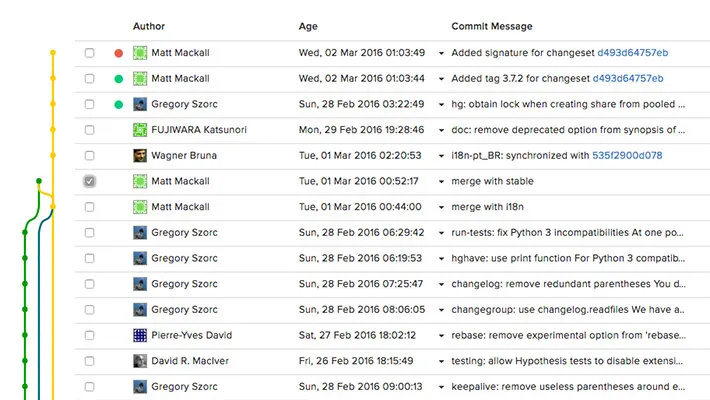
The philosophy of RhodeCode is centered on centralization, security, and control. It is designed for organizations where source code is a critical, high-value asset that must be protected and managed with surgical precision.
This makes it the ideal choice for:
Highly Regulated Industries: Finance, government, and healthcare organizations that require auditable, on-premise solutions to meet compliance standards.
Companies with Mixed VCS Environments: An organization with active SVN or Mercurial projects that is transitioning to or also using Git can unify its entire workflow.
IP-Sensitive Businesses: Semiconductor designers, game developers, and research firms that cannot risk their source code leaving their own network.
Large Enterprises Needing Granular Control: Teams that need to enforce complex access rules that go far beyond the standard permissions of other platforms.
If your mantra is “our code never leaves our network, and we control exactly who can touch what,” RhodeCode is built for you.
GitHub vs. RhodeCode: A Quick Comparison
The differences between GitHub and RhodeCode clearly illustrate their different target markets and design goals.
| Aspect | GitHub | RhodeCode |
|---|---|---|
| Primary Focus | Community, Open Source, Developer Experience | Enterprise Security, Compliance, Multi-VCS Unification |
| Hosting Options | Cloud (SaaS) and Self-hosted (Enterprise) | Self-hosted (CE & EE) + RhodeCode Cloud (EE, new in 2026) |
| Version Control | Git only | Git, Subversion (SVN), and Mercurial (Hg) |
| Security Model | Robust user/team permissions | Highly granular, rule-based permission system |
| AI Code Review | GitHub Copilot (add-on, GitHub-hosted) | Bring-your-own model (ChatGPT, Gemini, Claude, custom) |
| CI/CD | GitHub Actions (built-in) | External integrations (Jenkins, TeamCity, webhooks) |
| Secret Scanning | Available on GitHub Advanced Security | On-demand scanning built in (v5.4.0+) |
| Pricing | SaaS tiers (Free/Team/Enterprise) + self-hosted | CE free & open source; EE per-user licensing + support |
| Scalability | GitHub-managed (SaaS) or self-managed | RCstack multi-node, horizontal scaling, built-in metrics |
Pros and Cons
Why You Might Choose RhodeCode
Exceptional Multi-VCS Support: This is RhodeCode’s killer feature. Its ability to manage Git, SVN, and Hg in a unified way is unmatched and a lifesaver for organizations with legacy systems.
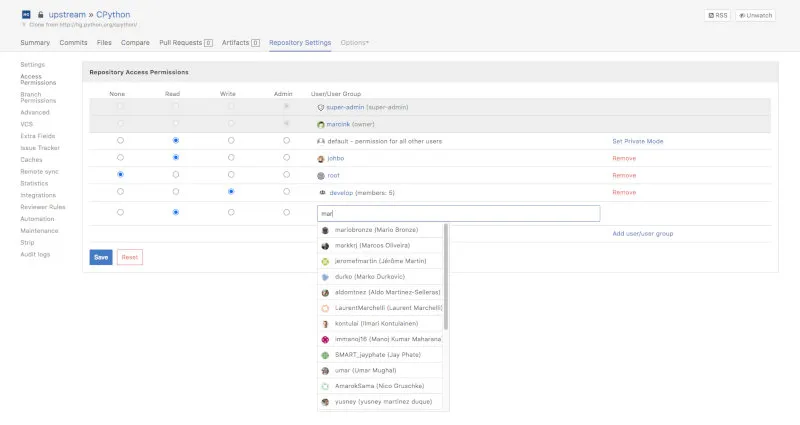
Best-in-Class Permission System: The fine-grained control over who can see and modify what part of a codebase is a critical differentiator for security-focused enterprises.
Full On-Premise Control: Being self-hosted means you have complete authority over your hardware, data, security protocols, and uptime.
Flexible AI Code Review: Rather than locking you into a single vendor, RhodeCode lets you connect to the AI model that fits your compliance requirements — including self-hosted models for air-gapped environments.
Python-Based and Extensible: The platform is built on Python, making it familiar to many operations teams, and it offers a robust API for integrations.
Zero-Downtime Upgrades: With RCstack, upgrades are performed with a rolling node strategy, so production traffic is never interrupted.
Potential Drawbacks
No Integrated CI/CD: RhodeCode focuses on source code management and review. For CI/CD, you must integrate it with external tools like Jenkins or TeamCity, which adds a layer of complexity.
Hosting Overhead (Self-Hosted): The Community and Enterprise self-hosted editions place the full burden of installation, maintenance, updates, and backups on your team. RhodeCode Cloud now removes this barrier for EE customers, but CE remains self-hosted only.
Smaller Ecosystem: You won’t find the vast marketplace of apps and community integrations that surrounds platforms like GitHub or GitLab.
Niche Focus: If you only use Git and don’t require its advanced permission model, its main advantages are lost, and other platforms may offer a more streamlined experience.
UI Polish: The interface has improved meaningfully in v5.5–5.9 with a refreshed diff viewer and faster navigation, but it still lags behind modern SaaS platforms like GitHub in visual polish and discoverability. The learning curve can be steeper for new users coming from GitHub.
How RhodeCode Works: A Technical Overview
RhodeCode operates as a self-hosted web application that centralizes version control system (VCS) management. Built on Python, it runs on your own servers, ensuring data remains within your infrastructure. Here’s how it functions:
Unified Repository Management: RhodeCode provides a single web interface and API to interact with Git, SVN, and Mercurial repositories. It abstracts the differences between these VCSs, allowing users to manage repositories, branches, and commits through a consistent dashboard.
Permission System: Its role-based access control (RBAC) system allows administrators to define permissions at multiple levels — users, groups, repositories, or even specific branches and files. For example, a developer might have write access to a specific branch but only read access to sensitive configuration files.
Code Review Workflow: RhodeCode’s integrated code review system supports pull requests (Git, Mercurial) and equivalent workflows for SVN. Reviewers can comment, approve, or request changes, with all actions logged for auditability.
Security Features: It integrates with LDAP, Active Directory, Crowd, CAS, and PAM for user authentication, and also supports OAuth via Google, GitHub, Bitbucket, and others. It supports IP whitelisting and maintains detailed audit logs for compliance. All data is stored on-premise.
Extensibility: The platform’s Python-based architecture and REST/JSON-RPC API allow integration with tools like Jenkins, Jira, Slack, Redmine, and custom scripts. A full SDK is also available for building deeper integrations.
Installation with RCstack
The current recommended way to install RhodeCode is via RCstack, the Docker-based installer. It provisions the entire stack — including the application, a PostgreSQL database, Redis, Traefik (reverse proxy with SSL), and Prometheus/Grafana for metrics — with a handful of commands.
Minimum requirements: 2 CPU cores and 2 GB RAM for small teams; 4–8 GB RAM recommended for full production use.
Quick Start
# Create a working directory and download the rcstack installer
mkdir docker-rhodecode && cd docker-rhodecode
curl -L -s -o rcstack https://dls.rhodecode.com/get-rcstack && chmod +x rcstack

# Run the guided setup wizard
./rcstack get-started
The get-started command walks you through picking an edition (Community or Enterprise), setting your domain, and configuring SSL. A valid domain name must be set during bootstrap — this can be a local hosts entry like rhodecode.local or a real DNS name pointing to your server IP.
Starting and Managing the Stack
# Start the full stack (router, services, app, metrics)
./rcstack stack up rhodecode

# Start only the metrics stack (Grafana, Prometheus, Loki)
./rcstack stack metrics up -d

# Check running containers
./rcstack stack ps
Zero-Downtime Upgrades
One of RCstack’s standout capabilities is performing upgrades without dropping traffic:
# Update the rcstack installer itself
./rcstack self-update

# Upgrade each component with zero downtime
./rcstack stack-upgrade router
./rcstack stack-upgrade services
./rcstack stack-upgrade rhodecode   # rolling, spawns extra nodes during upgrade
./rcstack stack-upgrade metrics

# Or upgrade everything at once
./rcstack stack-upgrade all
Pinning to a Specific Version
# Install a specific release (example: v5.9.0)
curl -L -s -o rcstack https://dls.rhodecode.com/get/v5.9.0 && chmod +x rcstack
./rcstack self-update --force --cli-revision v5.9.0 --docker-revision v5.9.0
Performance and Scaling
RhodeCode is designed to scale horizontally under RCstack. A single-node deployment handles most small-to-mid-size teams comfortably; larger organizations can add application nodes behind the built-in Traefik load balancer.
Scaling App Nodes
# Scale RhodeCode to 3 application nodes
./rcstack stack scale rhodecode=3

# Verify all nodes are up
./rcstack stack ps
RCstack uses a round-robin strategy by default. Each node is stateless with respect to request handling — shared state lives in PostgreSQL and Redis — so adding nodes is safe at any time.
Built-in Metrics (Prometheus + Grafana)
Once the metrics stack is running, Grafana is available at https://your-rhodecode.com/metrics (access controlled by the admin password set during bootstrap). Pre-built dashboards cover:
- HTTP request throughput and latency per endpoint
- VCS operation counts (clone, push, pull) by repository
- PostgreSQL connection pool and query latency
- Redis cache hit rate
- Node CPU and memory consumption
You can also scrape the metrics endpoint directly for integration with an existing Prometheus setup:
# prometheus.yml snippet
scrape_configs:
  - job_name: "rhodecode"
    static_configs:
      - targets: ["your-rhodecode.com:9100"]
    metrics_path: /metrics
    scheme: https
    bearer_token: "<metrics-bearer-token>"
Sizing Guidelines
| Team Size | Recommended Setup | RAM |
|---|---|---|
| < 20 users | 1 app node, single-node DB | 4 GB |
| 20–100 users | 2 app nodes, managed PostgreSQL | 8 GB |
| 100–500 users | 3–4 app nodes, dedicated DB server | 16 GB |
| 500+ users | 4+ app nodes, HA PostgreSQL, Redis cluster | 32 GB+ |
Using the REST API
RhodeCode exposes a JSON-RPC API at /_admin/api. Every call requires an API Authentication Token, which you create at: Username → My Account → Auth tokens. Always use a dedicated token scoped for API access only.
API Request Structure
All API requests follow the same format — a POST with a JSON body:
curl -X POST https://your-rhodecode.com/_admin/api \
  -H "Content-Type: application/json" \
  -d '{
    "id": 1,
    "api_key": "YOUR_API_TOKEN",
    "method": "get_repo",
    "args": {"repoid": "my-repo"}
  }'
The response always looks like:
{
  "id": 1,
  "result": { ... },
  "error": null
}
Common API Examples
List all repositories:
curl -X POST https://your-rhodecode.com/_admin/api \
  -H "Content-Type: application/json" \
  -d '{
    "id": 1,
    "api_key": "YOUR_API_TOKEN",
    "method": "get_repos",
    "args": {}
  }'
Create a new Git repository:
curl -X POST https://your-rhodecode.com/_admin/api \
  -H "Content-Type: application/json" \
  -d '{
    "id": 2,
    "api_key": "YOUR_API_TOKEN",
    "method": "create_repo",
    "args": {
      "repo_name": "backend/payments-service",
      "repo_type": "git",
      "description": "Payments microservice",
      "private": true
    }
  }'
The repo_name can include / to place the repo inside a group. In the example above, payments-service will be created inside the backend group.
Get recent commits from a repository:
curl -X POST https://your-rhodecode.com/_admin/api \
  -H "Content-Type: application/json" \
  -d '{
    "id": 3,
    "api_key": "YOUR_API_TOKEN",
    "method": "get_repo_changesets",
    "args": {
      "repoid": "backend/payments-service",
      "start_rev": "tip",
      "limit": 10,
      "details": "basic"
    }
  }'
Using the API from Python (with error handling):
import requests
from requests.adapters import HTTPAdapter
from urllib3.util.retry import Retry

RHODECODE_URL = "https://your-rhodecode.com"
API_TOKEN = "YOUR_API_TOKEN"

# Configure a session with automatic retries
session = requests.Session()
retry = Retry(total=3, backoff_factor=0.5, status_forcelist=[500, 502, 503, 504])
session.mount("https://", HTTPAdapter(max_retries=retry))

def rc_api(method: str, **kwargs) -> dict:
    """
    Call the RhodeCode JSON-RPC API.
    Raises RuntimeError on API-level errors, requests.HTTPError on HTTP errors.
    """
    payload = {
        "id": 1,
        "api_key": API_TOKEN,
        "method": method,
        "args": kwargs,
    }
    response = session.post(
        f"{RHODECODE_URL}/_admin/api",
        json=payload,
        timeout=30,
    )
    response.raise_for_status()  # Raise on 4xx/5xx HTTP errors

    data = response.json()
    if data.get("error"):
        raise RuntimeError(f"RhodeCode API error [{method}]: {data['error']}")
    return data["result"]

# List all repos
try:
    repos = rc_api("get_repos")
    for repo in repos:
        print(f"{repo['repo_name']} ({repo['repo_type']})")
except RuntimeError as e:
    print(f"API error: {e}")

# Create a repo
try:
    rc_api(
        "create_repo",
        repo_name="infra/terraform-modules",
        repo_type="git",
        private=True,
        description="Shared Terraform modules"
    )
    print("Repository created successfully.")
except RuntimeError as e:
    print(f"Could not create repo: {e}")
Accessing Raw Content Without Logging In
For CI/CD integration, you can expose raw file or diff access via token-authenticated URLs by whitelisting controllers in rhodecode.ini:
# In rhodecode.ini
api_access_controllers_whitelist =
    RepoCommitsView:repo_commit_raw,
    RepoCommitsView:repo_commit_patch,
    RepoCommitsView:repo_commit_download
Then access raw content with:
# Download a repo archive without web UI login
https://your-rhodecode.com/my-repo/archive/tip.zip?auth_token=<vcs-token>

# Fetch a raw commit diff
https://your-rhodecode.com/my-repo/changeset-diff/<sha>?auth_token=<vcs-token>
Setting Up Permissions Programmatically
One of RhodeCode’s most powerful features is its granular permission system. Here’s how to configure it via the API for a common enterprise scenario: a team of developers who need write access to a feature branch but only read access to the main branch.
import requests

RHODECODE_URL = "https://your-rhodecode.com"
API_TOKEN = "YOUR_API_TOKEN"

def rc_api(method, **kwargs):
    payload = {"id": 1, "api_key": API_TOKEN, "method": method, "args": kwargs}
    r = requests.post(f"{RHODECODE_URL}/_admin/api", json=payload)
    result = r.json()
    if result.get("error"):
        raise RuntimeError(result["error"])
    return result["result"]

# 1. Create a user group for the feature team
rc_api("create_user_group", group_name="team-payments", description="Payments team")

# 2. Add users to the group
for username in ["alice", "bob", "carol"]:
    rc_api("add_user_to_user_group", usergroupid="team-payments", userid=username)

# 3. Grant group read access to the repo at the top level
rc_api(
    "grant_user_group_permission",
    repoid="backend/payments-service",
    usergroupid="team-payments",
    perm="repository.read"
)

# 4. Grant write access only to the feature branch (Enterprise Edition)
# This is done via branch permissions in the web UI or EE API
print("Repo and group permissions configured successfully.")
LDAP Configuration Snippet
For enterprises using Active Directory or LDAP, authentication can be configured in rhodecode.ini:
[app:main]
# LDAP / Active Directory Integration
rhodecode.auth_plugins = egg:rhodecode-enterprise-ce#token,
                         egg:rhodecode-enterprise-ce#ldap

# LDAP server settings
rhodecode.auth_ldap.host = ldap.your-company.com
rhodecode.auth_ldap.port = 389
rhodecode.auth_ldap.dn_user = cn=svc-rhodecode,ou=service-accounts,dc=company,dc=com
rhodecode.auth_ldap.dn_pass = <service-account-password>
rhodecode.auth_ldap.base_dn = ou=employees,dc=company,dc=com
rhodecode.auth_ldap.filter = (&(objectClass=person)(sAMAccountName=%(login)s))
rhodecode.auth_ldap.attr_login = sAMAccountName
rhodecode.auth_ldap.attr_email = mail
rhodecode.auth_ldap.attr_firstname = givenName
rhodecode.auth_ldap.attr_lastname = sn
Integrating with CI/CD
RhodeCode does not include built-in CI/CD, but it integrates cleanly with Jenkins, TeamCity, and any webhook-capable system.
Webhook to Jenkins
In the RhodeCode web UI, navigate to Admin → Integrations → Webhooks and add a push hook. Below is an example of what a Jenkins job trigger webhook looks like:
POST https://jenkins.your-company.com/job/payments-service/build?token=BUILD_TOKENYou can also configure it to pass the branch and commit as parameters using RhodeCode’s template variables:
POST https://jenkins.your-company.com/job/payments-service/buildWithParameters
  ?token=BUILD_TOKEN
  &BRANCH=${branch}
  &COMMIT=${commit_id}
Jenkins Pipeline: Cloning from RhodeCode
In your Jenkinsfile, use a VCS token (not your user password) for secure access:
pipeline {
    agent any
    environment {
        RC_VCS_TOKEN = credentials('rhodecode-vcs-token')
    }
    stages {
        stage('Checkout') {
            steps {
                git(
                    url: "https://${RC_VCS_TOKEN}@your-rhodecode.com/backend/payments-service",
                    branch: env.BRANCH
                )
            }
        }
        stage('Build') {
            steps {
                sh 'make build'
            }
        }
        stage('Test') {
            steps {
                sh 'make test'
            }
        }
    }
}
Git Configuration for SSH Access
After setting up an SSH key in your RhodeCode profile, clone via SSH on port 9022 (the default for RCstack deployments):
# Clone via SSH (note non-standard port)
git clone ssh://git@your-rhodecode.com:9022/backend/payments-service.git

# Configure SSH to use the correct port automatically
# Add to ~/.ssh/config:
Host your-rhodecode.com
    Port 9022
    User git
    IdentityFile ~/.ssh/id_ed25519_rhodecode
AI-Assisted Code Review
Released in December 2025, AI-powered code review is one of RhodeCode’s most significant recent additions. It allows enterprise teams to connect an external AI model and receive automated analysis of pull/merge requests, with all reviews operating within existing access control boundaries.
Supported AI Providers
- OpenAI (ChatGPT / GPT-4o)
- Google Gemini
- Anthropic Claude
- Any custom/self-hosted model with an OpenAI-compatible API
Enabling AI Review (Admin Setup)
Navigate to Admin → Settings → AI Code Review and enter your API key and provider endpoint. Below is an example of the configuration format:
# In rhodecode.ini (Enterprise Edition)
[app:main]
rhodecode.ai_review.enabled = true
rhodecode.ai_review.provider = openai           # openai | gemini | anthropic | custom
rhodecode.ai_review.api_key = sk-...            # your provider key
rhodecode.ai_review.model = gpt-4o             # model name
rhodecode.ai_review.custom_prompt =
    Review this diff for security vulnerabilities, logic errors,
    and adherence to our Python style guide. Be concise.
Triggering an AI Review via the API
curl -X POST https://your-rhodecode.com/_admin/api \
  -H "Content-Type: application/json" \
  -d '{
    "id": 1,
    "api_key": "YOUR_API_TOKEN",
    "method": "trigger_ai_review",
    "args": {
      "repoid": "backend/payments-service",
      "pull_request_id": 42
    }
  }'
The AI will analyze the diff and post inline comments directly on the pull request, visible to all reviewers.
Use Cases and Real-World Applications
RhodeCode shines in scenarios where security, compliance, and multi-VCS support are critical. Here are some practical examples.
Financial Institutions: A bank with legacy SVN repositories for core banking systems and newer Git-based microservices uses RhodeCode to manage both in a single platform. Granular permissions ensure only authorized developers access sensitive financial code, while audit logs support regulatory compliance. Secret scanning prevents credentials from being accidentally committed.
Game Development Studios: A studio developing a AAA game with proprietary code uses RhodeCode to keep all assets on-premise. The permission system restricts junior developers to specific modules, protecting intellectual property like game engine code. Large binary file support (Git LFS, Mercurial Largefiles) handles art assets without straining the VCS. Teams report review cycle times reduced by enabling AI-assisted review for first-pass checks on large pull requests.
Government Agencies: A defense contractor uses RhodeCode to manage Mercurial repositories for legacy projects and Git for new ones. IP restrictions and LDAP integration ensure only cleared personnel access classified codebases. Full audit log export supports compliance reporting for security audits.
Enterprises in Transition: A manufacturing firm transitioning from SVN to Git uses RhodeCode to maintain both systems during the migration. Its unified code review process ensures consistent quality across teams, and the no-downtime RCstack upgrade path prevents disruption to ongoing development.
Migrating to RhodeCode
Importing from GitHub or GitLab
RhodeCode provides a migration tool to import repositories along with their metadata. For GitHub sources, use the API to enumerate repos and clone them into RhodeCode:
# 1. Clone a repo from GitHub
git clone --mirror https://github.com/your-org/my-repo.git

# 2. Create the target repo in RhodeCode via API
curl -X POST https://your-rhodecode.com/_admin/api \
  -H "Content-Type: application/json" \
  -d '{
    "id": 1,
    "api_key": "YOUR_API_TOKEN",
    "method": "create_repo",
    "args": {
      "repo_name": "migrated/my-repo",
      "repo_type": "git",
      "private": true
    }
  }'

# 3. Push the mirror into RhodeCode
cd my-repo.git
git remote add rhodecode https://your-rhodecode.com/migrated/my-repo
git push --mirror rhodecode
Importing from SVN
For SVN-to-Git migrations, use git svn to convert history, then push to RhodeCode. Alternatively, add the SVN repository directly to RhodeCode and manage the migration gradually — both VCSs can coexist on the platform throughout the transition.
# Clone an SVN repo with full history
git svn clone https://svn.your-company.com/repos/legacy-app \
  --authors-file=authors.txt \
  --no-metadata \
  -s \
  legacy-app-git

# Push to RhodeCode
cd legacy-app-git
git remote add rhodecode https://your-rhodecode.com/migrated/legacy-app
git push --all rhodecode
git push --tags rhodecode
The authors.txt file maps SVN usernames to Git author format:
jsmith = John Smith <jsmith@your-company.com>
amartinez = Ana Martinez <amartinez@your-company.com>
Verifying the Migration
After migration, use the RhodeCode API to confirm commit counts match the source:
result = rc_api(
    "get_repo_changesets",
    repoid="migrated/legacy-app",
    start_rev="0",
    limit=1,
    details="basic"
)
print(f"Total commits visible: {result['total_count']}")
Getting Started & Further Reading
Ready to lock down your source code management? Start with a free Community Edition install, or reach out to the RhodeCode team to trial the Enterprise Edition.
Official Website: https://rhodecode.com/
Download / Try RhodeCode: https://rhodecode.com/download
Documentation (latest): https://docs.rhodecode.com/
RCstack Installer Docs: https://docs.rhodecode.com/rcstack
API Documentation: https://docs.rhodecode.com/rce/api/api.html
Editions & Pricing: https://rhodecode.com/pricing
Community Portal: https://portal.rhodecode.com/
Community Forum: https://community.rhodecode.com/
FAQ
What version control systems does RhodeCode support?
RhodeCode supports Git, Subversion (SVN), and Mercurial (Hg), providing a unified interface for all three from a single web UI and API.
Is RhodeCode available as a cloud-hosted solution?
Yes — as of 2026. RhodeCode Cloud is a managed Enterprise Edition offering hosted in isolated single-tenant environments. The Community Edition remains self-hosted only. See rhodecode.com/pricing for details.
What is RCstack?
RCstack is RhodeCode’s Docker-based installer and stack manager. It orchestrates all RhodeCode services — including the application, database, reverse proxy, and metrics — in a single environment using Docker Compose. It supports zero-downtime upgrades and horizontal scaling.
Can RhodeCode integrate with CI/CD tools?
Yes. RhodeCode integrates with external CI/CD tools like Jenkins and TeamCity via webhooks and VCS tokens. It does not include built-in CI/CD functionality, but webhook-based triggers and the JSON-RPC API make integration straightforward with any modern pipeline tool.
Does RhodeCode support AI code review?
Yes, as of December 2025 (Enterprise Edition). You can connect RhodeCode to OpenAI, Google Gemini, Anthropic Claude, or any OpenAI-compatible self-hosted model to automatically analyze pull requests and post inline review comments — across Git, SVN, and Mercurial.
How does RhodeCode ensure security for sensitive codebases?
RhodeCode offers granular permission management, full audit logs, LDAP/Active Directory integration, IP restrictions, and (as of v5.4.0) on-demand secret scanning. The Enterprise Edition adds branch-level permissions and audit log export for compliance reporting.
What are the pricing and licensing options?
The Community Edition is free and open source (MIT-licensed). The Enterprise Edition is licensed on a per-user basis and includes priority support, SLAs, and access to EE-only features. RhodeCode Cloud is available as a managed EE option. Contact the RhodeCode team at rhodecode.com/pricing for current pricing.
How are API tokens structured?
RhodeCode supports several token types: API tokens for JSON-RPC calls, VCS tokens for Git/SVN/Hg operations (ideal for CI servers), feed tokens for RSS access, and web interface tokens for passwordless web UI access. Each is created under Username → My Account → Auth tokens.
Can I migrate from GitHub or GitLab to RhodeCode?
Yes. RhodeCode can import any Git repository via standard git push --mirror. See the Migrating to RhodeCode section above for step-by-step examples covering GitHub, GitLab, and SVN sources.
Is there a mobile or CLI client?
RhodeCode itself is a web application with no dedicated mobile app. CLI access is through standard VCS clients (git, svn, hg) plus the rcstack management CLI. All standard Git/SVN/Mercurial tooling works without modification.
Is RhodeCode suitable for small teams or startups?
RhodeCode CE is free and open source, so small teams can self-host it at no cost. However, teams using only Git and not requiring advanced permissions might find simpler alternatives like GitHub or GitLab more suitable for day-to-day developer experience.
Conclusion
RhodeCode is not a general-purpose GitHub clone; it is a specialized instrument for a critical job. It provides a secure, powerful, and unified environment for enterprises that need to manage a mix of Git, SVN, and Mercurial repositories — whether behind their own firewall or via the new RhodeCode Cloud managed offering. The 2025–2026 additions of AI-assisted code review, secret scanning, squash merges, and significant performance improvements for large repositories make it more capable and easier to operate than ever.
For organizations where security, compliance, and granular control are non-negotiable, RhodeCode stands in a class of its own. Download the Community Edition or request an Enterprise trial to see it in action.