Perforce P4 (formerly Helix Core): The King of Version Control for Massive Scale
Table of Contents
- 2025–2026 Updates: What’s New
- Key Features at a Glance
- Who Is Perforce P4 For?
- GitHub (Git) vs. Perforce P4: Quick Comparison
- Security, Compliance, and Audit
- CI/CD and Ecosystem Integrations
- Core CLI Commands and Code Snippets
- Python Automation with P4Python
- Setting Up a Basic Server
- Licensing and Cost Guidance
- Migrating to P4 from Git or SVN
- Pros and Cons
- Getting Started & Further Reading
- FAQ
- Conclusion: When to Choose P4 vs. GitHub
When discussing alternatives to GitHub, we typically talk about other platforms that host Git repositories. Perforce P4 (formerly Helix Core) breaks this mold entirely. It is not a Git hosting platform — it is a fundamentally different version control system with its own architecture, purpose-built to solve problems that Git fundamentally struggles with.
Perforce P4 is the undisputed champion in industries working with massive files and enormous monorepos. It is the go-to version control system for AAA game development, semiconductor design, visual effects, and other fields where source code is just one piece of a much larger puzzle of digital assets.
2025–2026 Updates: What’s New
Perforce made sweeping changes between 2025 and 2026 — a major rebrand, a new artist-focused client, significant server security hardening, and a revamped GUI toolchain. Here is everything you need to know.
The Big Rebrand: Helix Core Is Now P4
In March 2025, Perforce officially renamed Helix Core to Perforce P4, consolidating its suite of tools under the unified P4 Platform banner. The rebrand returns the product to its original “P4” roots — the name practitioners have used for decades through commands like p4 sync and clients like P4V — while signaling tighter integration between previously separate products.
The full product rename mapping is:
| Old Name | New Name |
|---|---|
| Perforce Helix Core | Perforce P4 |
| Helix Core Cloud | P4 Cloud |
| Helix Swarm | P4 Code Review |
| Helix DAM | P4 DAM |
| Helix Plan (Hansoft) | P4 Plan |
| Helix Search | P4 Search |
| Helix4Git / GitFusion | P4 Git Connector |
The CLI commands, file formats, and server binaries are unchanged — p4d is still p4d, and all existing scripts continue to work without modification.
P4 One: A New Client for Artists (2025.1 → 2026.1)
Perforce acquired Snowtrack, a version control tool built for non-technical creative users, and rebranded it as P4 One. It launched publicly in 2025 as a first-party client specifically aimed at artists, designers, and other non-developers who have historically found P4V intimidating.
Key P4 One capabilities across its release history:
2025.1 (First Public Release):
- 3D model viewer with up to 5× rendering performance improvement, reaching 60 FPS and beyond
- Audio format support: OGG, OPUS, M4A, AAC
- Classic (“local”) depot compatibility alongside stream depots
- Offline-style local mode for branching and reverting before reconciling back to the server
- Pending changes view and new submit dialog
- Auto-imports existing P4 server connections on first launch
2026.1 (March 2026):
- Dramatically faster large workspace loading — metadata loads in the background so you can browse, open, and edit files immediately. Detecting local file changes now takes 15–30 seconds even on workspaces with hundreds of thousands of files
- Redesigned version timeline: the file view now shows the actual state of files on disk rather than the selected timeline version
- “Browse Version files” button for comparing across local versions
- Show/hide hidden files toggle in the file view
- Full file paths shown when filtering to disambiguate files with the same name in different directories
P4 One is a meaningful step toward making version control accessible to entire creative pipelines, not just engineers.
P4 Server 2026.1: Secure by Default
The 2026.1 server release (May 2026) introduced the most significant security hardening in the product’s history. A range of configurables now have stricter defaults that take effect automatically on install or upgrade after running p4d -xu:
| Configurable | Previous Default | New Default |
|---|---|---|
security | 0 | 4 |
server.rolechecks | 0 | 1 |
dm.info.hide | 0 | 1 |
dm.user.noautocreate | 0 | 2 |
dm.user.resetpassword | 0 | 1 |
run.users.authorize | 0 | 1 |
dm.user.autoprotections | (new) | 1 |
rmt.enforce.serviceusertype | (new) | 1 |
The most operationally significant change: server-to-server calls are now restricted to service users. If you were using a standard user account for replication or broker connections, it must be replaced with a service user before upgrading. This enforces proper separation between human and automated accounts.
Sparse streams: branch-on-submit — A long-standing workflow problem with sparse streams has been resolved. Previously, editing a non-resident parent file would immediately branch it into the sparse stream (branch-on-edit), making the stream “less sparse” even after reverting. The 2026.1 change switches to a branch-on-submit model: the branch only lands in the stream if the change is actually submitted. Reverting leaves the sparse stream untouched.
P4 Server 2024.2 – 2025.x Enhancements
Several earlier releases added capabilities that are now standard:
p4 hotfiles — For teams using P4 Virtual File Service (P4 VFS) with altsync workspaces. Rather than syncing everything or relying entirely on placeholders, p4 hotfiles lets you define file patterns that are always fully synced. Now supported in P4 Cloud as of the 2025.1 server upgrade.
p4 obliterate for stream specs — Permanently remove deleted stream spec metadata, giving better cleanup than previously possible.
p4 logexport — Exports server logs to external aggregation services for observability pipelines.
p4 diagnostics — Promoted from Technology Preview to GA in 2026.1.
Delta transfer expanded — Delta transfer (sending only changed portions of large binaries) now applies to p4 sync in addition to p4 submit, dramatically reducing bandwidth for large asset repos.
Custom stream spec fields — Define custom fields in stream specs via p4 streamspec, useful for embedding project metadata directly into stream definitions.
P4V 2026.1 and Tool Suite Updates
The GUI client P4V also received meaningful updates in 2026.1:
- Diff Summary tab now includes an option to diff local files against their shelved versions — a workflow frequently requested for pre-review checks
- Individual commands can now be canceled from the Activity Monitor
- “Collapse All Folders” button added to Depot and Workspace tabs
- Message of the Day (MOTD) support: admins can push time-sensitive announcements (maintenance windows, server availability notices) directly into P4V via a new property
- Improved progress reporting for sync operations
- Timestamps in the Log view can now be copied alongside commands
Configure Monitoringmenu option fully deprecated — use the Configurables tab instead
P4 Search: AI-Powered Image Detection
P4 Search 2025.6 added optional AI auto-tagging for assets using OpenAI’s CLIP computer vision model. A containerized P4 Detect component can be deployed alongside P4 Search to tag images by content automatically, making large art libraries searchable by visual similarity rather than just file name.
Configuration File Migration
Perforce recommends migrating server configuration files to TOML format, which is the standard going forward. The older flat key-value format remains supported but is considered legacy.
Key Features at a Glance
| Feature | Description | Key Benefit |
|---|---|---|
| Centralized Architecture | A single authoritative server holds the full history and all assets. | Unmatched control, security, and visibility. Clear audit trail of who changed what and when. |
| Binary File Handling | Delta compression stores only the changed portions of large binary files. | Far more efficient than Git LFS for multi-gigabyte assets like textures, CAD files, and video. |
| Extreme Scalability | Engineered for repositories with 10M+ files and 100 GB+ of binary content. | Powers the world’s largest game and hardware design repos without the performance cliff Git hits in massive monorepos. |
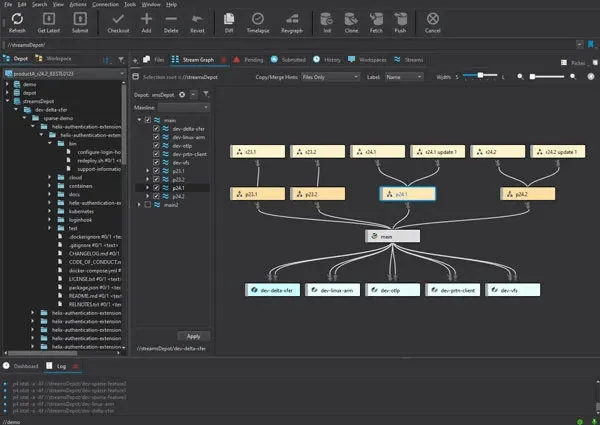
| Perforce Streams | Structured, hierarchical branching with enforced promotion rules (mainline → release → dev). | Reduces merge complexity; provides a visual map of how code and assets flow through the development lifecycle. |
P4 VFS + p4 hotfiles | On-demand placeholder files for local workspaces; p4 hotfiles pins critical paths for immediate access. | A team can have a “view” of a 10 TB repo without storing it locally. |
| P4 Git Connector | Free connector allowing Git-native developers to push/pull from P4 via standard Git tooling. | Mixed teams can coexist without forcing anyone to change their primary workflow. |
| P4 One | Artist-focused desktop client with 3D viewer, audio preview, and background workspace loading. | Brings non-technical team members into version control without a steep learning curve. |
| Granular Protections | Per-file and per-directory access control lists, full audit logs, and compliance-ready reporting. | Critical for securing IP in regulated industries (semiconductor, defense, VFX). |
Who Is Perforce P4 For?
The philosophy of Perforce P4 is to be the single source of truth for all digital assets, at any scale. It is built for environments where performance, security, and the ability to manage more than just source code are non-negotiable.
Game Development Studios — For managing code, 3D models (100 MB+ per asset), textures, audio, and video in one place. Perforce has native editor integrations for both Unreal Engine and Unity. Studios like Epic Games, EA, and Activision use it for repos that would be impossible to run on Git.
Semiconductor Companies — EDA (Electronic Design Automation) file sets routinely exceed hundreds of gigabytes. Managing HDL source alongside simulation data, tooling, and firmware in a single repo requires the kind of scalability and access control P4 provides.
VFX and Animation Studios — Shot data, render farms, and video assets that run into the terabytes per project. P4’s stream-based branching maps well to the show → sequence → shot hierarchy common in VFX pipelines.
Enterprise “One Big Repo” Strategies — Organizations standardizing on a monorepo for all projects benefit from P4’s ability to handle repositories that Git would choke on — think 10 million files, multiple terabytes, and hundreds of concurrent users.
If your repository holds files too large for Git LFS to handle gracefully, or your file count is growing into the millions, you are the target audience for Perforce P4.
GitHub (Git) vs. Perforce P4: Quick Comparison
| Aspect | GitHub (using Git) | Perforce P4 |
|---|---|---|
| VCS Model | Distributed: every developer has a full history copy. | Centralized: one server holds the authoritative history. |
| Best Use Case | Source code, open source, web development. | Enterprise digital asset management (code + large binaries). |
| Binary File Handling | Inefficient; stores full file copies per change. Git LFS helps but has storage and bandwidth limits. | Highly efficient; delta compression stores only changed portions. VFS adds on-demand local hydration. |
| Scale Sweet Spot | Repos under ~100 GB and a few hundred thousand files. | Repos with 10 GB–multi-TB of binary content, 1M–100M+ files. |
| Branching Model | Flexible, lightweight, un-opinionated. | Structured, hierarchical, policy-driven Streams. |
| Mixed Teams (devs + artists) | Artists struggle with Git LFS and CLI tools. | P4 One brings artists in natively; P4V for technical users; P4 Git Connector for Git-only devs. |
| Offline Work | Full history available offline. | Server required for most operations; P4 One adds limited offline mode. |
| Security / Access Control | Repo-level and branch-level protection rules. | Per-file and per-directory ACLs, full audit logs, compliance-ready. |
| Learning Curve | Widely taught; vast community resources. | Steeper; specialized knowledge and server administration required. |
| Pricing | Free for public repos; tiered for teams. | Free up to 5 users; contact sales for enterprise pricing. |
Security, Compliance, and Audit
One of P4’s strongest enterprise selling points — often undersold in comparisons — is its security model.
Granular protections work at the file and directory level, not just the repository level. You can grant a contractor read-only access to a single depot path while blocking all others, or prevent a team from even seeing that certain files exist. This is enforced server-side and cannot be bypassed by a client.
Full audit trail — Every file open, submit, sync, and admin action is logged with the user, timestamp, client workspace, and IP address. This audit data is queryable with p4 logger or p4 monitor and can be exported via p4 logexport to SIEM systems like Splunk, Elastic, or Datadog.
2026.1 security hardening defaults the server to security level 4 — the strictest pre-existing level — on fresh installs and upgrades. Tickets replace passwords for session management (use p4 login -a for long-lived tickets), and server-to-server communication is restricted to dedicated service users.
Compliance use cases — Semiconductor and defense teams routinely use P4’s protections to enforce export control (ITAR/EAR) at the file level, restricting access to controlled technical data based on user attributes. Audit logs satisfy ISO 27001 and SOC 2 requirements for change tracking.
# View the full protections table
p4 protect -o

# Grant read-only access to a contractor on one path only
p4 protect -i << 'EOF'
Protections:
    write user * * //...
    read  user contractor1 * //depot/myproject/public/...
    deny  user contractor1 * //...
EOF

# Use tickets instead of passwords (best practice)
# Login with a long-lived ticket (up to 2 weeks depending on server config)
p4 login -a

# Check ticket expiry
p4 login -s

# Rotate your own ticket
p4 logout && p4 login -a

# Query the audit log for all submits by a user in a date range
p4 changes -u developer1 @2026/01/01,@2026/06/01

# Export logs to an external SIEM
p4 logexport -f /var/log/p4/structured.log
Pro tip: Never store your P4 password in environment variables or scripts. Use
p4 login -ato generate a long-lived ticket, then setP4TICKETSto point to a secure file path.
CI/CD and Ecosystem Integrations
P4 is not an island. It has first-party and community integrations with the tools development pipelines depend on.
Unreal Engine — Epic’s Unreal Editor has built-in P4 source control support. Artists and programmers can check out assets, submit changes, and resolve conflicts without leaving the editor.
Unity — Unity’s Version Control (formerly Plastic SCM) integrates with P4 via the P4 Git Connector, and Perforce has long published a Unity P4 plugin.
Jenkins — The official Perforce Jenkins plugin (p4-plugin) handles workspace creation, sync, polling for changes, and shelf-based pre-tested commits directly from Jenkins pipelines.
GitHub Actions / GitLab CI — Teams using the P4 Git Connector can trigger standard CI runners against Git-mirrored P4 repos. The runner sees a Git repo; P4 is the system of record.
Docker — Perforce maintains an official perforce/helix-p4d image for containerized server deployment, suitable for CI environments and local evaluation.
Kubernetes — Perforce publishes Helm charts for deploying P4D in Kubernetes clusters, with support for persistent volumes and horizontal replica scaling.
// Jenkinsfile example using the Perforce Jenkins plugin
pipeline {
    agent any
    triggers {
        // Poll for P4 changes every 5 minutes
        perforce(credential: 'p4-creds', polling: true, populate: forceClean(
            quiet: false
        ))
    }
    environment {
        P4_WORKSPACE = "jenkins-${env.BUILD_NUMBER}"
    }
    stages {
        stage('Sync') {
            steps {
                p4sync credential: 'p4-creds',
                       workspace: manualSpec(
                           name: env.P4_WORKSPACE,
                           spec: clientSpec(
                               view: '//depot/myproject/... //${P4_CLIENT}/...'
                           )
                       )
            }
        }
        stage('Build') {
            steps {
                sh 'make -j8 all'
            }
        }
        stage('Submit Build Artifacts') {
            steps {
                // Shelve build output for QA review rather than auto-submitting
                sh "p4 -c ${env.P4_WORKSPACE} shelve -c new -d 'CI build ${env.BUILD_NUMBER}'"
            }
        }
    }
}
Core CLI Commands and Code Snippets
The P4 command-line client (p4) is the backbone of any Helix Core workflow. Here is a practical reference for the most common operations.
Connecting to a Server
# Set connection details (persisted to user config)
p4 set P4PORT=ssl:your-server:1666
p4 set P4USER=yourname
p4 set P4CLIENT=yourname-workspace

# Log in using a ticket (preferred over password)
p4 login -a

# Verify connection and server info
p4 info
Creating and Configuring a Client Workspace
A “client” (or workspace) is the local mapping between your file system and files in the depot.
# Open the client spec editor interactively
p4 client

# Create a client spec non-interactively
p4 client -i << 'EOF'
Client: myproject-workspace
Owner: yourname
Root: /home/yourname/myproject
Options: noallwrite noclobber nocompress unlocked nomodtime normdir
View:
    //depot/myproject/... //myproject-workspace/myproject/...
EOF
The Core Daily Workflow
# Sync the latest files from the depot to your workspace
p4 sync

# Sync only files newer than a specific changelist (faster for large repos)
p4 sync @12345

# Parallel sync with 4 threads (significantly faster on large workspaces)
p4 sync --parallel=threads=4

# Preview a sync without actually writing files
p4 sync -n

# Check out (open for edit) a file before modifying it
p4 edit path/to/file.cpp

# Add a new file to the depot
p4 add path/to/newfile.txt

# Mark a file for deletion
p4 delete path/to/oldfile.txt

# Reconcile: automatically detect adds/edits/deletes on disk (like `git add -A`)
p4 reconcile //depot/myproject/...

# See what files you have checked out
p4 opened

# Review your pending changes before submit
p4 diff

# Submit (commit) your changes as a changelist
p4 submit -d "Fix: corrected collision detection bug in character controller"
Working with Changelists
Changelists are P4’s equivalent of commits. Unlike Git where commits are created at submit time, P4 lets you build up a named changelist progressively.
# Create a named pending changelist
p4 change

# Move a file to a specific changelist number
p4 reopen -c 67890 path/to/file.cpp

# See all pending changelists owned by you
p4 changes -s pending -u yourname

# See the last 10 submitted changelists on a path
p4 changes -m 10 //depot/myproject/...

# Describe the files and diff in a specific changelist
p4 describe 67890

# Describe with full diff output
p4 describe -du 67890
Shelving (Sharing Uncommitted Work)
Shelving is P4’s answer to Git stashing — but server-side, making it ideal for code review handoffs and cross-machine sharing.
# Shelve all files in changelist 67890
p4 shelve -c 67890

# Unshelve someone else's shelf onto your workspace
p4 unshelve -s 67890

# Update an existing shelf with new changes
p4 shelve -f -c 67890

# Delete a shelf when no longer needed
p4 shelve -d -c 67890
Working with Streams
Streams are the structured branching system in Helix Core. They are hierarchical (mainline → release → dev) and enforce promotion rules.
# List all streams in a depot
p4 streams //depot/...

# Create a new development stream branching from mainline
p4 stream -t development -P //depot/myproject/mainline //depot/myproject/feature-physics

# Switch your client workspace to a different stream
p4 client -s -S //depot/myproject/feature-physics

# Merge down from parent (get latest mainline changes into your dev stream)
p4 merge -S //depot/myproject/feature-physics

# Copy up to parent (promote your work to mainline)
p4 copy -S //depot/myproject/feature-physics

# Permanently remove a deleted stream spec and all metadata (2024.2+)
p4 stream --obliterate -y //depot/myproject/old-feature
Note on sparse streams (2026.1+): P4 now uses a branch-on-submit model for sparse streams. Editing a non-resident parent file branches it into your workspace and reopens it for add — but the stream is only affected if you actually submit. Reverting keeps the sparse stream untouched.
Using p4 hotfiles (New in 2024.2)
For large repos using P4 VFS with altsync mode, hotfiles ensures certain paths are always fully synced rather than getting on-demand placeholders:
# Open the hotfiles spec editor for your workspace
p4 hotfiles

# Example spec — define which paths are always pre-fetched:
# HotFiles:
#     //depot/project/config/...          (always sync all files here)
#     //depot/project/src/...   text      (only text files)
#     //depot/project/art/...   binary <50M  (only binaries under 50 MB)
Pro tip: Use
p4 hotfilesto keep frequently-used configs, shared scripts, and small reference files instantly available, while letting large texture and audio files stay as placeholders until needed.
Server Administration Snippets
# Check who is connected and what they are doing
p4 monitor show -a

# Enable real-time monitoring for live performance inspection (2024.2+)
p4 configure set rt.monitorfile=/var/log/p4/p4monitor.txt
p4 configure set monitor=10

# Run server diagnostics (GA in 2026.1)
p4 diagnostics -s

# Obliterate a file range permanently (e.g. accidental commit of secrets)
# ALWAYS dry-run first (no -y flag)
p4 obliterate //depot/myproject/secrets.env#1,5
# Then confirm permanently
p4 obliterate -y //depot/myproject/secrets.env#1,5

# Purge file content while preserving history metadata (safer alternative)
p4 obliterate -p -y //depot/archive/...@2020/01/01,2022/01/01

# Create a checkpoint backup of the server
p4d -r $P4ROOT -jc

# Export structured logs to a SIEM or log aggregator (2024.2+)
p4 logexport -f /var/log/p4/structured.log

# Review the protections table
p4 protect -o
Python Automation with P4Python
P4Python is the official Perforce Python API, ideal for build pipelines, asset processors, and admin scripts.
Installation
pip install p4pythonBasic Connection Using a Context Manager
Using a context manager ensures the connection is always closed cleanly, even on exceptions.
from contextlib import contextmanager
from P4 import P4, P4Exception

@contextmanager
def p4_connect(port, user, client=None):
    """Context manager for safe P4 connections using ticket auth."""
    p4 = P4()
    p4.port = port
    p4.user = user
    if client:
        p4.client = client
    try:
        p4.connect()
        # Authenticate using a pre-cached ticket (p4 login -a)
        # P4Python picks it up automatically from P4TICKETS
        yield p4
    except P4Exception as e:
        for error in p4.errors:
            print(f"P4 error: {error}")
        raise
    finally:
        p4.disconnect()

# Usage
with p4_connect("ssl:your-server:1666", "buildbot", "buildbot-workspace") as p4:
    result = p4.run_sync("//depot/myproject/...")
    print(f"Synced {len(result)} files")

    fstat = p4.run_fstat("//depot/myproject/src/main.cpp")
    for f in fstat:
        print(f"Head rev: {f['headRev']}, Type: {f['headType']}")

    changes = p4.run_changes("-m", "5", "//depot/myproject/...")
    for cl in changes:
        print(f"CL {cl['change']}: {cl['desc'].strip()}")
Automated Changelist Submission
from P4 import P4, P4Exception

def submit_files(server, user, client, file_paths, description):
    """
    Open files for edit (or add if new) and submit them as a single changelist.
    Uses ticket auth — run `p4 login -a` before calling this.
    """
    p4 = P4()
    p4.port = server
    p4.user = user
    p4.client = client

    try:
        p4.connect()

        for path in file_paths:
            try:
                p4.run_edit(path)
            except P4Exception:
                p4.run_add(path)  # File is new to the depot

        change = p4.fetch_change()
        change["Description"] = description
        saved = p4.save_change(change)
        cl_num = saved[0].split()[1]

        for path in file_paths:
            p4.run_reopen("-c", cl_num, path)

        result = p4.run_submit("-c", cl_num)
        submitted_cl = result[-1]['submittedChange']
        print(f"Submitted changelist: {submitted_cl}")
        return submitted_cl

    except P4Exception:
        print(f"P4 errors: {p4.errors}")
        raise
    finally:
        p4.disconnect()
Asset Pipeline Integration Example
This pattern is useful for automated asset baking tools (e.g., a texture compressor that reads source PSD files and writes cooked platform assets back to the depot):
from P4 import P4, P4Exception
import subprocess
import pathlib

def bake_and_submit_texture(p4: P4, source_path: str, output_path: str, cl_num: str):
    """
    1. Sync the source texture
    2. Run an external baking tool
    3. Open the output for add/edit and move to the pipeline changelist
    """
    # Ensure we have the latest source
    p4.run_sync(source_path)

    # Run external tool (replace with your actual baker)
    result = subprocess.run(
        ["texturetool", "--compress", "BC7", source_path, "--out", output_path],
        capture_output=True, text=True
    )
    if result.returncode != 0:
        raise RuntimeError(f"Texture bake failed: {result.stderr}")

    # Open cooked output for add or edit
    if pathlib.Path(output_path).exists():
        try:
            p4.run_edit(output_path)
        except P4Exception:
            p4.run_add(output_path)
        p4.run_reopen("-c", cl_num, output_path)
        print(f"Staged cooked asset: {output_path} → CL {cl_num}")

# Example usage inside a larger pipeline loop
with p4_connect("ssl:your-server:1666", "pipeline-bot", "pipeline-workspace") as p4:
    change = p4.fetch_change()
    change["Description"] = "Automated: baked BC7 textures for platform build"
    cl = p4.save_change(change)[0].split()[1]

    for src in p4.run_files("//depot/art/source/...@=head"):
        bake_and_submit_texture(p4, src["depotFile"], src["depotFile"].replace("/source/", "/cooked/"), cl)

    p4.run_submit("-c", cl)
Querying Streams Programmatically
from P4 import P4

with p4_connect("ssl:your-server:1666", "admin") as p4:
    streams = p4.run_streams("//depot/...")
    for stream in streams:
        print(
            f"{stream['Stream']:50s}  "
            f"type={stream['Type']:15s}  "
            f"parent={stream.get('Parent', 'none')}"
        )
Setting Up a Basic Server
For teams evaluating Perforce P4, here is how to get a local server running using the free tier (up to 5 users).
On Linux
# Download the latest p4d (server) and p4 (client) — update version as needed
wget https://cdist2.perforce.com/perforce/r26.1/bin.linux26x86_64/p4d
wget https://cdist2.perforce.com/perforce/r26.1/bin.linux26x86_64/p4
chmod +x p4 p4d
sudo mv p4 p4d /usr/local/bin/

# Create the server root
mkdir -p /opt/p4depot
export P4ROOT=/opt/p4depot
export P4PORT=1666

# Start the server as a background daemon
p4d -r $P4ROOT -p $P4PORT -d

# Connect and initialize
export P4PORT=localhost:1666
p4 user -f admin       # Create the admin user
p4 protect             # Initialize the protections table

# After 2026.1: server defaults to security level 4.
# Set a strong password immediately:
p4 passwd
Creating Your First Depot and Stream
# Create a stream depot
p4 depot -t stream myproject

# Create the mainline stream
p4 stream -t mainline //myproject/mainline

# Create a client workspace mapped to that stream
p4 client -S //myproject/mainline -o | p4 client -i

# Add your first files and commit
cd /workspace
p4 add src/...
p4 submit -d "Initial commit: project skeleton"
Docker Quick Start (Evaluation)
Perforce provides an official Docker image for rapid local testing:
# docker-compose.yml
version: "3.8"
services:
  perforce:
    image: perforce/helix-p4d:latest
    ports:
      - "1666:1666"
    environment:
      P4PORT: "1666"
      P4ROOT: /data
      P4PASSWD: "MyP@ssw0rd" # Change before any real use
      P4USER: admin
      JNL_PREFIX: perforce
    volumes:
      - p4data:/data
    healthcheck:
      test: ["CMD", "p4", "-p", "localhost:1666", "-u", "admin", "info"]
      interval: 30s
      timeout: 10s
      retries: 3

volumes:
  p4data:
docker compose up -d
# Wait for the health check to pass, then connect
p4 -p localhost:1666 -u admin login
p4 -p localhost:1666 infoNote on the Docker image name: As of mid-2026 the image remains published as
perforce/helix-p4d. The P4 rebrand is reflected in the P4 Platform products but Docker Hub image names have not yet changed. Check hub.docker.com/r/perforce for the latest.
Licensing and Cost Guidance
P4’s licensing model is often a surprise to teams coming from Git.
Free tier: Up to 5 users and 20 client workspaces, with no time limit. Suitable for small studios or individual evaluation.
P4 Cloud: A managed SaaS option. Contact Perforce sales for current pricing tiers; the product supports teams up to 100 users with monthly subscription pricing. Storage and egress are billed separately on metered tiers.
Self-hosted enterprise: Licensing is per-named-user and typically negotiated annually. Costs scale with team size and optional add-ons (P4 Code Review, P4 Search, P4 DAM). Perforce does not publish list prices publicly — expect to engage their sales team for quotes at 10+ users.
P4 Code Review (formerly Helix Swarm): Available as a free add-on on P4 Cloud for subscriptions with at least 3 active users.
Free add-ons: The P4 Git Connector, P4V, P4 Admin, P4 Merge, P4 One, and P4Python are all available at no additional charge.
Migrating to P4 from Git or SVN
Migration is one of the most common pain points teams raise when evaluating P4. Here are the main options and practical gotchas.
From Git
Option 1 — P4 Git Connector (recommended for ongoing mixed use): Set up the connector so your existing Git repos mirror into P4. Developers continue using Git; P4 is the system of record. Git history is preserved as P4 changelists.
Option 2 — git-p4: A community tool included with Git that can replay Git commits as P4 changelists. Works for one-time migrations of smaller repos. Not maintained by Perforce.
Option 3 — Full cutover: Freeze the Git repo, export a tarball, add all files to P4 as a single initial changelist, then cut over. Loses Git history in P4 but is the simplest approach for repos with complex binary history that would bloat P4 storage.
# Check out your Git repo and export all files
git clone https://your-repo.git /tmp/migration-source
cd /tmp/migration-source

# Create a P4 client workspace mapped to the target depot path
p4 client -i << 'EOF'
Client: migration-workspace
Root: /tmp/migration-source
View:
    //depot/myproject/... //migration-workspace/...
EOF

# Reconcile: P4 detects all new files automatically
p4 -c migration-workspace reconcile //depot/myproject/...

# Submit as the initial import changelist
p4 -c migration-workspace submit -d "MIGRATION: initial import from Git"
From Subversion (SVN)
Perforce offers svn2p4, a migration tool that replays SVN revisions as P4 changelists, preserving history, authors, and commit messages. For large SVN repos, run it on a staging P4 server first to validate the output before cutting over production.
Common Pitfalls
File type misclassification — P4 needs to know whether a file is text, binary, or binary+F (forced binary, no delta). Miscategorization causes storage bloat or corrupted diffs. Always run p4 typemap to configure automatic type detection rules before importing.
Workspace roots on network shares — Avoid mapping P4 client roots to network-mounted filesystems (NFS, SMB). P4 performs many small stat operations; network latency causes severe slowdowns. Use local SSDs.
Password vs. ticket auth in scripts — Never hardcode passwords in CI scripts. Use p4 login -a on the CI agent to cache a long-lived ticket, then let P4Python pick it up automatically from the ticket file.
Pros and Cons
Why You Might Choose Perforce P4
Superior performance with large files — Orders of magnitude faster and more efficient than Git for versioning binary assets. Delta compression plus VFS on-demand loading is a combination Git LFS cannot match.
Massive scalability — Handles repository sizes and file counts that would bring Git to a standstill. Teams with 10M+ files, 100 GB+ binaries, or hundreds of concurrent users are in P4’s wheelhouse.
Granular security and compliance — Per-file and per-directory ACLs, full audit logging, and the 2026.1 “secure by default” posture make P4 the choice for ITAR-controlled data, IP-sensitive game assets, and regulated industries. See the Security, Compliance, and Audit section.
Atomic commits — Changesets span multiple files in a single atomic transaction. The repository is always in a consistent state; there is no equivalent of a Git partial merge.
Mixed team support — P4 One for artists, P4V for technical users, and the P4 Git Connector for Git-native developers can all coexist against the same server.
Virtual File Service — Terabyte repos can be mounted as virtual filesystems with on-demand hydration. p4 hotfiles pins the files you need instantly.
Potential Drawbacks
It’s not Git — The biggest hurdle. New commands, a different mental model (checkout before edit, not after), and Git muscle memory working against you. Plan for a 2–4 week ramp-up for developers.
Requires server administration — A self-hosted, client-server system requires dedicated infrastructure and an administrator who knows the product. P4 Cloud removes most of this burden but has scale limits.
Licensing costs — Free for up to 5 users, but enterprise licensing is a significant investment. Budget discussions are required before committing to a larger rollout.
Less open-source ecosystem — The open-source and web development worlds are built around Git. Fewer third-party integrations, fewer Stack Overflow answers, and a smaller hiring pool of people who already know the tool.
Offline limitations — The centralized model requires a server for most operations. P4 One’s offline mode helps artists, but developers still need connectivity for most tasks.
Getting Started & Further Reading
Official Website: https://www.perforce.com/products/helix-core
P4 CLI & Server Documentation: https://help.perforce.com/helix-core/server-apps/cmdref/current/
Server Administration Guide: https://help.perforce.com/helix-core/server-apps/p4sag/current/
Free for Small Teams (up to 5 users): https://www.perforce.com/solutions/free-perforce
P4 One (Artist Client): https://help.perforce.com/helix-core/server-apps/p4one/current/
P4 Git Connector: https://www.perforce.com/products/helix-core-git-connector
P4Python API: https://help.perforce.com/helix-core/api/python/current/
Jenkins Plugin: https://plugins.jenkins.io/p4/
What’s New in P4 Platform: https://www.perforce.com/products/p4/p4-platform-update
Perforce Community: https://community.perforce.com/s/
FAQ
Q: Is “Helix Core” still the right name to use?
A: As of March 2025, Perforce officially rebranded Helix Core as Perforce P4. In documentation and job postings you will increasingly see “P4” and “P4 Platform” used. “Helix Core” remains widely understood, but new articles and job descriptions should use “Perforce P4 (formerly Helix Core)” on first mention.
Q: Can P4 integrate with Git?
A: Yes. The free P4 Git Connector (formerly Helix4Git / Git Fusion) lets teams use Git-native workflows — including pushing to GitHub, GitLab, and Bitbucket — while the central server is P4. Git commits appear as Perforce changelists and vice versa. Critically, large binary files pushed via Git are handled by P4’s delta compression rather than Git LFS, removing one of the main bottlenecks in mixed teams.
Q: Is P4 suitable for small teams or startups?
A: It is free for up to 5 users, making it accessible. However, its complexity and administrative overhead is overkill for teams without large binary assets or monorepos. For most small software-only teams, Git remains the pragmatic choice.
Q: How does P4 handle large binary files compared to Git LFS?
A: P4 uses delta compression to store only the changed portions of binary files, making it far more efficient than Git LFS, which stores full file copies. The Virtual File Service (VFS) further reduces local storage by using on-demand placeholders, and p4 hotfiles gives fine-grained control over what is pre-fetched.
Q: What is p4 hotfiles and when should I use it?
A: Introduced in server version 2024.2, p4 hotfiles works with VFS altsync workspaces to define specific file paths that are always fully synced rather than getting placeholders. Use it for frequently accessed configs, small scripts, or reference files where placeholder latency is unacceptable.
Q: What changed in the 2026.1 server from a security perspective?
A: The 2026.1 release defaults the server to security level 4 on install/upgrade, restricts server-to-server replication to service users, auto-initializes protections tables, and hides user information from unauthenticated queries. Review the Behavior Changes section of the 2026.1 release notes before upgrading a production server.
Q: What infrastructure is needed for P4?
A: A dedicated server with local SSD storage for the database. Perforce offers P4 Cloud (managed SaaS), plus AWS, Azure, and GCP marketplace images for self-hosted deployments. Self-hosted setups need robust hardware and an administrator familiar with the product.
Q: What is P4 One, and who is it for?
A: P4 One (launched 2025, updated 2026.1) is a desktop client for non-technical users — artists, designers, audio engineers. It features a 3D model viewer, audio preview, a simplified workspace interface, and background loading for large workspaces. The 2026.1 release cut initial load times dramatically for workspaces with hundreds of thousands of files.
Q: How do I migrate from Git to P4?
A: Three main options: the P4 Git Connector (mirrors Git repos into P4 for ongoing mixed use), git-p4 (replays Git commits as P4 changelists for one-time migration), or a full file cutover (p4 reconcile from a checked-out Git repo). See the Migrating to P4 from Git or SVN section for practical steps and pitfalls.
Q: Is P4 open-source friendly?
A: While P4 can host open-source projects, it lacks the public repository discovery, forking, and social coding features of GitHub. It is not well-suited as an open-source collaboration platform.
Conclusion: When to Choose P4 vs. GitHub
Perforce P4 is not a “better GitHub.” It is a different and more powerful tool for a different class of problems.
Choose GitHub (Git) if: your team works primarily in source code, your largest files are under a few hundred megabytes, your repository has fewer than a million files, and open-source collaboration or extensive third-party integrations are priorities.
Choose Perforce P4 if: your repository contains 10M+ files or 100 GB+ of binary content; you manage mixed code-and-art pipelines across developers, artists, and engineers; you need per-file access control and a compliance-ready audit trail; or you are in game development, semiconductor design, VFX, or defense — industries where P4 is the established professional standard.
The 2025–2026 release cycle signals Perforce’s ambition to close the remaining adoption gaps. P4 One makes version control accessible to creative teams that previously avoided it. The 2026.1 security hardening and sparse stream improvements address long-standing enterprise concerns. The P4 Git Connector lets organizations adopt P4 incrementally without forcing a toolchain change on developers.
If you are evaluating it, start with the 5-user free tier, spin up the Docker image, and run through the CLI snippets in this guide. The learning curve is real, but so is the payoff when your team stops waiting hours for Git to choke on a 20 GB texture pack.