
GitBucket: The Lightweight, Self-Hosted GitHub Clone
Table of Contents
- What’s New in GitBucket (2026 Update)
- Key Features at a Glance
- The GitBucket Philosophy: Who Is It For?
- GitHub vs. GitBucket: A Quick Comparison
- GitBucket vs. Gitea: Which Lightweight Server Wins?
- Pros and Cons
- Getting Started & Further Reading
- Frequently Asked Questions (FAQ)
- Conclusion
In the world of Git hosting, not every team needs a heavyweight, all-in-one DevOps platform. Sometimes, what you really want is the familiar, efficient interface of GitHub, but running on your own server with minimal setup and resource usage. This is precisely the niche that GitBucket fills, and it does so brilliantly.
Written in Scala and running on the Java Virtual Machine (JVM), GitBucket is a free, open-source, and incredibly easy-to-install Git platform. It’s designed to be a GitHub clone, providing the core features and user experience that developers already know and love, but in a self-hosted package that you can get running in minutes.
Current as of mid-2026: The latest stable release is GitBucket 4.46.1 (April 2026), with 4.46.0 having landed in March 2026 and 4.45.0 in January 2026. The project ships roughly every six to eight weeks and saw commits as recently as May 2026, so this remains an actively maintained option, not an abandoned one.
What’s New in GitBucket (2026 Update)
GitBucket’s recent releases have addressed several of the platform’s older rough edges, particularly around editing and collaboration workflows. Here’s what’s landed over the past several months:
GitBucket 4.46.1 (April 2026): A follow-up patch release on top of 4.46.0, rolling in additional bug fixes and stability improvements. As always, check the GitHub release notes for the full list before upgrading a production instance.
GitBucket 4.46.0 (March 2026): Pull requests can now be reverted directly from the PR page, removing the need to manually create revert commits. The comment editor gained a markdown toolbar for quick formatting, and the Ace Editor now powers Wiki editing, bringing syntax highlighting and customizable keybindings (including Vim and Emacs modes) to wiki pages. Webhooks also got more secure, with support for the SHA-256 signature header (X-Hub-Signature-256) alongside the older SHA-1 signature.
GitBucket 4.45.0 (January 2026): Added the option to display full usernames in the UI instead of just account IDs, a small but welcome usability fix for teams with larger rosters.
GitBucket 4.44.0 (September 2025): Shipped enhanced branch protection, expanding beyond the older, more limited rule set — a direct response to one of the platform’s longstanding feature gaps.
GitBucket 4.43.0: A maintenance-focused release upgrading the embedded H2 database from the 1.x to 2.x series. If you’re running an older GitBucket instance, read the official H2 migration guide before upgrading — the database format change requires exporting and re-importing your data with the new H2 driver, and it isn’t a drop-in replacement.
Java requirement: Since version 4.42.0, GitBucket requires Java 17 to run (Java 11 support was dropped to support a newer Jetty version). If you’re setting up a new instance or upgrading an old one, confirm your JVM is current before downloading the latest .war.
The pace of these releases — averaging one every six to eight weeks — is a reasonable signal of project health for anyone deciding whether to trust GitBucket with a production self-hosted setup in 2026.
Key Features at a Glance
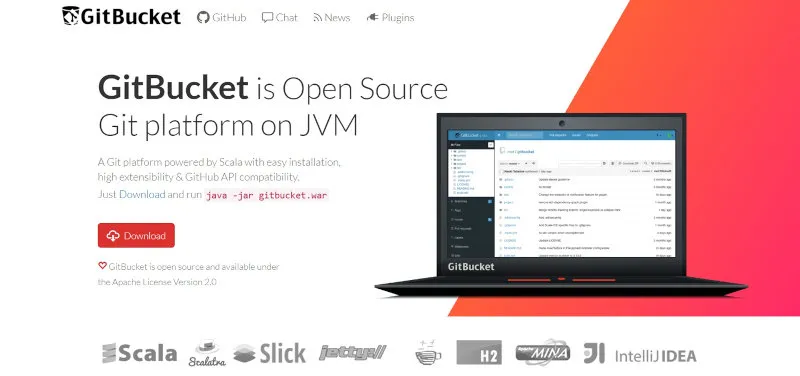
GitBucket’s philosophy is to provide essential features in a lightweight package, prioritizing simplicity and performance.
| Feature | Description | Key Benefit |
|---|---|---|
| GitHub-like UI/UX | Provides a web interface that is a near-perfect replica of GitHub’s, including repositories, pull requests, issue tracking, and wikis. | Virtually no learning curve for developers already familiar with GitHub, allowing for immediate productivity. |
| Easy Installation | Packaged as a single .war file. Installation can be as simple as running a single java -jar command. | Extremely low barrier to entry. You can have a personal Git server running on almost any machine with Java installed in under five minutes. |
| Lightweight | Requires significantly fewer system resources (CPU, RAM) compared to more comprehensive solutions like GitLab. | Ideal for running on low-cost Virtual Private Servers (VPS), a Raspberry Pi, or a personal home server without dedicating a powerful machine. |
| Plugin Architecture | The core is kept simple, but functionality can be extended via a robust plugin system. Plugins exist for CI/CD, notifications, and more. | Customize your installation with the features you need without the bloat of those you don’t. |
| Modern Editing Tools | As of 2026, the Wiki and comment editors run on the Ace Editor with syntax highlighting, custom keybindings, and inline text-completion suggestions, plus a markdown formatting toolbar. | Closes a long-standing gap with GitHub’s editor experience, making day-to-day documentation and discussion noticeably smoother. |
| Core Collaboration Features | Public and private repositories over HTTP/HTTPS and SSH, Git LFS support, an in-browser file editor, issues, pull requests, wikis, an activity timeline, email notifications, and LDAP-backed account and group management. | Covers the everyday workflow of a Git host out of the box, without needing third-party plugins for the basics. |
| GitHub API Compatibility | Implements a meaningful subset of the GitHub REST API, so existing tools and scripts built against GitHub’s API often work against GitBucket with minimal changes. | Eases migration and integration for teams already automating around GitHub’s API. |
The GitBucket Philosophy: Who Is It For?
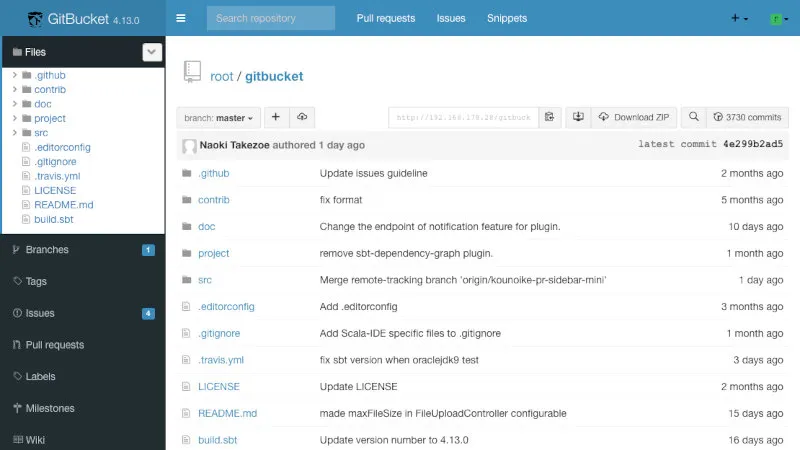
GitBucket is for those who value simplicity, control, and familiarity. It does not try to compete with the sprawling feature sets of its larger competitors. Instead, it aims to do one thing exceptionally well: provide a self-hosted, GitHub-like experience with maximum ease and minimum overhead.
This makes it the perfect choice for:
Individuals and Hobbyists: An excellent way to host private projects on a home server or a cheap cloud instance.
Small to Medium-Sized Teams: Teams that need a private, on-premise Git server but don’t require a full DevOps suite.
Educational Environments: Simple for schools or universities to set up for students to learn Git and collaborative workflows in a private environment.
Prototyping and Testing: Quickly spin up a temporary Git server for a specific project or experiment.
Regulated or Air-Gapped Environments: Organizations in regulated industries (finance, healthcare, government contracting) that need strict on-premises control over source code, with no dependency on a third-party SaaS provider, often find GitBucket’s self-contained, single-file deployment a good fit for internal tooling.
If the thought of configuring and maintaining a resource-heavy platform seems like overkill, GitBucket is your answer.
GitHub vs. GitBucket: A Quick Comparison
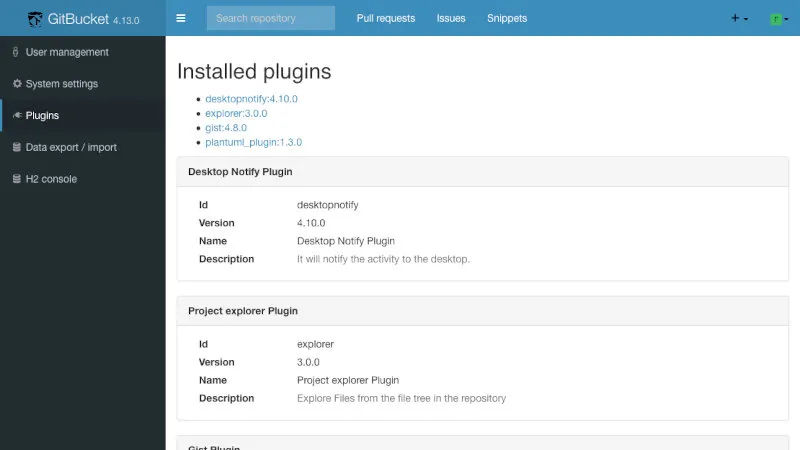
The comparison between GitHub and GitBucket is one of scale, purpose, and deployment model.
| Aspect | GitHub | GitBucket |
|---|---|---|
| Primary Focus | A global platform for community, open-source, and enterprise collaboration. | A simple, self-hosted Git server for private use by individuals and small teams. |
| Hosting Options | Cloud (SaaS) and Self-hosted (Enterprise) | Self-hosted only. |
| CI/CD | Fully integrated, powerful GitHub Actions. | Relies on external plugins (e.g., for Jenkins integration). No built-in solution. |
| Technology Stack | Massive, proprietary stack (Ruby on Rails, Go, etc.) | Open-source Scala, runs on the JVM. Very easy to deploy and understand. |
GitBucket vs. Gitea: Which Lightweight Server Wins?
If you’re researching GitHub alternatives in 2026, GitBucket is rarely the only lightweight, self-hosted option on your shortlist — Gitea usually is too. Gitea itself has a notable community fork, Forgejo, created by Codeberg in response to governance concerns after Gitea’s maintainers launched a commercial entity; Forgejo is often the recommended pick in 2026 for organizations that specifically want a community-governed, non-commercial project. Functionally, Gitea and Forgejo are close cousins, so most of the comparison below applies to both.
| Aspect | GitBucket | Gitea |
|---|---|---|
| Language/Runtime | Scala, runs on the JVM | Go, compiles to a single static binary |
| Resource Footprint | Lightweight, but the JVM adds baseline memory overhead | Generally lighter still — a compiled Go binary with a smaller memory footprint |
| Installation | Single .war file plus a Java runtime | Single binary, no separate runtime required |
| Built-in CI/CD | None; relies on external plugins | Has an integrated CI/CD system (Gitea Actions), GitHub Actions-compatible |
| Release Cadence | Roughly every 6–8 weeks | Frequent, with an active community and ecosystem |
| GitHub UI Familiarity | Very close visual and workflow parity with GitHub | Similar but with more of its own design identity |
The practical takeaway: if avoiding a JVM dependency matters to you, or you want CI/CD built in rather than bolted on through plugins, Gitea (or Forgejo) is worth evaluating alongside GitBucket. If you specifically want the closest visual and workflow replication of GitHub with the absolute simplest deployment story (one .war, one java -jar command), GitBucket still has an edge.
Pros and Cons
Why You Might Choose GitBucket
Extremely Lightweight: Its biggest selling point. GitBucket can run comfortably with as little as 512MB of RAM, making it vastly more efficient than GitLab.
Incredibly Easy to Install: The single-file deployment is a game-changer for anyone who values simplicity. No complex dependencies or configuration files to get started.
Familiar Interface: If you know how to use GitHub, you know how to use GitBucket. This eliminates training time and friction.
Completely Free and Open Source: No licensing fees or enterprise tiers to worry about. You have full access to the source code and can modify it if needed.
A Note on Security & Maintenance: Because GitBucket is self-hosted, security and uptime are entirely your responsibility — but the project makes this manageable. Recent releases have steadily improved this picture: SHA-256 webhook signatures (4.46.0) give integrations a stronger verification option than SHA-1 alone, and enhanced branch protection (4.44.0) helps enforce review requirements before code reaches protected branches. For backups, all of GitBucket’s data — repositories, the database, configuration — lives under a single ~/.gitbucket directory by default, so a regular backup of that one folder (stopped or snapshotted consistently) is enough to protect your instance. Combine that with staying current on releases, since each version typically folds in dependency and library updates alongside new features.
Potential Drawbacks
No Built-in CI/CD: This is a significant trade-off in the modern development landscape. While plugins offer integration, it’s not the seamless, out-of-the-box experience of GitHub Actions or GitLab CI.
Self-Hosted Only: There is no official SaaS version. You are responsible for hosting, maintaining, backing up, and securing your instance.
Limited Feature Set: Lacks the advanced features of larger platforms, such as package registries, advanced security scanning (SAST/DAST), or sophisticated project management tools (epics, roadmaps). That said, this gap has narrowed somewhat — recent releases added enhanced branch protection and SHA-256 webhook signatures, so core security-adjacent workflows have improved even if the bigger platform features remain absent.
Smaller Community and Ecosystem: While active, the community is much smaller than GitHub’s or GitLab’s, meaning fewer integrations and community-provided resources.
Getting Started & Further Reading
Ready to spin up your own private GitHub? Check out these official links.
Quick Start: Confirm Java 17 (or newer) is installed, then download the latest
.warfrom the releases page and run:java -jar gitbucket.warOpen
http://localhost:8080/in your browser and log in with the default credentials (root/root). Change that password immediately if the instance is reachable beyond your own machine.
Official Website & GitHub Repository: http://gitbucket.github.io/
Installation Guide & Documentation: https://github.com/gitbucket/gitbucket/wiki
Available Plugins: https://gitbucket.github.io/plugins/
Release Notes & Changelog: https://gitbucket.github.io/gitbucket-news/
Note: The previously available Heroku-hosted live demo is no longer reliable, since Heroku discontinued its free dyno tier some years ago. The fastest way to try GitBucket today is still to download the latest
.warfile and run it locally withjava -jar gitbucket.war— you’ll have a working instance in well under five minutes.
Try it now: download the latest gitbucket.war →
Frequently Asked Questions (FAQ)
Q: Is GitBucket still actively maintained in 2026?
A: Yes. As of mid-2026, GitBucket has shipped four releases in the prior year (4.43 through 4.46.1), with code commits as recent as May 2026. The project averages a new release roughly every six to eight weeks, which is a healthy cadence for a niche, community-maintained tool.
Q: What’s new in the latest GitBucket release?
A: GitBucket 4.46.0/4.46.1 (March–April 2026) added the ability to revert merged pull requests from the PR page, a markdown formatting toolbar, an upgraded Ace-based Wiki editor with text completion, and SHA-256 webhook signatures for more secure integrations. Earlier in the year, 4.44.0 added enhanced branch protection.
Q: How does GitBucket compare to GitLab?
A: GitBucket is much lighter and simpler than GitLab, focusing on a GitHub-like experience with minimal resource requirements. GitLab offers a broader DevOps feature set (CI/CD, package registries, etc.), but it’s more resource-intensive and complex to set up.
Q: How does GitBucket compare to Gitea?
A: Both are lightweight, self-hosted alternatives to GitHub. Gitea is written in Go and ships as a single compiled binary with a smaller resource footprint and built-in CI/CD (Gitea Actions). GitBucket runs on the JVM and offers the closest visual and workflow replication of GitHub itself. If a JVM dependency is a dealbreaker, or you want CI/CD without plugins, Gitea (or its fork, Forgejo) is the stronger pick; if maximum GitHub-like familiarity matters most, GitBucket holds its own.
Q: What are the hardware requirements?
A: GitBucket runs comfortably on modest hardware — as little as 512MB–1GB of RAM is generally enough for personal or small-team use, plus whatever disk space your repositories need. A Raspberry Pi or the smallest tier of most VPS providers is sufficient to get started.
Q: Can I run GitBucket on a Raspberry Pi?
A: Yes — its lightweight design and modest RAM needs make it a natural fit, provided Java 17 is installed.
Q: Does GitBucket support CI/CD?
A: GitBucket does not have built-in CI/CD like GitHub Actions or GitLab CI. However, you can integrate CI/CD tools like Jenkins via plugins or external configurations.
Q: Is GitBucket suitable for large teams?
A: GitBucket is best suited for individuals or small to medium-sized teams. Large teams may find its feature set limited compared to GitLab or GitHub Enterprise, especially for advanced DevOps needs — though recent additions like enhanced branch protection (2025) have made it somewhat more viable for teams with stricter governance requirements.
Q: How can I contribute to GitBucket?
A: You can contribute by submitting pull requests, reporting issues, or developing plugins. Check the GitHub repository at https://github.com/gitbucket/gitbucket for contribution guidelines.
Conclusion
GitBucket is an outstanding project that knows exactly what it wants to be: the Honda Civic of self-hosted Git servers. It’s reliable, efficient, and provides everything you need for the core task of code collaboration without the cost or complexity of a luxury SUV. Now well over a decade old and still shipping regular updates in 2026 — including meaningful editor and security improvements over the past year — it’s matured without losing the simplicity that made it worth choosing in the first place. For individuals and teams who want a private, no-fuss Git server that “just works,” GitBucket is not just an alternative; it’s often the best possible choice.
If GitBucket’s simplicity appeals to you but you’re still weighing your options, browse the rest of our GitHub Alternatives series for deeper looks at Gitea, Forgejo, GitLab, and other self-hosted platforms.